Upgrading The Processors On My Early 2009 Mac Pro At A Bargain Price

Erik Naso

Veteran
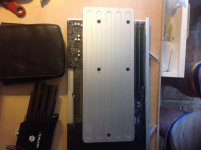
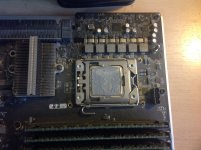
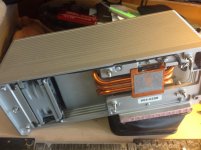
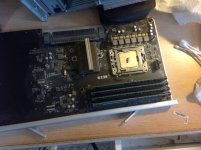
I was looking at ways to upgrade my Mac Pro since buying a new iMac 4K or Mac Pro was too expensive at this time. I came across CPU upgrades. I was surprised to find out this is possible with the older models. For $550 I was able to double my speed. Here is how I did it.
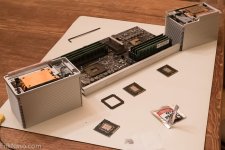
Half done (1 of 1).jpg
 
I've followed your advice, bought from DN Computers and done the upgrade, it was child's play, it's a very cost effective way of updating a Mac. I'm very pleased.
 
Thanks, I'll have to check this out some more...

Read how someone did the same.. I thought it had to be 2010 to 2012... mine's I believe a 2009 like yours... but its at my sister's who uses... might have to steal it back.. but like you a way to update instead of buying what I call the trash can or round Mac Pro now...
 
Thanks, I'll have to check this out some more...

Read how someone did the same.. I thought it had to be 2010 to 2012... mine's I believe a 2009 like yours... but its at my sister's who uses... might have to steal it back.. but like you a way to update instead of buying what I call the trash can or round Mac Pro now...
 
Eric how is this working out for you... I just sent an email to DN computers since mine is a 2008 but its a Macbook Pro 4.1... and has the intel processors... to see if it'll work for me also..
 
Thanks, I'll have to check this out some more...

Read how someone did the same.. I thought it had to be 2010 to 2012... mine's I believe a 2009 like yours... but its at my sister's who uses... might have to steal it back.. but like you a way to update instead of buying what I call the trash can or round Mac Pro now...

If it's a 2009 Mac Pro (not MacBook Pro) as in the 'cheese grater' not that laptop, you can upgrade it. The 2009 Mac Pro (otherwise
known as MacPro 4.1) is almost identical to the 2010-2012 Mac Pro (otherwise known as MacPro 5.1). You do need to 'flash' the
firmware on the 2009 Mac Pro and it will then be seen as a MacPro 5.1 and you can upgrade processors. It's even easier in a
single processor model like mine. I had bought a Mac Pro 2.66 Quad core back in 2009 off the Mac refurb store for $2000.
The single processor configuration is easy to just slide in a new processor. On the single processor Quad Core model,
the processors are the typical everyday processors with the IHS (Integrated Heat Sink). On the dual processor
Quad Core model (8 cores).....as Erik said, you have to deal with 'lidless' processors in one way or another.
It's a bit more difficult to 'DIY' which is why there are services that will remove the cap from the processor.
Lucky for me, I bought a single processor version way back in 2009. It literally takes about 10 minutes
to do the upgrade from a quad core 2.66 to a hex core 3.5 and just about doubles geekbench scores.
I just upgraded to a 6 Core 3.46ghz processor. Total cost $235. Not bad if I do say so myself. Plus I get to keep
my new upgraded video card, the Blu Ray burner, all the third party RAM, and my work RAID that I had already installed
in my Mac Pro.
 
Last edited:
lol just got MacBook Pro stuck in my head... found out mine won't work... I don't have the intel processors ...

Not sure if I want to go PC... a friend can build one for 1,600 bucks... pretty much all the good stuff... but then I have to spend another 600 bucks to go to the cloud on my CC suite since I'm Mac based and not PC when I got CC5.5... now if $ grew on trees... ah... an Alexa and other things... :)
 
Here is my experience upgrading the single quad core version of the 2009 Mac Pro. I hope you don't mind
Erik, I linked to your blog to show the similarities and differences between the single and dual processor
versions of the 2009 Mac Pro, and how it impacts upgrading them. I included Geekbench 'before and after'
benchmarks, as well as a much more interesting 'real world' video compression test.
If anyone is interested, they can read about it here.

IMG_0183.jpgIMG_0184.jpgIMG_0185.jpgIMG_0186.jpg
 
Last edited:
Back
Top