

Moseph
Veteran
I'm working with HDV 30F from an XH A1, captured to ProRes 422. When I export from After Effects CS3, even with the correct settings so that the finished movie files can be dropped right into my FCP timeline with no rendering, I get this strange loss in resolution. There's also some aliasing. To a certain extent, the raw footage in my viewer and comp look a little lower res when in AE, but I have nothing to compare it to, whereas in FCP I can quickly go back and fourth between the original and the finished shot.
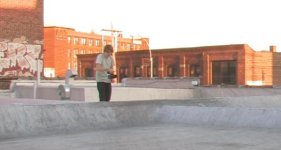
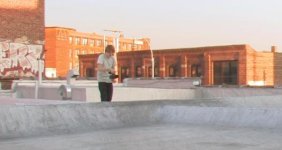
Here's a quick before and after, viewed at 100 percent in the FCP canvas.
I did run a search, I didn't come up with anything.
For the output module, all I changed from lossless was the codec (to Prores 422) and the audio output. Before, I had the stretch option checked to ensure that the aspect ratio didn't come out at 4:3 since HDV is 1440x1080, but turning that off had absolutely no affect on the video, aspect ratio or the resolution. I left everything alone in the render settings.
Converting the footage to DVCPRO HD before importing it to AE did seem to solve the problem, but does anyone know of a better solution than that?
Here's a quick before and after, viewed at 100 percent in the FCP canvas.
I did run a search, I didn't come up with anything.
For the output module, all I changed from lossless was the codec (to Prores 422) and the audio output. Before, I had the stretch option checked to ensure that the aspect ratio didn't come out at 4:3 since HDV is 1440x1080, but turning that off had absolutely no affect on the video, aspect ratio or the resolution. I left everything alone in the render settings.
Converting the footage to DVCPRO HD before importing it to AE did seem to solve the problem, but does anyone know of a better solution than that?

