

sony3000
Active member
My name is Alexander Perel and I am wedding videograopher in Israel. I decided to share a couple of tips for wedding videography.
So, you’re at a wedding ceremony – what is going to determine the quality of the work you produce can be divided into three sections – Your skill as a professional/artist, the quality of your equipment (usually, the better quality equipment costs more money, so for example a cheap camera can go for 500USD, while something otherworldly can go for ten times as much, 5000USD – and similarly with the lenses, ranging anywhere from 300 to 2500USD), and your Auxiliary Equipment. This article is going to focus on the last one of the three categories – about what I would call the “auxiliary equipment”, for lack of a better term.
The number one, most important thing to consider is the natural deterioration of equipment. You know how DVDs and CDs accumulate scratches over time and it becomes hard to get them to play, or maybe they start getting stuck? Or, how HARDDRIVES in computers tend to have a high failure rate after they are 5 years and older? Well, guess what – your media card is the same. It’s not a question of “will my media card ever let me down?” rather, one of “Gee, I wonder when this puppy will pop”. So, can you imagine shooting an event and later on coming home and finding out that when you insert your memory card into your computer it doesn’t bring up the automated “folder” option to browse it but rather tells you that the memory card is empty and to use it you need to format it – because everything went corrupt and so as a consequence everything you shot – is simply gone? Boy, that’s one call to your clients you do NOT want to make.
So what’s the solution you might ask? Well, dual media-writing, naturally. Nowadays there are three high-end cameras which will allow you to simultaneously write on two media cards whatever you are shooting – the Canon C100 comes with this ability from the start. Open it up, pop 2 memory cards, and you’re good to go; The Sony FS100 and FS700, well, not quite so – if you wish to use simultaneous media-Card writing, you will need to buy an external module. Imagine how you will feel when you insert an media card into your computer, and it’s empty. All the information is gone. Not there. AND THEN, then you insert the backup media-Card… Bam! It’s all there. Suddenly those 10 years you just lost from the nerve wrecking experience are restored, and you write a thank you letter to Canon/Sony for this wise feature.
So lets say you got your media-Card potential disaster situation covered, what else can go wrong? Well, some professionals say that good, distinctive sound quality, is even more import than good video quality. The way sound is usually captured is by the internal microphone that the camera has built in it, which picks up whatever sounds are available in the environment – which is *usually* a great way to record sound, usually, but not always. Sometimes we need to capture sound only from one particular source, without the accompanying environmental acoustical influences, for example – imagine a wedding ceremony, the bride and groom are standing under the chuppah with the Rabbi and their families. The Rabbi gives a speech and says the appropriate prayers into a microphone so that everyone can hear, and after that he passes the microphone to the groom so that he in turn can say a couple of prayers. Your job as the videographer in this case is to record the sound that comes solely from the Rabbi and the groom/bride, not the whole environment. If you use only the internal microphone of the camera, it’s highly likely that you will later, during the editing process, discover that you can’t always hear the words being spoken by the people who hired you – their voices are overpowered by the environmental noise. And that's where a wireless microphone system comes in handy. The best way to record good clean sound from one specific source is to be directly connected to it. Sennheiser G3 wireless system is the perfect solution – It allows a videographer to capture clean sound from a specific source to one of the audio channels of the video camera. With headphones, the videographer can monitor the sound and insure that it is being recorded properly and without interference from the crowd, and there’s even the option to connect a small audio recorder to back up the audio from the wireless system. A responsible professional will always record video on two media simultaneously as well as audio directly on the camera, and monitor it with the headset.
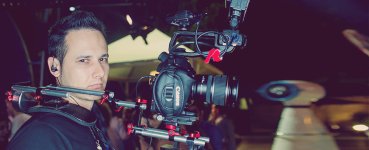
So the safety of your Video and Audio are covered, what’s next? Well, last but not least is your ability to provide a steady, stable video. Your hands/shoulder are not as stable as you might imagine – supportive gear helps video artists to be as stable as they want, when they need it, make smooth tilts and pans or even run with the camera – while still providing a video that is watchable and not a shaky mess. The most basic of these is the monopod: it is a one legged support that makes your shots very stable. A slider is another tool used by professionals, what it does is give the camera an ability to slide smoothly from one side to the other, or from the back to the front. It provides with high production shots. Steadicam is a system balance for a hand held camera and it isolates the camera from the operator's movement. My personal favorite is the Rig – it is a shoulder support system that allows me the freedom of movement to any direction quickly and without instability – It is constructed like Lego and every videographer can adjust the camera’s position as it best suits him. There are many other gadgets on the market that a videographer might use, but I consider these to be of the most value, these ones are going to have the biggest impact on your video.
I hope you’ve enjoyed reading this article as much as I enjoyed writing it, but more importantly, I hope that this will contribute to your own professional advancement in this field, and maybe save you some embarrassing moments.
So, you’re at a wedding ceremony – what is going to determine the quality of the work you produce can be divided into three sections – Your skill as a professional/artist, the quality of your equipment (usually, the better quality equipment costs more money, so for example a cheap camera can go for 500USD, while something otherworldly can go for ten times as much, 5000USD – and similarly with the lenses, ranging anywhere from 300 to 2500USD), and your Auxiliary Equipment. This article is going to focus on the last one of the three categories – about what I would call the “auxiliary equipment”, for lack of a better term.
The number one, most important thing to consider is the natural deterioration of equipment. You know how DVDs and CDs accumulate scratches over time and it becomes hard to get them to play, or maybe they start getting stuck? Or, how HARDDRIVES in computers tend to have a high failure rate after they are 5 years and older? Well, guess what – your media card is the same. It’s not a question of “will my media card ever let me down?” rather, one of “Gee, I wonder when this puppy will pop”. So, can you imagine shooting an event and later on coming home and finding out that when you insert your memory card into your computer it doesn’t bring up the automated “folder” option to browse it but rather tells you that the memory card is empty and to use it you need to format it – because everything went corrupt and so as a consequence everything you shot – is simply gone? Boy, that’s one call to your clients you do NOT want to make.
So what’s the solution you might ask? Well, dual media-writing, naturally. Nowadays there are three high-end cameras which will allow you to simultaneously write on two media cards whatever you are shooting – the Canon C100 comes with this ability from the start. Open it up, pop 2 memory cards, and you’re good to go; The Sony FS100 and FS700, well, not quite so – if you wish to use simultaneous media-Card writing, you will need to buy an external module. Imagine how you will feel when you insert an media card into your computer, and it’s empty. All the information is gone. Not there. AND THEN, then you insert the backup media-Card… Bam! It’s all there. Suddenly those 10 years you just lost from the nerve wrecking experience are restored, and you write a thank you letter to Canon/Sony for this wise feature.
So lets say you got your media-Card potential disaster situation covered, what else can go wrong? Well, some professionals say that good, distinctive sound quality, is even more import than good video quality. The way sound is usually captured is by the internal microphone that the camera has built in it, which picks up whatever sounds are available in the environment – which is *usually* a great way to record sound, usually, but not always. Sometimes we need to capture sound only from one particular source, without the accompanying environmental acoustical influences, for example – imagine a wedding ceremony, the bride and groom are standing under the chuppah with the Rabbi and their families. The Rabbi gives a speech and says the appropriate prayers into a microphone so that everyone can hear, and after that he passes the microphone to the groom so that he in turn can say a couple of prayers. Your job as the videographer in this case is to record the sound that comes solely from the Rabbi and the groom/bride, not the whole environment. If you use only the internal microphone of the camera, it’s highly likely that you will later, during the editing process, discover that you can’t always hear the words being spoken by the people who hired you – their voices are overpowered by the environmental noise. And that's where a wireless microphone system comes in handy. The best way to record good clean sound from one specific source is to be directly connected to it. Sennheiser G3 wireless system is the perfect solution – It allows a videographer to capture clean sound from a specific source to one of the audio channels of the video camera. With headphones, the videographer can monitor the sound and insure that it is being recorded properly and without interference from the crowd, and there’s even the option to connect a small audio recorder to back up the audio from the wireless system. A responsible professional will always record video on two media simultaneously as well as audio directly on the camera, and monitor it with the headset.
So the safety of your Video and Audio are covered, what’s next? Well, last but not least is your ability to provide a steady, stable video. Your hands/shoulder are not as stable as you might imagine – supportive gear helps video artists to be as stable as they want, when they need it, make smooth tilts and pans or even run with the camera – while still providing a video that is watchable and not a shaky mess. The most basic of these is the monopod: it is a one legged support that makes your shots very stable. A slider is another tool used by professionals, what it does is give the camera an ability to slide smoothly from one side to the other, or from the back to the front. It provides with high production shots. Steadicam is a system balance for a hand held camera and it isolates the camera from the operator's movement. My personal favorite is the Rig – it is a shoulder support system that allows me the freedom of movement to any direction quickly and without instability – It is constructed like Lego and every videographer can adjust the camera’s position as it best suits him. There are many other gadgets on the market that a videographer might use, but I consider these to be of the most value, these ones are going to have the biggest impact on your video.
I hope you’ve enjoyed reading this article as much as I enjoyed writing it, but more importantly, I hope that this will contribute to your own professional advancement in this field, and maybe save you some embarrassing moments.
