Totally freaked out and need help with pixels

Robertson6

Active member
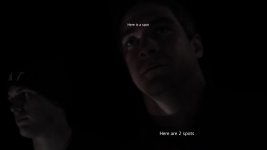
We are shooting our first feature film and are just over 3/4 done. About half way through we were shooting a bunch of really dark footage and noticed 3 spots on all of the video (which we have went back and found on all of it). I am not sure if it is dead pixels or what because it isn't a lens issue. Does anybody know how to get things like this out in post, other wise we are gonna have to live with this and that would be terrible considering how much hard work went into this. I honestly have no idea how we missed this but the damage is done and we can't go back. I have posted an example image of what I am talking about. I realize that FCP probably doesn't have the software needed, but is there a program I can use or a place I can send the finished product to that can do it? Thank you so much for your help.

Rich
 
There's a plugin for FCP from Digital Heaven called 'DH_Reincarnation'. It can mask out two dead pixels, and should work perfectly for your problem. You'll need to apply the filter twice to your clip to get rid of the three dead pixels. Since all your footage has this problem, you might want to nest the timeline and then apply the filters, or apply to a single clip - copy - select all clips then - paste attributes - filters.
It's only $40.00.
Cheers.

http://www.digital-heaven.co.uk/dh_reincarnation
 
Any compositing program like AE, Motion, etc. will also take care of it. I just wouldn't use it for all of your footage. Obviously pick out the takes you'd want to use and only fix them.
 
You can use Motion (or AE) to either blur the areas or cover them up with nearby pixels. Like others have mentioned, do this with spots where it's most noticeable. Depending on what the destination is for your video it might not even be noticeable after the compression or can get covered up by noise and color correction.
 
Thanks everyone, that digital heaven program looks awesome, that may be just what I need to save the day. For those of you who suggested using MOTION, how would you use that. I have only used motion maybe 1 to 2 times and don't know it very well. Thank again for your help.

Rich
 
We are shooting our first feature film and are just over 3/4 done. About half way through we were shooting a bunch of really dark footage and noticed 3 spots on all of the video (which we have went back and found on all of it). I am not sure if it is dead pixels or what because it isn't a lens issue. Does anybody know how to get things like this out in post, other wise we are gonna have to live with this and that would be terrible considering how much hard work went into this. I honestly have no idea how we missed this but the damage is done and we can't go back. I have posted an example image of what I am talking about. I realize that FCP probably doesn't have the software needed, but is there a program I can use or a place I can send the finished product to that can do it? Thank you so much for your help.

Rich
I hope that program works and you fix this. that would suck so much balls if your footage was stuck like that and you couldn't fix it. things like this make me want to puke, seriously.
 
Back
Top