Hi everyone,
well I purchased Premiere Elements 4.0 for my laptop as a stop-gap until I can afford FCP or a Mac Pro. I'm pleasantly surprized at just how versatile this little program is.
However, I find the title program really niggly. Whenever I create a rolling title, it rolls top to bottom in a staccato fashion, it's really jagged and jumpy for some reason. How do I get the rolling title to roll normally and smoothly?
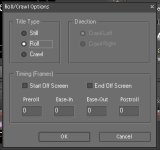
I've tried adjusting the settings (see Figure 1) but are unsure what numbers I should enter. Changing the %age or speed of the title through "Time Stretch" doesn't make any difference to the jaggedness.
Cheers
rc444
well I purchased Premiere Elements 4.0 for my laptop as a stop-gap until I can afford FCP or a Mac Pro. I'm pleasantly surprized at just how versatile this little program is.
However, I find the title program really niggly. Whenever I create a rolling title, it rolls top to bottom in a staccato fashion, it's really jagged and jumpy for some reason. How do I get the rolling title to roll normally and smoothly?
I've tried adjusting the settings (see Figure 1) but are unsure what numbers I should enter. Changing the %age or speed of the title through "Time Stretch" doesn't make any difference to the jaggedness.
Cheers
rc444