Time for a new editing puter

immusicman

Active member
Well it has been a LONG time since I have posted anything here. I had to stop my hobby for a while but I am back again. I still have the HVX200 and just purchased some new P2 cards, though I have thought about selling the HVX and P2 cards and getting the HMC150. But with that said, I went out into the Woods here in WV last weekend and had a friend shoot video of me and another friend acting out a little 5 min story, blank guns and all that.., So when I uploaded my media into Vegas, I was kind of shocked at how slow my computer had become after just adding a few effects. It renders fine, but takes a little while. But, playback is horrible. In an action scene, I have to build a short dynamic ram in Vegas 12 to be able to watch it completely.

That got me to thinking I need to go faster than my current quad core 2.6GHZ intel, and up my ram from 8gb to at least 32gb. What are you guys using for editing?

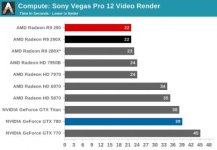
I just ordered a 4930k 6 core computer with 32gb ram, and solid state drives 2x 240gb ea. I have a large Two TB drive for data storage, but I thought it would be nice to have a solid state for operating system and one for video data. When rendering, render to the regular 2tb drive, but use SSD for working fles. I am trying every angle to get real time playback no matter how many effects. Lets not forget a GPU video card. I have wrestled with which card to get, and I am sure many will disagree, but I believe, after much review research, The R9 Radeon 280x is best because in the testing I read, playback was significantly faster than the nvida GTX 780. One test said the GTX780 rendered 1 second faster on a short project. Took 22 seconds to render with 780 and 23 seconds with 280x radeon. I noticed, in vegas, you have the option to render with GPU or CPU. My CPU and ram will render fast on new system, its real time playback that I worry about, and that is where the 280x will Shine, along with the other components in my opinion. My Motherboard will allow me up to 64gb. I will add 32gb more if I need it. But I would think 32gb shall be plenty, I only have 8gb now. Any thoughts? Thanks all, good to be back.
 
It renders fine, but takes a little while. But, playback is horrible. In an action scene, I have to build a short dynamic ram in Vegas 12 to be able to watch it completely. [..] What are you guys using for editing?

You can use AVID DNxHD encoded videos to edit instead of the original files, it'll help. h.264 videos tend to be ressource demanding a bit when editing.
Or, like I did, move from Vegas to Media Composer. The stability is on a whole new level compared to Vegas. It's not as "user-friendly" as Vegas might be, but once you've learned how the software works, it's rock solid.
 
One of the best things I have done was switch to Edius. It will take about anything (codec) thrown on the timeline and playback in real time. I have be using P2 media since 2009 with no problem on Edius. They edit/playback natively. Also, may want to consider the HD spark card which comes with some versions of Edius. It allows you to view your video on an HDTV when editing. No lag...no rendering. Edius does not require a powerful/expensive graphics card. I am running a Sapphire HD7700 ($100) and everything works fine.
 
Last edited:
I wouldn't convert P2 files to DNxHD. No reason to.

Yes I do not like the idea of converting anything before editing. I guess I should have been a bit more specific about my question. I meant to get answers about what kind of hardware people were using. I prefer Vegas over any other editing I have tried. It is very user friendly, and honestly at 45 years old, I don't want to have to learn a whole new editing system. I have heard a few people say edius was very good on playback. I can play back my video fine also with the system I have right now UNTIL I add a few effects. Then it's bad. When I build a dynamic ram, it plays perfectly, however, it ties up much of my memory. That is one reason I am considering getting 64gb of ram instead of the 32gb on my new system I just ordered. I could dedicate 16gb or more just for dynamic ram purposes and problem would be solved. However, I believe the new editing system will eliminate the need for dynamic ram building for the most part.
 
I felt the same way as you about learning a whole new editing system but did it anyway and I am glad I did. Sounds like you configured your new computer around working with Vegas and I understand that. Just wanted to let you know there are other options out there to work with P2 that require much less beefy system specs. I am editing P2 with 3 GB of ram and no hiccups. Most effects except the "specialty ones" are real time without rendering.
 
Thanks Mark. I appreciate your hospitality and did go to Edius website and check it out. You are correct that I do not want to have to learn another system. I am getting more stability in my older age and this causes me to hang on to what I am familiar with. I used to change cars at least once a year, for years! Can't tell you how much money I have lost doing that. Now I have a car that I have actually kept for 3 years and same goes for everything else. However, the down side is this same state of mind keeps me from trying new things sometimes. I am a registered nurse and everything was great up until April of 2012 when my only brother and best friend was diagnosed with leukemia. I moved in with him and took care of him and really thought I was going to help him beat this thing. Sadly, he passed away in July and I wasn't finding any joy in anything, so I resurrected my hobby again, and finally I am enjoying something. This video work, acting, and editing is a great outlet for me. In fact, I am more serious now with it than I ever was.
 
David, any FX slows it down, but especially 3rd party FX like new blue. I didn't add a lot, but every little thing slows it more and more. I love Vegas, and as Mark said, I am building my hardware around it feeling that it will completely solve my issues. Do you think there would be a significant gain from 32gb ram vs 64gb? Keep in mind I only have 8gb now, and I am certain 32gb will be a huge help. I just couldn't pull the trigger on the extra 32 at this time as I felt the money was better appropriated for the GPU card and processor. I found the article on the graphic card comparisons and it included a section on vegas rendering times. I am going to post the graph here, and article can be found here: http://www.anandtech.com/show/7481/the-amd-radeon-r9-290-review/14

I chose the 280x R9. great price and it out performed the gtx780 NVidia. graph rendering times.jpg
 
Third-party stuff, especially Magic Bullet, tends to be pretty resource-heavy and will slow down the mightiest of machines.

More memory is always better, but there does come a point when the returns diminish. 64GB is probably (fairly well) beyond that point. You can put the money into more useful things like an even better processor.

Also, your better bet is selective prerendering, not dynamic RAM preview. That's going to be the most resource-efficient way to go.
 
good point

good point

Third-party stuff, especially Magic Bullet, tends to be pretty resource-heavy and will slow down the mightiest of machines.

More memory is always better, but there does come a point when the returns diminish. 64GB is probably (fairly well) beyond that point. You can put the money into more useful things like an even better processor.

Also, your better bet is selective prerendering, not dynamic RAM preview. That's going to be the most resource-efficient way to go.


Very good point. I was tooling around with the selective prerendering idea also. My processor I have ordered is a 6 core 4930k. I feel like this will get it done.
 
Back
Top