
Navigation
Install the app
How to install the app on iOS
Follow along with the video below to see how to install our site as a web app on your home screen.
Note: This feature may not be available in some browsers.
More options
You are using an out of date browser. It may not display this or other websites correctly.
You should upgrade or use an alternative browser.
You should upgrade or use an alternative browser.
The Official Manhattan LCD HD Monitor Thread
- Thread starter johnzo1995
- Start date
Manhattan monitor Just Died
Manhattan monitor Just Died
Hi all. I just rented a Manhattan HD071A to try it out before buying. It worked for about 2 minutes and then died. When I turn it on, I get the "Manhattan" splash screen but then the monitor goes dark except for some random white specks at the top.
I've ruled out power issues (get same results running from AC power as battery).
Any ideas?
Thanks.
Manhattan monitor Just Died
Hi all. I just rented a Manhattan HD071A to try it out before buying. It worked for about 2 minutes and then died. When I turn it on, I get the "Manhattan" splash screen but then the monitor goes dark except for some random white specks at the top.
I've ruled out power issues (get same results running from AC power as battery).
Any ideas?
Thanks.

Zephyrnoid
Veteran
Did you call Manhattan LCD?
Hi all. I just rented a Manhattan HD071A to try it out before buying. It worked for about 2 minutes and then died. When I turn it on, I get the "Manhattan" splash screen but then the monitor goes dark except for some random white specks at the top.
I've ruled out power issues (get same results running from AC power as battery).
Any ideas?
Thanks.

johnzo1995
Active member
We fixed the problem with the GH2; if anybody has problems please contact us.
We fixed the problem with the GH2; if anybody has problems please contact us.
I sent 3 mails to support@manhattanlcd.com (19/02-21/02-27/02) and I didn't get any answer...please could you get in touch with me? The order number is 2146...it's in the subject.
I'm sending it again, this time to jreed@manhattanlcd.com
Please help me, thanks john!
t.
johnzo1995
Active member
Hi all. I just rented a Manhattan HD071A to try it out before buying. It worked for about 2 minutes and then died. When I turn it on, I get the "Manhattan" splash screen but then the monitor goes dark except for some random white specks at the top.
I've ruled out power issues (get same results running from AC power as battery).
Any ideas?
Thanks.
WE have a possible temporary fix for that Hold down the UP and down button then press and hold the power button for 5 seconds this should clear the NVRAM.
firmware release DEC 21 2010 has a couple of bugs in it we think that problem was caused by a corrupted russian font file in the language section of the monitor. leave the language set to english for now and dont fiddle with it.
in the current firmware FEB 22 2011 we disabled language options and changed the HDMI color space logic so it can be forced to YUV 601/709.
our programmer is working out some kinks with language and HDMI color space logic the HDMI problem only seams to affect cameras with the new MPEG 4 chipset like the pana GH2 cameras. whic for some reason makes our monitor think it is RGB when it is infact YUV 601.
So all affected with the Purple Screen and firmware release 6 6 2010 and later you can try and manually set the hdmi color space to YUV 601 in the menu system.
-Vinny
johnzo1995
Active member
I sent 3 mails to support@manhattanlcd.com (19/02-21/02-27/02) and I didn't get any answer...please could you get in touch with me? The order number is 2146...it's in the subject.
I'm sending it again, this time to jreed@manhattanlcd.com
Please help me, thanks john!
t.
sent you a reply check your email if you did not get it call Vinny at 407-362-1818 between 10AM and 4 pm EST tomorrow i will answer any questions you may have.
I just received the "firmware update" package from Manhattan for my 089B. Only problem is that in the package, there is only the cable, not latest software. Any chance a downloadlink or info where to get it.
Regards,
Jaakko
Edit: My bad, the files were deleted by mailserver. Everything is now up & running...
Regards,
Jaakko
Edit: My bad, the files were deleted by mailserver. Everything is now up & running...
Last edited:
Rolf Schwarz
Member
no driver...
no driver...
hi,
just got the firmware update kit,but there are no driver for the usb to vga adapter on the cd...any help would be nice
rolf
no driver...
hi,
just got the firmware update kit,but there are no driver for the usb to vga adapter on the cd...any help would be nice
rolf
johnzo1995
Active member
The USB driver is CDM20600.exe, its included on the CD. If not, just email us at support@manhattanlcd.com and we can email it over. All the files zipped are ~4 megs.
Rolf Schwarz
Member
no input on hdmi
no input on hdmi
hi
did the firmware update on my hd089b but still have the problem that the hdmi
input is not working when i turn on the monitor and after a while (ca.10 min)
PING! there is the picture,although i did nothing...really would like to have a picture
when i start the camera(af101)thank you for any help
rolf
no input on hdmi
hi
did the firmware update on my hd089b but still have the problem that the hdmi
input is not working when i turn on the monitor and after a while (ca.10 min)
PING! there is the picture,although i did nothing...really would like to have a picture
when i start the camera(af101)thank you for any help
rolf
Pushpa de Silva
Member
Hi Erikcubano, Where you have installed the battery for the LCD panel. Can u please tell me where u bought the battery and how it will last if you use it straight without switching OFF and ON. Your help is much appreciated. Thanks.
Pushpa de Silva
Australia
e-Mail: nathapushpa@gmail.com
Pushpa de Silva
Australia
e-Mail: nathapushpa@gmail.com

patapoms
Member
Hi guys,
yesterday i've received my LCD. I've take the HD071A and after few tests it seems to work very well.
Just one question... Why I can't display the peaking function of my Canon XHA1 on the monitor?
(I'm plugged on component Ypbpr)
If I activate the peaking it works on the XHA1 lcd but not on the Manhattan LCD... Why??
Thanks for your answers.
yesterday i've received my LCD. I've take the HD071A and after few tests it seems to work very well.
Just one question... Why I can't display the peaking function of my Canon XHA1 on the monitor?
(I'm plugged on component Ypbpr)
If I activate the peaking it works on the XHA1 lcd but not on the Manhattan LCD... Why??
Thanks for your answers.
Are you guys working on a hdmi loop through monitor ?
I talked to Johnzo last week and he did confirm an HDMI loop through monitor is coming soon
dannys present past
New member
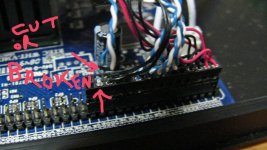
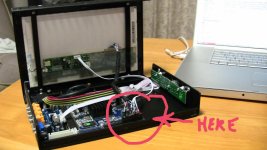 Can anyone tell me if this is why my monitor stopped working?there seems to be 2 wires ,blue and White that have either been cut or have some how broken off the circuit board connector on my 089B
As firmware update from this year is only for HD089B and C - does it mean that new features
3 Canon 5D/7D modes
Red Camera Mode
False Color
Focus Assist
Blue Only
Monochrome
Color Bars
Screen Markers & Guides
Under-scan / Over-scan
Advanced Color Control
Individual Red Green & Blue channel adjustments
Hue
Gamma Controls
Picture In Picture
Support for multiple HDMI Color spaces
are not available in HD089A?
I am considering one of these second hand...or maybe i should wait for some refurbished directly from manhattan? - my budget is small.
3 Canon 5D/7D modes
Red Camera Mode
False Color
Focus Assist
Blue Only
Monochrome
Color Bars
Screen Markers & Guides
Under-scan / Over-scan
Advanced Color Control
Individual Red Green & Blue channel adjustments
Hue
Gamma Controls
Picture In Picture
Support for multiple HDMI Color spaces
are not available in HD089A?
I am considering one of these second hand...or maybe i should wait for some refurbished directly from manhattan? - my budget is small.
Why use a Power Regulator?
Why use a Power Regulator?
We're about to invest in our first Manhattan.
We also need a few accessories we may as well buy at the same time - shipping to Australia is a killer.
So need a definitive explanation on the need for a Power Regulator? Would one of the gurus here please advise.
TIA - Howard G
Why use a Power Regulator?
We're about to invest in our first Manhattan.
We also need a few accessories we may as well buy at the same time - shipping to Australia is a killer.
So need a definitive explanation on the need for a Power Regulator? Would one of the gurus here please advise.
TIA - Howard G