The Official Manhattan LCD HD Monitor Thread

OK, this is my story, I've read about this monitor here at the forums and decided to go for it. Yup, two days later after getting my LCD from them I'm dead in the water cause it wont work. First, the colors got all scrambled up to the point where I could not use it anymore, so I turned it off and restarted and what I got? The LCD lights come up and that's about it. I confess I lost confidence on it. Also some constructive critique: I think the manual should have a better presentation and depth.

I must tell though for all interested in buying, while it worked (6 hrs max) it was one the best monitors for its size that I have ever used, it's very light and looks very professional, has more than enough res for critical focus.

I will keep you all posted on how things develop from here.

Chris Soares
O2HD
USA - Brazil


UPDATE: John contacted me promptly about replacing the defective monitor. I see that Manhattan LCD is a good company with very nice products and that John and Vin care for their costumers satisfaction, I will in the future purchase other products from these guys and recommend that you go for it if you're thinking about it.
 
It's been awhile since I've checked back in to this thread, and I'm glad the 089C is available!

I have a shoulder mount system and a Steadicam, and I'm starting to seriously want an external display.

I've got a few questions for Johnzo, as well as anyone with first hand experience with the 089C.

1. Is the 1:1 function still only accessible through a menu?

2. Is the DC in a tip size that comes with the Tekkeon(I already own the Tekkeon)?

3. How well can the display be read in sunlight situations with a Steadicam, and will I need an anti-glare film for this application?

4. What arm or mounting device would anyone suggest? My Steadicam will have Rails like those on a regular Rail setup, although I'd like to mount the monitor in the middle of the two rails. The Shoulder mount though, I would like to mount the LCD off of one rail(off the left side). With the Shoulder mount I will be needing to flip the image, and with Steadicam I'll usually go without a 35mm adapter, but I may occasionally need to flip the image.

Thanks Johnzo, and everyone else! :)
 
I received my replacement HD089C today. I'm very satisfied with it. Resolution is the best I've seen for this size of monitor, I yet have to see what the reflective screen will be like outside. Color rendition is pretty accurate out of the box with minor adjustments. I definitely recommend this Monitor. Great addition for my cameras.

Chris Soares
O2HD
USA - Brazil
 
Dear John at all,

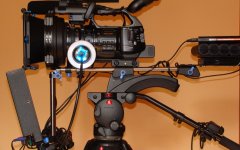
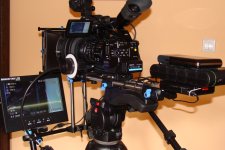
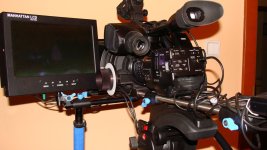
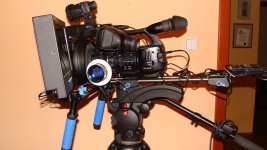
I'm your very satisfied customer from Poland. As can be seen in the bottom 2 pictures, I've been using the large HD109A monitor. When on tripod (and specially with my Letus setup, not shown here), the monitor is simply marvellous. However, it's a bit too bulky for using with the RR shoulder mount (and too heavy as well, as I've just undergone a serious neck spine surgery). Therefore, I've been thinking:

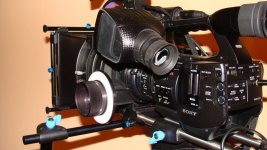
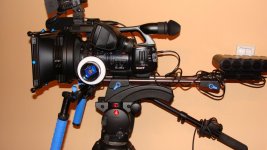
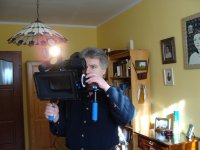
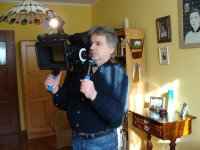
- looking at my current shouldermount setup (the upper 4 pics), which of the Manhattan monitor models would fit best? I certainly need a native 720p one for easy focusing. Also, due to the tight space left on the rig (see the left handle bar), it'd need to have all the inputs on the lower (or upper) edge, and the buttons at the left side...

What do you guys think? I have added 2 pics of my current HD109A attached - it's possible, but certainly not optimal. Will the HD089C be OK, or should I wait for the HD8900? Or perhaps I should go for the tiny HD071A ? Again, I cannot stress hard enough how much the low weigh and size are important to me (while not compromising on the sharpness)!

Comments welcome:)

PS. Oh, and I only want a Manhattan - the SmallHD is no good for PAL...
 

Attachments

  • DSC06518.jpg
    DSC06518.jpg
    153.1 KB · Views: 0
  • DSC06524.jpg
    DSC06524.jpg
    126.1 KB · Views: 0
  • DSC01460a.jpg
    DSC01460a.jpg
    303.2 KB · Views: 0
  • DSC01458a.jpg
    DSC01458a.jpg
    331 KB · Views: 0
  • DSC01451a.jpg
    DSC01451a.jpg
    292 KB · Views: 0
  • DSC01450a.jpg
    DSC01450a.jpg
    301.8 KB · Views: 0
  • DSC06529.jpg
    DSC06529.jpg
    140.6 KB · Views: 0
  • DSC06530.jpg
    DSC06530.jpg
    138.7 KB · Views: 0
Last edited:
lately I've purchased this battery: http://cgi.ebay.com/Portable-12V-li...emQQptZLH_DefaultDomain_0?hash=item5ad3679bf2
I've tested it on my manhattan HD0089B for a total of only 2 hours.

I was very disappointed of course since I figured this battery is 57WH capable (although there is a big possibility that it's not in fact) and should provide me with 5 hours of usage since the tekkeon is advertised as 5 hour and it is 58WH.

The test was I just left the monitor in the blue screen without connecting anything to it and connected a fully charged battery.
In the last 10 minutes I connected it to a computer and started showing videos.

Is it possible that the manhattan draws much more than 20W?
Even if it's 20W, how does the tekkeon achieve 5 hours?

Also the screen turns very hot after 2 hours (power adapter or battery)
 
The monitor uses less than 12W. The problem could be attributed to 2 separate issues. Firstly, the batteries sold on Ebay more often than not are grossly overrated in their capacity. It is likely a 30-35wh battery. Secondly, a fully charged Li-Ion 3 cell battery like this is 12.6V. While discharging the voltage drops to about 9V at the end. The monitor needs at least 10 (or even 11) volts to operate. So much of the battery capacity is not utilized as the monitor turns off before the battery had a chance to deliver its full charge. The Tekkeon has a built in voltage regulator maintaining 12V throughout the whole run. Same thing with our vDoubler plate that is used with the monitor. Both of them allow for full battery utilization. HTH
 
THANKS!
That clears things up.
I figured it had something to do with the voltage drop.
I measured my battery at 6volts when the device turned off.
it's still cheaper to get 2 of these instead of the expensive tekkeon or other solutions.
 
Actually, I could get full 5 hrs from the Tekkeon with my big HD109A!
That was continuous work; with switching on and off it would be a little shorter.
Oh, and the Tekkeon was set to 9 V, not 12.
 
Hi,
I'm sorry if this has been asked here before in this long thread, but I was wondering if I needed a special connection to make use of the 1:1 pixel mapping? I just recently got a Manhattan LCD but when I go select the feature in the menu, the screen turns into fuzzy colorful dots and nothing else. Does it only work with the HDMI input or something, which I am not using?
 
HD089c

HD089c

It's been awhile since I've checked back in to this thread, and I'm glad the 089C is available!

I have a shoulder mount system and a Steadicam, and I'm starting to seriously want an external display.

I've got a few questions for Johnzo, as well as anyone with first hand experience with the 089C.

1. Is the 1:1 function still only accessible through a menu?

2. Is the DC in a tip size that comes with the Tekkeon(I already own the Tekkeon)?

3. How well can the display be read in sunlight situations with a Steadicam, and will I need an anti-glare film for this application?

4. What arm or mounting device would anyone suggest? My Steadicam will have Rails like those on a regular Rail setup, although I'd like to mount the monitor in the middle of the two rails. The Shoulder mount though, I would like to mount the LCD off of one rail(off the left side). With the Shoulder mount I will be needing to flip the image, and with Steadicam I'll usually go without a 35mm adapter, but I may occasionally need to flip the image.

Thanks Johnzo, and everyone else! :)


HD089c works fine to me. I am happy with the monitor. :)

1. Yes, you have to access the manu for 1:1 pixel.
2. Yes, you can use Tekkeon battery pack with "B" tip.
3. The LCD surface is glossy. Sometimes, it is hard to read focus under outdoor setup. you should use a hood under the sun.
 
Hi,
I'm sorry if this has been asked here before in this long thread, but I was wondering if I needed a special connection to make use of the 1:1 pixel mapping? I just recently got a Manhattan LCD but when I go select the feature in the menu, the screen turns into fuzzy colorful dots and nothing else. Does it only work with the HDMI input or something, which I am not using?

Nevermind, I answered my own question by purchasing the component cable. Now all looks well. It's so ridiculously sharp! I love it!
 
i noticed the hd089a monitors are no longer listed. Whats all that about, they were like the best bang for your buck monitors available,
 
i noticed the hd089a monitors are no longer listed. Whats all that about, they were like the best bang for your buck monitors available,

I have been away for a awhile. We disco'd the HD089A due to the controller manufacturer discontinuing the controller we used. We are also going to discontinue the HD089C.

However, are pleased to announce the the HD071A will be avalible soon and this model will replace the HD089A. Also the HD8900 will replace the HD089C. Yes this model is a few hunderd dollars more but it is well worth it. We might run a pre sale special on both or provide some coupons for forum members.

The HD8900 will be shipping later this week, (we actually had a small load last week and still have one left). Hopefully the HD071A will start shipping in two to three weeks.
 
John

Thanks for the update. Will the HD071A display all menu area of the EX1/3 without problem?

PS. I'm asking, because - having compared the Manhattan monitors to quite a number of other offerings - I'm about to buy a second Manhattan monitor! While my HD109A works great when on the tripod, I think I'd do with a much smaller one to use with my shoulder mount.
 
Last edited:
Hi,
I recently purchased a Manhattan LCD (HD089C), but I have to say I'm a bit confused/disappointed. No matter what, I cannot seem to calibrate the monitor. Color bars on here are useless. Using component inputs, I get all of these dancing blue noise dots in shadowy areas that do not appear on the footage when I import it into FCP. It's very noisy. Also, it's not as sharp as I had anticipated; and when a character is centered, the focus is really sharp, but off to the side, they go soft, even if they are on the same focal plane. I thought this could be my adapter, but the footage also looks okay after I import it.

I'm using the 1:1 pixel ratio setting. I've heard so many rave reviews about this monitor, that I think it either could be a defective unit, or I just haven't figured out how to calibrate it correctly. I'm using an HVX200A, and I cannot seem to properly set it up using the in-camera color bar generator. Any suggestions?!
 
Hi,
I recently purchased a Manhattan LCD (HD089C), but I have to say I'm a bit confused/disappointed. No matter what, I cannot seem to calibrate the monitor. Color bars on here are useless. Using component inputs, I get all of these dancing blue noise dots in shadowy areas that do not appear on the footage when I import it into FCP. It's very noisy. Also, it's not as sharp as I had anticipated; and when a character is centered, the focus is really sharp, but off to the side, they go soft, even if they are on the same focal plane. I thought this could be my adapter, but the footage also looks okay after I import it.

I'm using the 1:1 pixel ratio setting. I've heard so many rave reviews about this monitor, that I think it either could be a defective unit, or I just haven't figured out how to calibrate it correctly. I'm using an HVX200A, and I cannot seem to properly set it up using the in-camera color bar generator. Any suggestions?!


Can you send color bars from the camera?
Send color bars to the monitor.
Then on the remote, hit Source and 9-1-1 this will put you into the hidden menu.
Under Factory Menu 0, scroll down to “Auto Cal ADC” and hit right on remote.

This will calibrate the monitor with the color bars from your camera, then you might have to adjust the Green Gain and Offset (you will need 10% gray bars)

Please email me for any questions
 
Back
Top