

starcentral
Veteran
I'm a PC guy. I've been building, at one time selling, and using PC's for well over two decades. I legally own a lot of PC software from Adobe Production Suites, 3D software and more that to this day I still use on a regular basis.
4 years ago this April I bought a macbook pro because I wanted a new laptop for portability and personal use, but as a plus I knew I could also use it for transcoding footage to the ever-so popular ProRes format which is in demand from many of my clients. I've written guides online on using DaVinci & FCP X for everything from roundtrip workflows to simple transcoding of footage and Mac has become an important part of my post work on productions that I am hired to work on.
I never wanted to turn into a MAC guy but after 4 years running the macbook pro I started to see how absolutely far superior the mac OS is compared to Windows. Not to mention in general I feel the user interface and experience is better too. I have to give credit to Apple for this even if inside it kills me a little. Having been a PC guy for so long I know how much support and fixing I've had to do for all my family members and friends running PC's. In particular I mean Windows and the all so easy to get malware and viruses just from using IE browser exploiting the many vulnerabilities in the O/S. Last year on my PC I had malware unknown to me that gave my banking login information being taken which then lead to over $5000 being taken out of two bank accounts. This kind of thing is extremely rare on a Mac (not impossible but RARE) just on the simple foundation of security that Apple mac OS's are built on.
I know MAC vs PC can be subjective and let's face it personal... but after running it solid for 4 years I can say it's been far more reliable with less crashes, way less prone to "build up" of junk that slows it down, and as mentioned way less prone if not almost impossible to get virus/adware/malware which wastes resources if nothing else.
In back of my mind I had always wanted to eventually get mac workstations for my home studio and post production work but being torn with so much invested in PC software I wasn't entirely sure I wanted to completely cross over to the dark side. Back in 2005 (wow does time fly) Apple announced they would be switching to Intel based processors away from Motorola 68000 processors and what that did was open it up for enthusiasts who wanted to build Hackintosh computers - that is the Apple OSX running on a PC computers (brand name of PC clone). I found a website last year http://www.tonymacx86.com/ dedicated to listing compatible parts, installation guides, and a user support forum full of information and details about how to go about it.
Finally last week my main PC died. It was only the power supply which was an easy $60 to fix but I sort of wanted an excuse to build a completely new machine with some of the latest cutting edge power available from Intel and Nvidia. I decided this might be the time to try building the Hackintosh so before I bought any parts I used the website to make sure I was going to buy parts that were said to be compatible.
After a week of reading what really seems like very cryptic instructions to get this working, over the past weekend I was successful in getting OSX 10.11 (El Capitan) running on my PC clone machine. I still have a few things I need to do like verify the speed of my USB 3.0 ports and install a wireless adapter in the machine and probably bluetooth. Overall I'm happy to report that everything (sound, network, graphics, cuda drivers, and OS) are running really great and smooth.
So far I'm running DaVinci Resolve 12 and FCP X on it without any problems and the speed is absolutely blazing. Partly because of the new hardware obviously, but it's running as a "mac" and this is what has me most excited because the equivalent machine on spec is maybe $3800 USD from Apple but this machine was built for around $1100 USD. Below is my system and specs:

- Intel i7 4.0GHz 4790k Quad Core 8 thread processor
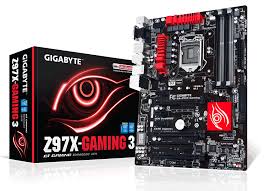
- Gigabyte Z97x Gaming 3 (integrated Intel graphics card, RealTek AC1150, Killer E2200 GB ethernet)
- EVGA GeForce 960 Superclocked 4GB
- 32GB Corsair Vengeance DDR3 1600MHz
- Samsung 850 EVO 500GB SSD
- Cooler Master G650M 650W PSU
- Cooler Master Hyper 212 direct heat pipe cooler
- Corsair Carbide series SPEC-1 Case
- 3x 120cm cooling fans
This cost me around $1611 Canadian ($1100 USD) plus taxes and can probably be bought for less if you were to really shopped around.
I have documented for the most part the step by step process and procedure steps that I took in order to get everything up and running here on this thread: http://www.tonymacx86.com/el-capita...i7-4790k-gtx760-sc-killer-ethernet-e2200.html
Just some brief caution: building a Hackintosh and getting it working is not at all easy to do and you will likely encounter problem after problem that you need a lot of patience for in order to resolve before getting to the next step. Sometimes instructions you read online on what you need to do are cryptic and not easy to understand. The steps I wrote will link to specific guides, or portions to other guides that I had to use in order to get my Hackintosh up and running properly but one thing to point out is that you can't follow my steps exactly if you go with different hardware components. As soon as you pick say a different motherboard or graphics card, the steps will change and you need to heavily research it or troubleshoot as you go along. Differences in hardware or combination of hardware will require different configurations, bios settings, and edits to the mac plists... and more. Some people get really lucky with their install but for others it can be extremely frustrating and difficult to get through so let this be a warning incase you decide you want to try this for yourself and thought it would be a breeze.
One tip I can suggest is that if you want to try building your own Hackintosh is to read the threads on Tonymacx86 marked [SUCCESS] to find other people who have successfully got it running on specific hardware components you might be considering to buy. There is also several GUIDES section where others with successful builds have outlined steps for very specific hardware components - so again look for these in advance of buying any parts. It will make your life much easier!
The processor, hard drive, and case isn't really going to make any difference when it comes to doing an install. It 95% has to do with the motherboard and graphics card and problems when the mac OSX is being installed and tripping up over drivers for specific hardware, so these are things to look out for. Differences between motherboards will be chipset, bios, bios version, EUFI compatibility, network controller, etc.. and it's this that will make the difference between an easy or hard build. If you read my build guide, you'll see that I didn't bother putting in the graphics card until after I got everything running ok. The reason is that the install can easily trip up over Nvidia cards so it's better to leave that for the end if you can.
What's next to conquer:
- get dual boot working (Windows 7 on separate SSD)
- verify the speed of my USB 3.0 ports
- install a wireless adapter
- install bluetooth
- research Thunderbolt
- get working: iMessage/FaceTime/iCloud
- get working: Sleep/Wake
- get working: CPU Speed Stepping/Power Management
4 years ago this April I bought a macbook pro because I wanted a new laptop for portability and personal use, but as a plus I knew I could also use it for transcoding footage to the ever-so popular ProRes format which is in demand from many of my clients. I've written guides online on using DaVinci & FCP X for everything from roundtrip workflows to simple transcoding of footage and Mac has become an important part of my post work on productions that I am hired to work on.
I never wanted to turn into a MAC guy but after 4 years running the macbook pro I started to see how absolutely far superior the mac OS is compared to Windows. Not to mention in general I feel the user interface and experience is better too. I have to give credit to Apple for this even if inside it kills me a little. Having been a PC guy for so long I know how much support and fixing I've had to do for all my family members and friends running PC's. In particular I mean Windows and the all so easy to get malware and viruses just from using IE browser exploiting the many vulnerabilities in the O/S. Last year on my PC I had malware unknown to me that gave my banking login information being taken which then lead to over $5000 being taken out of two bank accounts. This kind of thing is extremely rare on a Mac (not impossible but RARE) just on the simple foundation of security that Apple mac OS's are built on.
I know MAC vs PC can be subjective and let's face it personal... but after running it solid for 4 years I can say it's been far more reliable with less crashes, way less prone to "build up" of junk that slows it down, and as mentioned way less prone if not almost impossible to get virus/adware/malware which wastes resources if nothing else.
In back of my mind I had always wanted to eventually get mac workstations for my home studio and post production work but being torn with so much invested in PC software I wasn't entirely sure I wanted to completely cross over to the dark side. Back in 2005 (wow does time fly) Apple announced they would be switching to Intel based processors away from Motorola 68000 processors and what that did was open it up for enthusiasts who wanted to build Hackintosh computers - that is the Apple OSX running on a PC computers (brand name of PC clone). I found a website last year http://www.tonymacx86.com/ dedicated to listing compatible parts, installation guides, and a user support forum full of information and details about how to go about it.
Finally last week my main PC died. It was only the power supply which was an easy $60 to fix but I sort of wanted an excuse to build a completely new machine with some of the latest cutting edge power available from Intel and Nvidia. I decided this might be the time to try building the Hackintosh so before I bought any parts I used the website to make sure I was going to buy parts that were said to be compatible.
After a week of reading what really seems like very cryptic instructions to get this working, over the past weekend I was successful in getting OSX 10.11 (El Capitan) running on my PC clone machine. I still have a few things I need to do like verify the speed of my USB 3.0 ports and install a wireless adapter in the machine and probably bluetooth. Overall I'm happy to report that everything (sound, network, graphics, cuda drivers, and OS) are running really great and smooth.
So far I'm running DaVinci Resolve 12 and FCP X on it without any problems and the speed is absolutely blazing. Partly because of the new hardware obviously, but it's running as a "mac" and this is what has me most excited because the equivalent machine on spec is maybe $3800 USD from Apple but this machine was built for around $1100 USD. Below is my system and specs:
- Intel i7 4.0GHz 4790k Quad Core 8 thread processor
- Gigabyte Z97x Gaming 3 (integrated Intel graphics card, RealTek AC1150, Killer E2200 GB ethernet)
- EVGA GeForce 960 Superclocked 4GB
- 32GB Corsair Vengeance DDR3 1600MHz
- Samsung 850 EVO 500GB SSD
- Cooler Master G650M 650W PSU
- Cooler Master Hyper 212 direct heat pipe cooler
- Corsair Carbide series SPEC-1 Case
- 3x 120cm cooling fans
This cost me around $1611 Canadian ($1100 USD) plus taxes and can probably be bought for less if you were to really shopped around.
I have documented for the most part the step by step process and procedure steps that I took in order to get everything up and running here on this thread: http://www.tonymacx86.com/el-capita...i7-4790k-gtx760-sc-killer-ethernet-e2200.html
Just some brief caution: building a Hackintosh and getting it working is not at all easy to do and you will likely encounter problem after problem that you need a lot of patience for in order to resolve before getting to the next step. Sometimes instructions you read online on what you need to do are cryptic and not easy to understand. The steps I wrote will link to specific guides, or portions to other guides that I had to use in order to get my Hackintosh up and running properly but one thing to point out is that you can't follow my steps exactly if you go with different hardware components. As soon as you pick say a different motherboard or graphics card, the steps will change and you need to heavily research it or troubleshoot as you go along. Differences in hardware or combination of hardware will require different configurations, bios settings, and edits to the mac plists... and more. Some people get really lucky with their install but for others it can be extremely frustrating and difficult to get through so let this be a warning incase you decide you want to try this for yourself and thought it would be a breeze.
One tip I can suggest is that if you want to try building your own Hackintosh is to read the threads on Tonymacx86 marked [SUCCESS] to find other people who have successfully got it running on specific hardware components you might be considering to buy. There is also several GUIDES section where others with successful builds have outlined steps for very specific hardware components - so again look for these in advance of buying any parts. It will make your life much easier!
The processor, hard drive, and case isn't really going to make any difference when it comes to doing an install. It 95% has to do with the motherboard and graphics card and problems when the mac OSX is being installed and tripping up over drivers for specific hardware, so these are things to look out for. Differences between motherboards will be chipset, bios, bios version, EUFI compatibility, network controller, etc.. and it's this that will make the difference between an easy or hard build. If you read my build guide, you'll see that I didn't bother putting in the graphics card until after I got everything running ok. The reason is that the install can easily trip up over Nvidia cards so it's better to leave that for the end if you can.
What's next to conquer:
- get dual boot working (Windows 7 on separate SSD)
- verify the speed of my USB 3.0 ports
- install a wireless adapter
- install bluetooth
- research Thunderbolt
- get working: iMessage/FaceTime/iCloud
- get working: Sleep/Wake
- get working: CPU Speed Stepping/Power Management
Last edited:


 I think I will give it a go tonight though. Enjoy!