
So I went to dump my latest shoot and get to transcoding.... and I got this message when I plugged in my CalDigit AV Drive:
"The disk you inserted was not readable by this computer."
I did some googling and found most people's problems was when updating software or using a drive on multiple computers.
However.... that's not my case. I've been using this drive for about two weeks on my iMac 27" (3.06 Intel Core 2 Duo. $ GB Ram) I'm running 10.6.4
I have not updated any software in the past few months. This drive was just working on a few days ago before I left for the long Thanksgiving break. I ejected the drive and shut the computer down. Yesterday, I was in and unplugged the firewire cable to plug my iMac into a different room. I shut the iMac down, re-plugged it into my main space, and re-plugged the CalDigit drive into my iMac.
Again, no recent software/hardware updates. I properly ejected the drive. My other external HD (Seagate Free Agent USB) is working fine. Everything else on my computer is working fine.
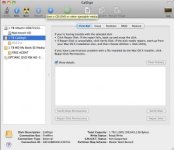
Here's a screen shot in Disk Utility:
:huh:
I went into Disk Utility and clicked "info" on the CalDigit. Here's the info:
Name : CalDigit
Type : Disk
Partition Map Scheme : Master Boot Record
Disk Identifier : disk1
Media Name : CalDigit AV Drive Media
Media Type : Generic
Connection Bus : FireWire
Connection ID : 38316884491239741
Device Tree : IODeviceTree:/PCI0@0/RP05@16/FWBR@0/FRWR@0/node@882100e100013d/sbp-2@c000
Writable : Yes
Ejectable : Yes
Location : External
Total Capacity : 1 TB (1,000,199,643,136 Bytes)
S.M.A.R.T. Status : Not Supported
Disk Number : 1
Partition Number : 0
In Disk Utility, I can click the "1 TB CalDigit" However, I can't click "Verify Disk" or "Repair Disk"
Also, there is a section below "1 TB CalDigit" that says "disk1s1" However, I can't click that as it is grayed out.
Any idea what the heck is going on?
"The disk you inserted was not readable by this computer."
I did some googling and found most people's problems was when updating software or using a drive on multiple computers.
However.... that's not my case. I've been using this drive for about two weeks on my iMac 27" (3.06 Intel Core 2 Duo. $ GB Ram) I'm running 10.6.4
I have not updated any software in the past few months. This drive was just working on a few days ago before I left for the long Thanksgiving break. I ejected the drive and shut the computer down. Yesterday, I was in and unplugged the firewire cable to plug my iMac into a different room. I shut the iMac down, re-plugged it into my main space, and re-plugged the CalDigit drive into my iMac.
Again, no recent software/hardware updates. I properly ejected the drive. My other external HD (Seagate Free Agent USB) is working fine. Everything else on my computer is working fine.
Here's a screen shot in Disk Utility:
:huh:
I went into Disk Utility and clicked "info" on the CalDigit. Here's the info:
Name : CalDigit
Type : Disk
Partition Map Scheme : Master Boot Record
Disk Identifier : disk1
Media Name : CalDigit AV Drive Media
Media Type : Generic
Connection Bus : FireWire
Connection ID : 38316884491239741
Device Tree : IODeviceTree:/PCI0@0/RP05@16/FWBR@0/FRWR@0/node@882100e100013d/sbp-2@c000
Writable : Yes
Ejectable : Yes
Location : External
Total Capacity : 1 TB (1,000,199,643,136 Bytes)
S.M.A.R.T. Status : Not Supported
Disk Number : 1
Partition Number : 0
In Disk Utility, I can click the "1 TB CalDigit" However, I can't click "Verify Disk" or "Repair Disk"
Also, there is a section below "1 TB CalDigit" that says "disk1s1" However, I can't click that as it is grayed out.
Any idea what the heck is going on?