Testing a used light meter for accuracy?

David G. Smith

Steak Knife Member
I just picked up a Pentax Spotmeter V used. I was wondering if anyone had any tips on how to test it for accuracy. I was planning on shooting a grey card across a range of of light intensities; setting the exposure on my FS-100 to the light meter readings from Pentax Spotmeter. I am also going to compare those readings with what I get with a Sekonic L-398 incident meter. From there I thought I would take the footage into my NLE (FCP-7) and look at it on the video scopes. What I am a little confused at is where the shots of the grey card should fall on a wave form monitor to indicate "Proper" exposure? Any other tips or techniques I should try? Thanks.
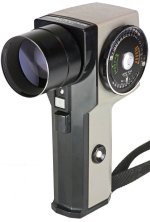
Pentax spotmeter 2.jpg
 
I just picked up a Pentax Spotmeter V used. I was wondering if anyone had any tips on how to test it for accuracy. I was planning on shooting a grey card across a range of of light intensities; setting the exposure on my FS-100 to the light meter readings from Pentax Spotmeter. I am also going to compare those readings with what I get with a Sekonic L-398 incident meter. From there I thought I would take the footage into my NLE (FCP-7) and look at it on the video scopes. What I am a little confused at is where the shots of the grey card should fall on a wave form monitor to indicate "Proper" exposure? Any other tips or techniques I should try? Thanks.

View attachment 80576

I realize this may not 'assist' much... but I've found all manner of numbers for what an 18% grey card 'should be' on a waveform monitor, ranging between 40-50%.

Since most meters are not 'lab' instruments, they may be 1/3-1/2 off from one another. I tend to use my L-308DC for 'incident' and readout in Footcandles, rather than for exposure calculations.

Anyway, I've used 55% IRE for my target value, given the meter reading. I've also noted that it's about 10% IRE increments per f-stop change.

The reason for slightly higher IRE for 'middle grey' is due to the fact this seems to put 'fair complexion' slightly higher, and 'reads' to my aesthetics better.

The problem of course is then I have less 'headroom' for over exposure. Alternatively one can calibrate to 45-50% and then 'tweak' the curves with a little boost in the middle, provided, that does not cause banding.

It is my plan this year... resolutions and all... to perhaps go through this sort of thing in a more formal/tutorial type way to describe the process.

If you ever did the Zone System, either the 'quickie' or full blown out densitometer reading of negative densities and print densities, what I do is essentially that to find the effective ISO value for the meter.

If the meter is 'way off' by stops, then perhaps something's wrong with the meter, given that I had several Pentax meters in the 70's... till the Wife lost the final one, and the replacement was so flaky we moved to the Minolta Spot... there may not be much in the way of readily available service...
 
If you happen to have a copy of Adobe OnLocation it will do live waveform/scopes which would be pretty advantageous for you to light your grey card until you see 50% IRE on them. Then, you can take your Penatax Spotmeter and test away..

:)
 
Borrow someone else's working light meter, and compare its output with your one, under various lighting conditions?
 
I don't tend to find light meters very useful for setting exposure on video as there are too many variables and the T-stop on most video lenses is constantly variable, the exposure devices in most cameras are also more accurate.

I do find them useful when setting up lights though and for seeing how different light sources balance out on a shoot.
 
First test I would do is use the IRE Scale on the Meter to test if it reads Black and White Correctly

The 1 - 10 IRE Scale is the handiest function of that Meter and later models of same.

Use a Totally Black Card (Velvet) and a White Card in same frame.

Expose them (by lighting them each separately) and compare to your wfm (in camera or in NLE)

If you have a gray scale card ...test that too if it has all the levels thru Black to White. eg Expose for the White and let the levels find there place below.

BTW - That Triangle on the IRE Scale is "Gray"

Thing with a Spotmeter and using the IRE SCale is you can simply test it by using a Gray Scale Card and seing if everythiong falls in place. White / Black.

No need to expose an image if you dont want to.
 
I don't tend to find light meters very useful for setting exposure on video as there are too many variables and the T-stop on most video lenses is constantly variable, the exposure devices in most cameras are also more accurate.

I do find them useful when setting up lights though and for seeing how different light sources balance out on a shoot.

Yeah, that is what I find. The final exposure needs to be done with the in camera exposure guides but a meter is real handy when setting lights.

First test I would do is use the IRE Scale on the Meter to test if it reads Black and White Correctly

The 1 - 10 IRE Scale is the handiest function of that Meter and later models of same.

Use a Totally Black Card (Velvet) and a White Card in same frame.

Expose them (by lighting them each separately) and compare to your wfm (in camera or in NLE)

If you have a gray scale card ...test that too if it has all the levels thru Black to White. eg Expose for the White and let the levels find there place below.

BTW - That Triangle on the IRE Scale is "Gray"

Thing with a Spotmeter and using the IRE SCale is you can simply test it by using a Gray Scale Card and seing if everythiong falls in place. White / Black.

No need to expose an image if you dont want to.

Thanks, I do like the IRE scale on the meter.
 
Sorry if I am telling you something you know already. ( but maybe of interest to others anyway)

Here is how I generally use the IRE Scale and my Spotmeter.

I will take an incident reading (with an incident meter) from the subject "lighting" and determine the f-stop as I wish it to be from that reading.

I set that (f-stop) against the Triangle on the Spot meter IRE Scale.

I then use the Spotmeter to "ping" around the set (from the camera position) to see where whites and blacks and in betweens are sitting.

From this I can tell exactly what windows, practicals, highlights, shadows, walls and BGs are doing.

From there... I use lighting to control the levels as I wish using the spotmeter IRE for the information.

Basically its a hand held waveform monitor. Both use the same scale (IRE) and relate exactly to each other.
 
Back
Top