danielisaiah
Active member
All,
I'm wondering if anyone else is experiencing "tearing" issues with 4K files on the latest Adobe Premiere CC 2014 update. I'm using GPU acceleration on my system and it should be able to easily handle 4k footage. All files are .MP4 format UHD 3840x2160 100mbs. All files were captured on a Sandisk Extreme Pro 16gb (95mbs class 10 SDHC I). I have confirmed that files themselves are NOT corrupt as playback on the GH4 shows clean files:
My system:
Windows 7 ultimate (64bit)
Gigabyte Ga z97x gaming 7 mobo
coolermaster CPU cooler
Intel core i7 4771 @3.5ghz
GeForce GTX 780ti (344.75)
16GB corsair DDR3 ram
Samsung 1tb SSD system drive
corsair 7x750m PSU
A few notes:
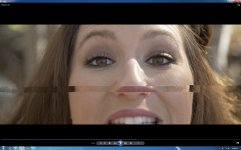
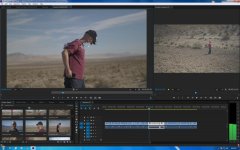
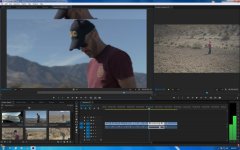
Here is what I am seeing:
I'm wondering if anyone else is experiencing "tearing" issues with 4K files on the latest Adobe Premiere CC 2014 update. I'm using GPU acceleration on my system and it should be able to easily handle 4k footage. All files are .MP4 format UHD 3840x2160 100mbs. All files were captured on a Sandisk Extreme Pro 16gb (95mbs class 10 SDHC I). I have confirmed that files themselves are NOT corrupt as playback on the GH4 shows clean files:
My system:
Windows 7 ultimate (64bit)
Gigabyte Ga z97x gaming 7 mobo
coolermaster CPU cooler
Intel core i7 4771 @3.5ghz
GeForce GTX 780ti (344.75)
16GB corsair DDR3 ram
Samsung 1tb SSD system drive
corsair 7x750m PSU
A few notes:
- I AM using an all SSD workflow (system OS and applications all on Samsung 1TB SSD)
- Editing SSD is 500GB Western Digital (I have tried files on both SSDs....same issues)
- I mention the SSD's because there are some folks that swear AGAINST them in editing etc....
- I'm seeing this happen in the SOURCE window....MOST of the time it translates into the sequence after render. Whats weird is that sometimes the rendered sequence file will have "tearing" in completely different areas than the source file!
Here is what I am seeing: