tape out issues on MixPre

Wait John, you are loosing me. Without some kind of pad the Tape Out is too high for my mic level camera.

The Mix Pre has two mic. level outputs: One on the main XLRs (these are switchable between mic. and line), the other on a dedicated stereo mic. output on a 3-pin mini XLR which you can use if you are using the main XLRs for something else. Itt's the small connector at the top between the two input XLRs in the picture below marked "ST UNBAL MIC OUT":-
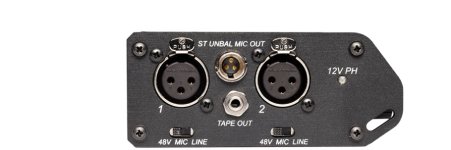
mixpred_left_panel.jpg

The main XLR outs (switchable between mic. and line are on the other side:
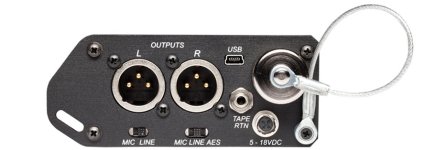
mixpred_right_panel.jpg

I hope this makes things clear. :thumbsup:
 
The pictures that John Willett posted above are for the new MixPre-D mixer.

Patryk Rebisz has the older MixPre mixer that does not have the unbalanced Mic-out or AES XLR out or LINE / MIC switch for the standard XLR outs.
 
You can make a pad, it's just some resistance added to the cable. I'm not sure If you can find a off the shelf padded 1/8" cable.

OR you can use the padded XLR's to go to the DSLR and the 1/8" to go to the recorder (it is the tape out after all). That -10 will work nicely with the unbalanced in's on your recorder. It's not the greatest connector but you can get right angle ones and you are talking a short in-bag run, and it's a line level, so you really don't have an issue with having unbalanced lines.
 
For those who care to know the outcome.

I ran a test today 1/8" to XLR > XLR -10db pad > XLR to 1/8". When feeding signal the levels on camera needed to be just a click or two over off (meaning 7D's crappy preams were turned down). The recording is clear. Though i noticed that h264 compression takes away just a bit of richness in the audio.
 
Back
Top