
So I have my footage and audio from separate sources synced in the timeline. I'm NOT ASKING HOW TO DO THAT, i'm talking about the next step.
Usually I have a sequence where I match up all the clips from a roll. I might call it SYNC ROLL A. Which looks like this...
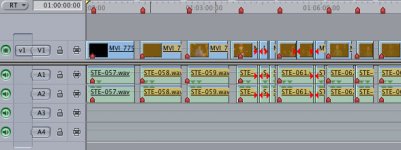
I CAN edit my features/shorts now by searching through this sequence and cutting out the pieces that I need (which i've done in the past)
But then i'm completely ignoring the A/B video windows.
I want to take each of those synced pieces and make it its own clip, (it MUST maintain the correct timecode so i'm afraid to re-export into synced clips).
Can I somehow make a subclip? that will link these two together and allow me to organize these synced visual/audio clips and use my two video windows?
thank you very much in advance!
Usually I have a sequence where I match up all the clips from a roll. I might call it SYNC ROLL A. Which looks like this...
I CAN edit my features/shorts now by searching through this sequence and cutting out the pieces that I need (which i've done in the past)
But then i'm completely ignoring the A/B video windows.
I want to take each of those synced pieces and make it its own clip, (it MUST maintain the correct timecode so i'm afraid to re-export into synced clips).
Can I somehow make a subclip? that will link these two together and allow me to organize these synced visual/audio clips and use my two video windows?
thank you very much in advance!


 rogar-BigGrin(DBG)