Hi folks,
I'm very much an amateur at all things videography, but I got involved here awhile back when I recorded some family histories on a Pana DVX-100 (interviews with the older generations)... In the end, with the help and advice of a great DVXUser community, the execution (and technical quality) definitely surpassed my expectations.
Now, I'm trying to go back and convert same ancient (mid-90s) VHS home videos:
Honestly, they appear to be pretty bad original quality (on some long-forgotten generic Magnavox recorder). I'm playing them on my (reasonably good) home Sony VHS player (SLV-575UC), digitizing them with a Happauge USB-Live2 (via Composite inputs; though it also accepts S-Video, the Sony player does not output it), and encoding them with H264+MP3 in MP4 container (via vlc software on Linux). The encoders are doing a wonderful job, and I have no complaints about the digitizer either. Further, I know I can hardly expect much, given the low-res VHS format, and the original low-end recorder.
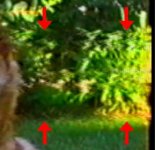
Regardless, what's bothering me the most is a series of "ripply" artifacts or "horizontal tearing" in the output as played on the Sony SLV-575UC (and faithfully captured in my final mp4). (Incidentally, please excuse my lack of knowledge, as I don't know the right name for this effect, though I'm sure there's some technical term for it.) To make sure that my description is understand, though, I'm attaching a snapshot of the transfer (close-up of corner of screen with most pronounced effect), with arrows showing a couple of the many such distortive lines.
Here's my question --- barring expensive and time-consuming post-processing of the transfer, is there anything technical I can do during the transfer in order to improve its quality?
For example, I'm wondering if I could upgrade my current VHS player (the Sony SLV-575UC) and find a higher end machine from which I can extract better quality with fewer artifacts.
I've noticed that some really high-end prosumer / professional VHS players are now available on eBay for very little. Eg:
Sony SLV-R1000 S-VHS VCR (~$100)
Sony SVP-5600 (~$150)
All things equal, seems like a relatively minor investment for better transfer quality (if it results); I can even pass on the equipment to someone else after I'm done with transfer.
What's the collective wisdom on the ability of above machines to counter the artifacts that I describe / show here? Any alternative ideas / suggestions?
All input gratefully received, and much appreciated! Best wishes...
I'm very much an amateur at all things videography, but I got involved here awhile back when I recorded some family histories on a Pana DVX-100 (interviews with the older generations)... In the end, with the help and advice of a great DVXUser community, the execution (and technical quality) definitely surpassed my expectations.
Now, I'm trying to go back and convert same ancient (mid-90s) VHS home videos:
Honestly, they appear to be pretty bad original quality (on some long-forgotten generic Magnavox recorder). I'm playing them on my (reasonably good) home Sony VHS player (SLV-575UC), digitizing them with a Happauge USB-Live2 (via Composite inputs; though it also accepts S-Video, the Sony player does not output it), and encoding them with H264+MP3 in MP4 container (via vlc software on Linux). The encoders are doing a wonderful job, and I have no complaints about the digitizer either. Further, I know I can hardly expect much, given the low-res VHS format, and the original low-end recorder.
Regardless, what's bothering me the most is a series of "ripply" artifacts or "horizontal tearing" in the output as played on the Sony SLV-575UC (and faithfully captured in my final mp4). (Incidentally, please excuse my lack of knowledge, as I don't know the right name for this effect, though I'm sure there's some technical term for it.) To make sure that my description is understand, though, I'm attaching a snapshot of the transfer (close-up of corner of screen with most pronounced effect), with arrows showing a couple of the many such distortive lines.
Here's my question --- barring expensive and time-consuming post-processing of the transfer, is there anything technical I can do during the transfer in order to improve its quality?
For example, I'm wondering if I could upgrade my current VHS player (the Sony SLV-575UC) and find a higher end machine from which I can extract better quality with fewer artifacts.
I've noticed that some really high-end prosumer / professional VHS players are now available on eBay for very little. Eg:
Sony SLV-R1000 S-VHS VCR (~$100)
Sony SVP-5600 (~$150)
All things equal, seems like a relatively minor investment for better transfer quality (if it results); I can even pass on the equipment to someone else after I'm done with transfer.
What's the collective wisdom on the ability of above machines to counter the artifacts that I describe / show here? Any alternative ideas / suggestions?
All input gratefully received, and much appreciated! Best wishes...