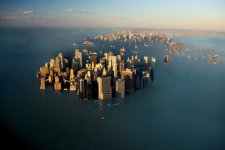
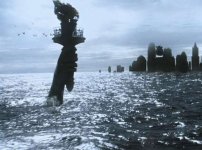
Submerged city.... any possible way to do this for cheap?

sb2012

Member
As a New Yorker and someone who is not a production company, someone who is paying out of pocket... is there any way to make a realistic submerged (half underwater; tops of buildings sticking out) city happen on a tight budget?

It's a scene I'm thinking about a future sci-fi feature I have in mind. There will of course be shots that are far away or from a certain distance and then there will be shots with characters on the water surface in the city, on a boat or craft next to the buildings.

I would imagine that the far away shots or shots that don't involve actors could be green screen combined with miniatures combined with some type of water tank? But then my question would be... How do you make a water tank like that look like an ocean? Post production effects I assume? Then, where does the miniature buildings come from? I tried looking everywhere online, would I have to build those myself?

I think the real challenge is having actors mixed with that environment on screen. There are two production studios on the East coast (not in NYC though) that have a water tank complete with wave machines but costs start at like $5000-$7000 minimum so.... yeah... that's not gonna happen.

Any tips or insight?
 
scale miniatures, snorkel lenses and slow motion? Cloud the water slightly and give the bottom of the tank a realistic color and texture. I'd allow for lots of reflection on the water surface to help hide showing the water for reasons you mention. The scale buildings will be the most difficult. They have model buildings, but how many effiel towers and Empire State buildings can be submerged in one shot? :)

That is to do it proper, or you can CGI it.


To be honest, the cheapest way to do it, would be to get a really good digital matte painting, animate some moving waves, and then put it into the distance of your shots... make some thick atmospheric haze to help hide the matte painting and let the imagination of the viewer do most the work.
 
One option I looked at:

http://www.redgiantsoftware.com/products/all/psunami/

But then I ended up making the water in After Effects with a 3D plane and fractal noise. Just depends on a lot of variables. For instance, night shots with water I think are SO MUCH easier. I would do locked down shots of the real city and then create water around them in after effects myself. Greenscreening your actors will probably be the simplest approach as well.
 
Ryan and Rick,

Thanks :) Those are some great tips. But what about for shots involving actors on a boat or raft sailing in between the buildings? Put actors on raft against a green screen background? Or perhaps pay/ask a local YMCA for permission to use their pool and put up a green screen on one side?
 
scale miniatures, snorkel lenses and slow motion? Cloud the water slightly and give the bottom of the tank a realistic color and texture. [...]
To be honest, the cheapest way to do it, would be to get a really good digital matte painting, animate some moving waves, and then put it into the distance of your shots... make some thick atmospheric haze to help hide the matte painting and let the imagination of the viewer do most the work.

I agree with everything Ryan said, but for a more "realistic" result, I would go with miniatures. Depending on how you really want it to look, you'll find your answer. Check the special edition of The Abyss, there's plenty of featurettes on the 2nd disc that could help. It's perfectly doable.
On a similar note, remember in New york 1997: the 3D green view of the city? It's been done with black buildings (miniatures) on a black background with some green paint "outlines" to create the 3D effect, CGI being too expensive at the time.
That's how I'd do it though.
 
Miniatures would be fine for the buildings, but probably not for the water - water has a fixed 'scale', and the human eye can easily spot whether waves/ripples are the right scale - you might be able to get away with half scale water for example, but probably not tenth scale or smaller. Possibly you can composite miniature buildings against real water?
 
Miniatures would be fine for the buildings, but probably not for the water - water has a fixed 'scale', and the human eye can easily spot whether waves/ripples are the right scale - you might be able to get away with half scale water for example, but probably not tenth scale or smaller. Possibly you can composite miniature buildings against real water?

I would second this. Take a look at old Hollywood movies with life boats etc. Even a number of the war movies, it's a very obvious miniature shot. You can do good CG water with the plugin mentioned above, I would stay away from the real stuff as much as possible. On the flip side you could film your actors on a boat on a lake, river etc. You don't really need a green screen if all that is behind them is water. You should be able to composite that with buildings and then add a touch of added building splash.

I would do a very detailed breakdown. If you can limit the heavy duty FX shots to short bits you can spend the time to make them very good.

For instance after you establish the actors on the boat in the submerged city you are probably going to be doing back and forth shots of them in the boat. Those shots in most cases probably don't need to show buildings with water touching them.
 
There may be cities like this in Thailand or elsewhere. Hire local filmmaker to shoot some background plates for you.
 
For Daylight a foreground plate was filmed of the cars that had crashed in the tunnel. Then, back at Kerner, we built a black tunnel in forced perspective with black miniature vehicles placed inside to precisely match the foreground live-action plate. The forced-perspective tunnel was raked, with the "far" end of the tunnel about a foot off the floor and the wide "near" end of the tunnel about 16' in the air. The ceiling of the tunnel was oriented to the top, so the explosion would rake across the ceiling realistically. Propane explosions were repeatedly fed in from the bottom of the tunnel, with the fire naturally rising up and enveloping the miniatures until it passed the camera, which was situated on a platform at the top.

The idea could work for you. Shoot a foreground plate of the city, taking into account the conditions (e.g., weather, day/night) of your final comp. to whatever extent possible. You would then build your miniature negative model with tracking marks off the buildings to create a mask with which to surround live action bits of water. You could go film the ocean to get these pieces, as long as your elevation matched the foreground shot. How the water interacts with the buildings where the two plates meet is another thing and, unless you're already well-versed in using fluidity tools to help blend them, you may want to compose or stack simple foreground elements to hide those areas.
 
It´s not that hard:

newyork-under-water.jpg submerged-New-York-AI-2001.jpg

Any decent AE artist can compose something like that in less than a day.

The shot with the boat is a bit more complicated.
I would shoot them on a lake with a greenscreen attached to the boat.
Camera as low as possible for a shot with the whole boat on it.
Than shoot some backplates (stitch some photos to a panorama, that you can pan behind them) of the city and compose it together.
For closeups, you can blur the backplate, and probably don´t even need a lake.
It´s crucial though, that you match light, time of the day and weather.

Frank
 
Back
Top