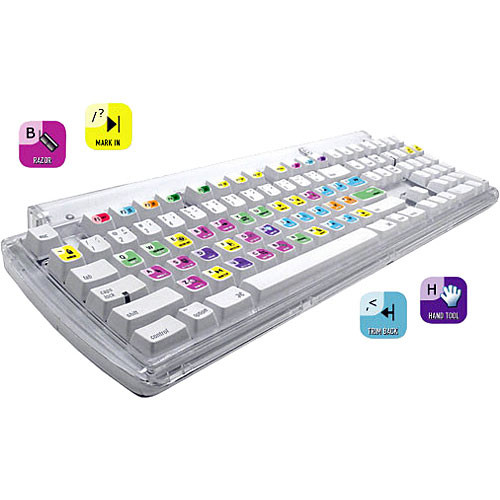
Specialized keyboard for Final Cut?

Buck Forester

Well-known member
I'm about to order my new Mac Pro and Final Cut Studio. I noticed there are colored keyboards out there specifically designed for Final Cut Pro. Are these gimmicks or "must haves"? If they are recommended, any particular brand the "standard"? Thanks!
 
If you are not good with the keyboard shortcuts, then get one. Keyboard shortcuts increase productivity.

You can get stick on labels for cheap, or buy actual keyboards, but those are pricey and can sometimes be flaky. Sorry I have no links for you, just google it.
 
They're useful and kewel.

Here's what I have:
489958.jpg


STICKERS $19.95
They are a PVC material laminate (i.e. not paper) so they are tuff and will not come off. Do not put them on and then change your mind. I got two sets, one for my laptop and one for my desktop.

you can also buy keys and replace keys
http://www.logickeyboard.com/shop/default.asp?SetLng=2&BypassShopClosed=1
more expensive ($70

and whole keyboards
most expensive ($199 I think)

Google around for the latter two options ... no time ... no time :D
 
Thanks! Real quick follow-up... if moolah wasn't the main issue, do you prefer the stickers, or would you get the entire keyboard? I'm already spending about $20 grand on my new Mac Pro based editing system and I don't want to go "cheap" in the keyboard. But if, as one of you said, they're "flaky", I'm thinking the stickers on a good keyboard might be better? Spending $200 would be okay for me since the keyboard is my main interface with my editing system, but it's gotta have the quality to match the price. Gracias!
 
Hahah, I would probably look into the real keyboard if you are putting together a suite like that and can still pay your rent and see a movie this month.

They're fun, useful, and a nice accessory that does add some to the impressing clients factor IMHO.

In my case, my stickers bring up my $1800 setup ... small chance they could bring down your $20K setup. though they do look pretty good.
 
Thanks so much! As for impressing clients, I'm gonna hafta try and do that with my own production footage because this is a home studio and won't have clients coming in. Well, if Lucas or Spielberg want to stop by and say hi, that'll be okay I guess. But I don't think I'll impress them much with a colorful keyboard. Ha! "Dude, that's a sweet keyboard, how would you like to work on my next project?". :Þ
 
No not them. heheh

If I were you I'd go for the stickers then. There's tons of third part plugins you could better put the rest of the money towards and you will likely have forgotton some $60 mac adapter or something that you will need to get an external monitor up and running (as a random example)

But that's me. I'm on a very tight budget.
 
Keyboard - LogicKeyboard

Mouse - Logitech MX518
Good mouse, has a total of 5 extra buttons other than right and left click and the wheel button. I assign apple's expose shortcuts to the mouse buttons so I can jump between apps really quick.

Edit Controller - Contour Design-Shuttle Pro
The shuttle pro is "money", you can put all of you most used shortcuts literally at your finger tips and you have a jog and shuttle wheel.

I also use Steermouse software with my mouse as well. Works well.
 
Noah, what do the KBcovers feel like when typing? I've been looking at them but haven't seen one upclose. Does that extra layer restrict typing? Thanks.
 
I know all the keyboard shortcuts but I got the logic keyboard anyway, as sometimes other people use my system, and my old keyboard was quite dirty. Also looks more professional if you have clients round and the colours help divide the controls up... i like it....
 
Back
Top