Soundboard for PC

David Evans

Well-known member
Hi guys,

I want to buy a very simple soundboard that allows me to record post-audio directly to the computer. I don't need anything with good preamps, because I already have a Sound Devices MM1 that I use as preamp. So, basically, just an affordable solution to be able to record directly to the computer.

The idea would be:

Mic -> MM1 -> Soundboard / PC

Thanks for helping!
 
SoundBoard with XLR & 1/4 inputs?
There's a lot of good audio interfaces for quite cheap on ebay.
FireWire, USB, PCI card... what would you prefer and what's the budget?
 
The only thing I need is something with XLR inputs that connects to the computer. It's not supposed to add good preamplification. I thought of the Scarlett 2i2 but I wonder if there's something even more simple that just takes the sound quality of the MM1 and records it to the PC. I was expecting to pull out 100USD tops, but this is just because I wouldn't think an interface that is supposed to just transform the sound into a .wav file would cost more. I value sound quality above all, so if a cheap soundboard would ruin the MM1 and mic sound quality, then I would have to spend more...
 
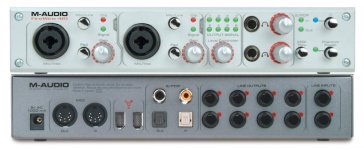
AVID, M-Audio and older audio interfaces would do the trick, as you feed clean preamp'd signal into them.
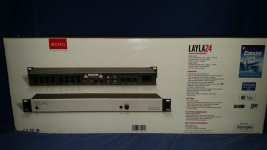
Otherwise, I'd say, the good old ECHO (Gina, Layla24, etc) would be a good choice. They're discontinued, but they're good products and they're selling quite low priced.
 
This is the model I picked up for like 125$, allows 8 I/O. I'll be using it mostly for surround monitoring when mixing sound. But still, a good choice.
$_57.jpg
 
A bit of advice. Since you said PC and "sound card", I'm assuming you are talking a Windows box, though this applies to Mac also. Drivers. It's all about drivers. Well not all but used gear that needs to connect with a computer gets problematic quick these days because you can't get drivers that work.

So what you need to do is work from A) what computer OS you will be using, B) what software you will be recording with.

Those two things will vastly narrow your options. Next IF this is a computer you plan on updating the OS on then eliminate any products that are not still being updated.

I'm kind of confused about how you would be using this since for post sound you generally don't do a lot of recording direct to the computer, but you do do a lot of playing back from the computer. By your description I would probably recommend something like a DR-40 or other small recorder that can work as an interface. But from doing sound post I would not consider anything that didn't have at least two ins and two outs of decent quality.

I also highly recommend against a "sound card" that you install inside a computer. That is the nosiest place in the universe and the only "sound cards" that really work well have been ones with external converters so analog signals are kept away from the inside of the computer.
 
I just decided to give another try to the M-Audio 410 and it's not bad at all! Works with FireWire, so I can't wait to get the ECHO to arrive and try that one (works with a PCI card).
Still, you can get an M-Audio 410 for like 50$ on ebay.
maxresdefault.jpg
 
All true. But Firewire was never very common on PC's and newer Macs don't have them anymore, though iMacs might still? And Macs after the G5 don't have PCI slots. So a lot of what works for one is not going to work for another. I have a bunch of MOTU gear that is useless because they didn't update drivers.

M-Audio stuff has been OK or better and I almost bought a Layla.

BTW
System Requirements
Mac System Requirements


-- Mac OS X (10.2 or later)


-- G4 or better processor (Power Mac G5 compatible)


-- 256 MB RAM (512 MB recommended)


PC System requirements:


-- Windows ME/2000/XP/Vista


-- Genuine Intel Pentium or AMD Athlon CPU


-- Motherboard with Intel, AMD, Via, or NVIDIA chipset


-- 256 MB RAM (512 MB recommended)

You are going to need a pretty old computer to hook this up.
 
ooops, those were specs for a later model. You can still download a drivers for your model from their site (ME, 2000, XP) and Mac OS10.2. I'm not sure how backward friendly the Windows side is but on the Mac side this is pre Intel and pretty much nothing crossed over so a G5 would be the last Mac that this would likely work with.
 
You are going to need a pretty old computer to hook this up.
The M-410 works just fine on Windows 7 x64 and I've been able to download the drivers for the ECHO Layla24 on their website, still for Windows 7 x64. Shouldn't be a problem.
 
Well let us know. I didn't see any drivers that recent, but I'll cross my fingers for you.

I tend to avoid old hardware that needs drivers, for obvious reasons, but I have a lot of old hardware that I love.
 
Noiz

Running anything firewire on any new mac with thunderbolt is as easy as a cheap (somewhat cheap) adapter. No bugs, and good reliability. And you are oh so correct about anything that needs a driver. I have lots of gear which has hit the brick pile for the sake of a new driver. I've been an Apple guy since the beginning and have always held their products in high regard. But dang, their pace of change is just relentless and many companies which have to revise drivers everytime Apple burps just end up exhausted at the effort. I have 4 different bootable drives to cover some legacy gear and software and it is just stupid.

Thread Hijack Finished
Grant

All true. But Firewire was never very common on PC's and newer Macs don't have them anymore, though iMacs might still? And Macs after the G5 don't have PCI slots. So a lot of what works for one is not going to work for another. I have a bunch of MOTU gear that is useless because they didn't update drivers.

M-Audio stuff has been OK or better and I almost bought a Layla.

BTW


You are going to need a pretty old computer to hook this up.
 
What adapter did you find? The cheapest I found was a "lightning to FW, and a bunch more" for about $200.

I have two machines. One is a fairly current iMac that is used for video and email etc. and a G5 for audio work only. I actually have two, one is a backup. The reason I have a G5 is that the ProTools HD system uses PCI cards which the intel did a way with. I could go to a windows system and still use it all or stay Mac and spend about $15,000 to upgrade hardware. Other than video uses there is very little bump for sound in upgrading. The cards do almost all of the processing so ... The other option, which a number of designers have gone with, is a "hackintosh" since apparently the cards will work fine in that set up, but again there is very little upside other than a newer OS which is kind of a non issue.
 
A bit of advice. Since you said PC and "sound card", I'm assuming you are talking a Windows box, though this applies to Mac also. Drivers. It's all about drivers. Well not all but used gear that needs to connect with a computer gets problematic quick these days because you can't get drivers that work.

So what you need to do is work from A) what computer OS you will be using, B) what software you will be recording with.

Those two things will vastly narrow your options. Next IF this is a computer you plan on updating the OS on then eliminate any products that are not still being updated.

I'm kind of confused about how you would be using this since for post sound you generally don't do a lot of recording direct to the computer, but you do do a lot of playing back from the computer. By your description I would probably recommend something like a DR-40 or other small recorder that can work as an interface. But from doing sound post I would not consider anything that didn't have at least two ins and two outs of decent quality.

I also highly recommend against a "sound card" that you install inside a computer. That is the nosiest place in the universe and the only "sound cards" that really work well have been ones with external converters so analog signals are kept away from the inside of the computer.

Hi Noiz2

The reason I need this interface is to be able record sounds that are not recorded with the image, during production. Let's say I'm recording a voice over of the narrator. It'd be much easier to record it directly to the PC where I'll be doing the post production, then recording it to an external recorder and the copy the wavs to the pc. That's why I mentioned a sound card. I'm using windows 10.
 
Let's say I'm recording a voice over of the narrator. It'd be much easier to record it directly to the PC where I'll be doing the post production, then recording it to an external recorder and the copy the wavs to the pc. That's why I mentioned a sound card. I'm using windows 10.

I'm not sure FireWire still holds well with Windows 10, otherwise, the M-Audio 410 has nice preamp and can be bought for like 50$ on ebay.
Mine works quite well on Windows 7 x64. Preamps aren't bad at all on it, and can use Phantom Power mics.

Meanwhile, I received my ECHO Layla24/96. Woah, that's a very nice card with the external interface. No XLR input though, but I'll be using it to monitor Surround Sound when mixing.
 
Back
Top