Sound design tips

Polaroid22

Well-known member
Hello,

Last year I shot this video, and I am finally edited this video. I did the SFX and soundtrack finally. And could really use some input. I am going to place an voice over over this(need to find a voice over guy first :) )

Here is the link.
https://youtu.be/3P4XX_JSOD4

Appreciate any input that you may have on it! Grading is only quickly done at this point, final grading will happen after the edit and sounds with voice over are finished.

Thanks!
 
So a few general things. First the end credits are not for this film. You should not be doing that, the filmmaker might get really pissed off.

Second general note is too much music, not enough sound. You have so much over amped music going that it starts to sound like a score for a trailer, but trailers have a sound track to match. It is REALLY common for low budget films to slather music on as a way to avoid dealing with sound but it mostly doesn't work. Music is good for emotion but doesn't add to the narrative. So what you end up with is sort of a music video, to a score.

The general test is your film should feel complete if played with no music at all. Then you can add music to pump emotions. This is especially true with a film with no or little dialog.

so specifics...


________________________________________
movie: FuelTest.mp4
size: 1920 X 1080
length: 00:01:19:09
overall notes:
________________________________________


movietime: 00:00:11:13 - Knuckle crack A bit OTT, too "close" doesn't sound like it's in the space.

movietime: 00:00:13:14 - Punches way too low/soft, especially after the knuckle crack. They need to have a lot more smack.

movietime: 00:00:16:05 - Jump rope whirl sounds good but I want to hear the feet and the rope touches more. You need them for balance but also to drive the scene,the whiris kind of a drone so the impact of either rope/ floor hits or feet floor hits are the "beat".


movietime: 00:00:18:03 - really want something here. Breathin? Cloth movement?


movietime: 00:00:19:19 - breaths mostly missing and I want the feet also


movietime: 00:00:23:04 - the flashes want something.

movietime: 00:00:26:05 - Still need something for the red lights. The gravely BG is interesting but what does it add to the story? As a texture it's nice but you need to also tell me something about where I am.


movietime: 00:00:30:06 - Probably needs forshadowing. It seems this is a cut to a memory so some of this should be happening when he is looking at the photo. It's OK if it is slightly confusing because you are working me up to your reveal, and the shot of the photo is too long if nothing is evolving in the audio. Curiosity gets you a few seconds but then we are just sitting looking at a static image and wondering when it will move on. If the sound track evolves then "we" are going somewhere and not sitting still so you buy a lot more time for the photo.

movietime: 00:00:34:18 - The heart beet is an element that should have been creaping in in the build up to the fire shot. It's too short now and then stops suddenly, did he die? If you are going to cut it out like that you need to tell us that it is for a reason other than death. So you can step on it with another big sound or you can build it up and reverb it away. Or something like that. If you do the build up and end it on a splash we know you are moving on and we don't have to read anything into the heart beat stoping.

movietime: 00:00:34:14 - Splash is OK but I would probably make it brighter/ sharper. The bubbles are OK. You might want to add something so it doesn't sound so "scubs diving", but maybe not.

movietime: 00:00:37:04 - Since this is a big change moment I really want to hear him grab the bar. Probably also some sound of the bar in it's stand as he lifts it

movietime: 00:00:40:18 - The story is about him I want to hear him! Breaths/ grunts / movement etc.

movietime: 00:00:41:08 - Again I want some sound. Also this is in a gym, is he the only one that uses this gym? If not then you might look for some places to add some BG sounds. Not a lot but something that sets the location.

movietime: 00:00:42:07 - How bad a shape is he in? I'm over 60 and my elbows don't crack like that. It's a very strange sound in that location.

movietime: 00:00:45:03 - Again he is punching hard but it shure doesn't sound like it. I would go rent Raging Bull, or just about any fight film to see what I am talking about.

movietime: 00:00:49:10 - Running. This is a great place to hear him run that space should sound fantastic.

movietime: 00:00:50:27 - Great place to have a bar back in stand klunk.

movietime: 00:00:52:04 - Face wipe would be great here


movietime: 00:00:53:05 - Page turn wants to be there

movietime: 00:00:57:14 - I want to hear the pen. Dito the following circles

movietime: 00:01:02:04 - Why don't we hear him?

movietime: 00:01:04:28 - Lift grunt is good

movietime: 00:01:06:04 - I can't tell but I think you put in the ball hit. If not you should and if you did the music is hurting you here.

movietime: 00:01:07:13 - the wing flaps in the second shot seem to be missing, also running again

movietime: 00:01:12:12 - till the end it's just all music.

The biggest note is really that if the film is about the guy then He needs to dominate, right now the main character is the music.

Another "classic" error is to toss in some specific sounds but leave other areas empty. What happens is that the added sounds don't integrate. They sound "slapped on" because they are not part of an over all sound scape. That is the other reason that even if you are going to go very heavy with music you need sound coverage if you are going to add any hero sounds because if you don't the sounds you add just will never fit in smoothly.

So...
Good start. Think about the notes. Some you may not agree with, I would argue for most of them though. The key is in every shot what is the sound telling us about the character and where we are. Once you have that in place you can add sounds that go to state of mind etc. Also if the character is the thing you want me to pay attention to then he needs to be the most interesting thing on the screen. If the music is winning, your character is loosing.
 
BTW the notes were done in "QT Movie Notetaker". It's free on dvcreators website. It's really old (hasn't been updated in 10 years) but still runs on OSX 10.11
 
Whoa AWESOME! THANKS A LOT!!!!, I will get to it and post the results when done. EXITED!

Note to myself(as on most locations we were alone, but we had music blasting so I did not record any sound then): cut the music and take audio at same time as recording. Will save you a ton of work.
 
Whoa AWESOME! THANKS A LOT!!!!, I will get to it and post the results when done. EXITED!

Note to myself(as on most locations we were alone, but we had music blasting so I did not record any sound then): cut the music and take audio at same time as recording. Will save you a ton of work.

Well not generally. Yes it is good to get sound while shooting but it's the sound of the set. In your case that mostly would have been good but on a lot of films you are not shooting in the same space "world" as the story takes place in. In that case most of the sound won't really be right for the film even though it was the sound of the images you shot. If that makes sense.

As an extreme example you could shoot a claustrophobic scene in a set you built in the corner of a warehouse. The visuals would be correct but the sound would be all wrong.

It's also near impossible to get everyone on a crew to shut up and not move for enough time to get a decent recording.

For the punches try hitting a rolled up and taped phone book with a wood baseball bat, if you can find a phone book... you could also try whacking a bet or couch but you will want something like leather on it to get some "slap" on impact. If I remember correctly a lot of the hits in Ragging Bull were done with a baseball bat and a side of beef. I also got a lot of nice ones at a gym with some people actually working out. Especially the speed bag has a sound that is all it's own. Your shot is so short you can probably get away with just doing the hit though.
 
It's also near impossible to get everyone on a crew to shut up and not move for enough time to get a decent recording.

A mentor of mine once said that the the odds of capturing unwanted sounds on the production tracks is the square of the number of people on the set. i.e. if you have four (4) people on the set you now have 16 opportunities for unwanted sound. Must be a friggin' nightmare with large crews.

Polaroid22 - Sound for picture has nothing to do with reality. The actual sounds are not necessarily the best sounds, even if you want "reality." Sounds need to be emotionally satisfying for the audience, and hopefully enhance the scene. And there are some sounds that the audience expects. Real pistol shots sound much like low pitched firecrackers at even modest distances, a couple dozen yards or so. Audiences want - and even expect - gunshots to have much more impact (sorry for the pun).
 
Even getting ten seconds of room tone with a small crew is a challenge. I'll sometimes wait a few seconds before confirming sound roll (speed) to get it. Atmos tracks OTOH are rarely from the set. If specific local ambient sound absolutely needed, I'll come back after the crew is long gone with more appropriate mics and such.
 
Thx all!

I already fixed a lot, I am mainly struggling finding sounds for the light flashes, and for the running part in the tunnel. So I am still figuring out what I could use for that.
Noiz2 I am putting you down as SFX supervisor in the credits :D
 
That would not be an appropriate title, consultant might be a better choice.

The flashes feel like it's a neon sign, so you might an electrical buzz kind of old school TV channel switch type thing.

FS I would probably look for some dry FS and cut them in and then run them through a reverb to get the tunnel sound. If you find reverby FS sounds you are going to have a hell of a time trying to cut them to match.

Also you may want to foreshadow them before the cut. It will smooth out the transition and add some pace.
 
Well that is an improvement. Some of the grunts, like on the pushups don't quite fit what the actor is doing. But you have enough sound in there now that it all hangs together a lot better. I think your clipping, probably too much bass, in the later part. I think. I was listening on headphones and didn't have any meters on it so it's possible it was just the cans overloading? But you are layering up a lot of bass at those points so I suspect it's a bit too much. One thing that sometimes happens is people load up the bass and end up with sub sonic junk that screws things up. A high pass filter very steep at 20Hz will kill that with out affecting anything you can hear.

The punches are still pretty anemic. The key to hits, especially if you have a lot of them, is to layer them up. Get a high sharp hit. Then on another track put in one solid medium hit, then on a third track put in a bass hit. If these are BIG hits you can also add a fourth track of whooshes.

Not an add since they are not really the right hits for what you are doing but I have a couple of collections of Hong Kong Action film style hit "tool boxes" on Sonniss. This comes up fairly often so I might grab some of the sequences and post a link. For you the high is going to be the leather part. You could maybe slap your hand on a leather couch, or swing a damp cloth onto a solid surface. You want something for the leather on leather part of the hit. Medium might be a baseball bat smacked into a bed or big cushion. It's the main muscle of the hit. The low you could record or we often just take the medium and pitch it down an octave or so.
Another trick is to record nice and clean and then clip it a bit before you use it. In ProTools there is a destructive gain plugin that will let you gain the clip to the point of clipping. We would set the gain to make the new peaks (theoretically) at +3 or so dBfs and that would square off the transient of the punch. It's too short to read as "distortion" but it give the hit a bit of an edge. This tends to work well on the high and or med hit, don't do it to the low. Depending on how Over The Top (OTT) you want to go you can add a swish/ whoosh/ etc. on top of it all.
The peak of the transient of the medium hit should go where you can see the full impact of the hit. The high transient is about where first contact is and the low is slightly trailing the Med. A whoosh if you use it is just before the med. hit. By playing with the relative volumes and exact placement you can generate just about any intensity of hit. You won't always use all four parts but you almost always want the three hit parts.

The other "trick" is that when you are doing a bunch of hits you should find or pitch them so that the sequence works "musically". Not a tune exactly but the pitch changing sequence should be interesting to listen to. It doesn't need to be dramatic but in some cases in can be.

If you go to http://www.askincstudios.com/reels/Reels Page/reelspage.htm

the "feature reel" has some fight sequences, and the Mountain Dew spot has a little, and the Nike Gladiator has a bunch of sword/ axe hits. All of them have the kind of "musical" sequencing I'm talking about. Gladiator has a pretty OTT sequence when he is hitting the bicycle stands with the sword. It is playing an actual "tune" of sorts. Pretty much nobody ever notices because if you do it right it's sort of how the audience "wants the world to sound" so they just don't notice.

Thats all for today class...
;~)
 
Kudos to Polaroid22 for spending so much time on sound.
Kudos to Noiz2, an industry pro, for helping him out so much (and for his other posts).

I am an idiot, so I have nothing specific to add about the sound.
 
Thanks Scott!
I will get to it asap. Yeah I know what you mean about the musical sequencing, allthough I have no idea how this is achieved. Is it pure luck by trial and error or is it a gift that you have. I will try the pitching. I am doing the audio in adobe premiere atm. But I might upgrade to resolve 15 and try the audio effects from there. As I am liking the one software for everything approach. Editing, coloring, audio, VFX, rendering all in the same software is the way forward I think.

@combatentropy: yeah all kudos go to Scott! Some of the best advice I have gotten in the years I have been doing this. This is why I love communities like this!
 
You don't really have a "big" fight sequence so the whole musicality doesn't come that much into it. A colleague who I learned a lot from cuts fights to percussive music. He will find some piece he feels reflects the pace and drop it in as a temp track and then time hits to being roughly on the beat. You do have to adjust to where the hits actually occur visually, but in an action film if you go slow you will realize that since they don't actually hit each other very often there is a window of when the hit could land. In that window it is much more important to land at a rhythmically satisfying place than at a visually "optimum" place. The reason seems to be that visually it is all going very fast and we know what is supposed to happen so we kind of see what we expect. Humans though are VERY rhythm conscious, so we anticipate the sound at a given point and it sounds off if it doesn't happen there with out good reason.

I'm not a picture editor but I suspect that editors who do a lot of action do actually cut to a rhythm. It would not surprise me at all if they drop in a temp track and literally cut the fight to match. I do know that a lot of editors will use temp tracks to sort of guide the cutting of a scene.

As to how to do it. There are a number of steps depending on the scale you are working at. The "gladiator" ad was 30 seconds so then you just pitch and cut to match. I generally lay in where they should be and then play it and check for how it feels. I would then move things around and or pitch them to get something that I like. On a big project like Drunken Master 2 where you literally have thousands of hits you build a couple one at a time and then when you have some sequences of hits that work you can copy whole sequences to new fights and you have to move things around and such but you have layers that work together so I tend to keep the four layer hits as groups. Adjusting relative place mant and levels will make that hit into a lot of different hits. Part of using a sequence over is to protect from one of the big traps which is reusing similar hits in close proximity. If you say look at the original Drunken Master 2 sound track they had like five hits that they just used over and over. It gets very cartoonish fast. So you need to have a big selection to start with and then when you build a sequence of interesting varring hits you can reuse them , sort of, inother sections and even though you are going to change them up you don't have to worry about a lot of repetition.
 
Continuing...

It's almost a requirement for an FX editor to have some musical sense. Many actually play some instrument but pretty much all have a feel for "musicality". To a great extent you are composing a score but in "sound" rather than instruments, so it doesn't hurt to know a little music theory and such. Most people have a decent musical sense, it is kind of built in. So when you are doing something like a fight sequence and you play just the sounds back you just need to ask "does it sound right?". As long as you are not repedativly using the same sound over and over the main thing to play with is timing.

A really great and easy way to get more in tune with timing is to take some songs and shorten them or make them longer. If you can do that and nobody notices where your edits are you win. 99% of selling those cuts is timing. If you have something like footsteps or a fight sequence you generally start by getting as close to "dead sync" as possible. Then you play with the timing until it feels right. Sometimes you won't need to change anything but often because of visual edits the audio timing will make a jump. In those cases it is usually better to go with where the sound should have come than go with where it visually does come. Again we are much more sensitive to the stutter in the cadence than to the visual sync. If you fudge a step or two you can transition back to dead sync and it will flow well and nobody will notice. If you stick to dead sync the edit will pop out because the sound hiccup will make the visual edit obvious.

Some picture editors are better than others at rhythm and sync than others, and some are completely clueless. Luckily it is pretty rare to get a pict editor with no sense of timing, I have only really had to deal with one and they were a real PITA. It was a very rhythmic spot and they cut totally out of sync with the music. It wasn't so bad till we put in sound. Then the sound was out of sync to the score, which got a complaint. So we cut in sync to the score and they complained it wasn't in sync with the picture. A long discussion ensued about why with the current edit it was not possible to do both since the picture was not in sync with the score. The picture editor had no idea what we were talking about as in literally "what do you mean in sync to the score?".

But that is pretty rare most good and all great editors have a well tuned sense of timing. But sometimes a cut has to be at a not great place so that is when you can hide it by doing the sound well.
 
intriguing. I dont edit stuff like this much or ever but the musicality aspect is intriguing. will keep it mind if i ever make a movie again.
 
Over all it sounds better, but the clipping is worse.
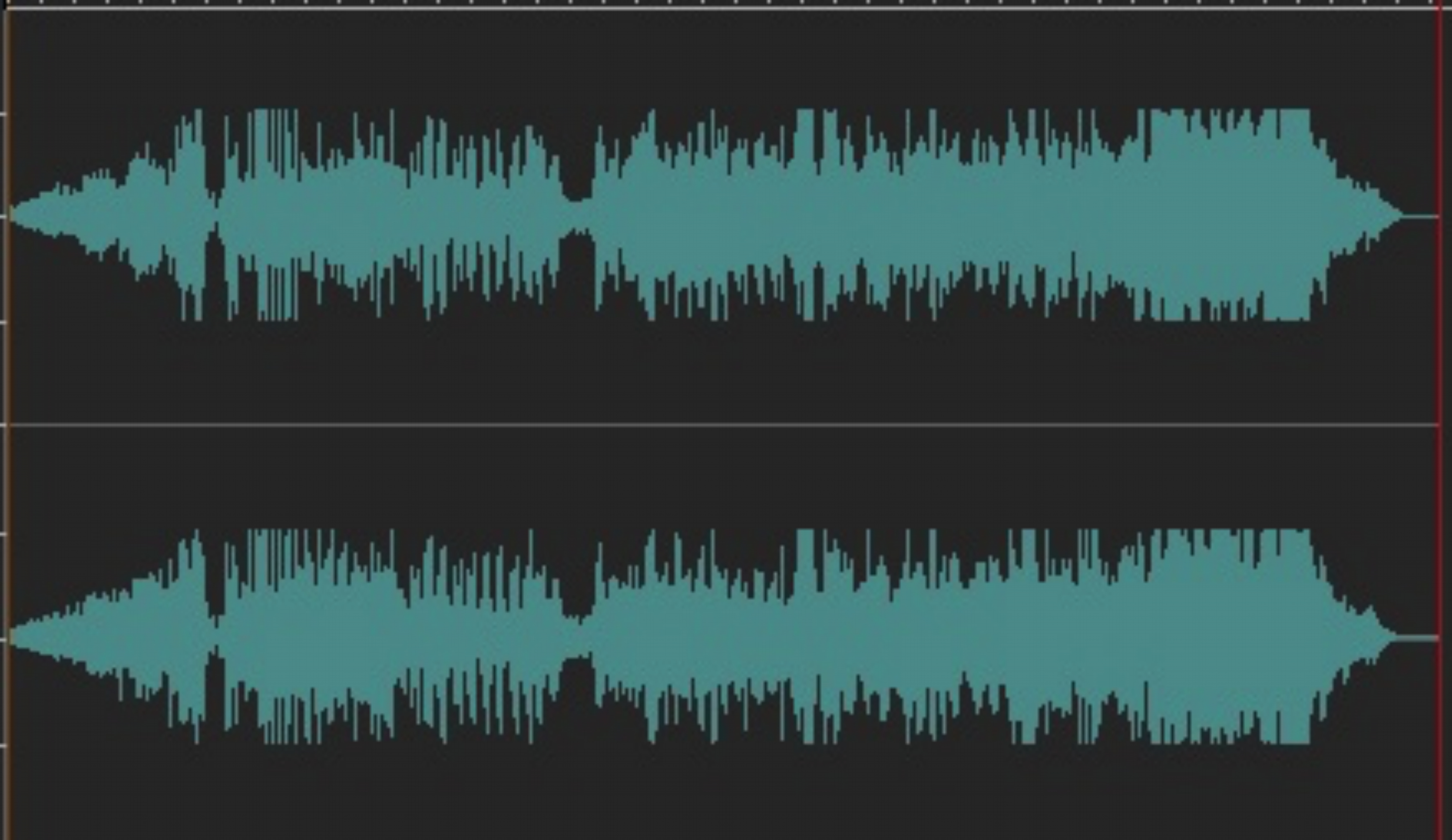
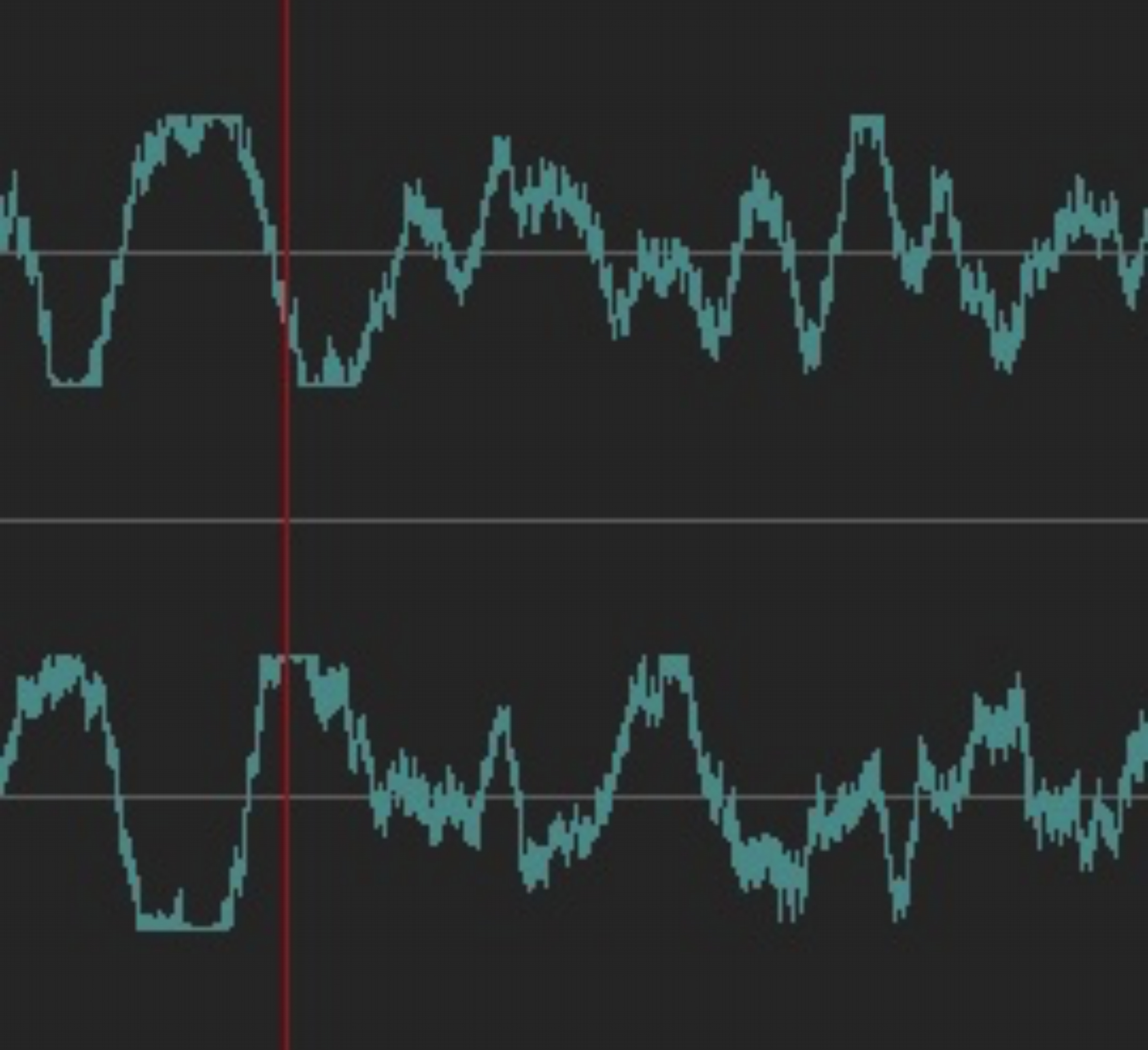
I did pull this up where I could see the wave form and Oh ya it is very over modulated in parts.

Screen%20Shot%202018-04-19%20at%2010.57.14%20AM.jpg


You also have some of this "fold back" going on which I have only seen with subharmonic synthesizers, where it clips to a point that it starts spiking back in the opposite direction. Though this may be something else it looks like it.
Screen%20Shot%202018-04-19%20at%2010.55.06%20AM.jpg


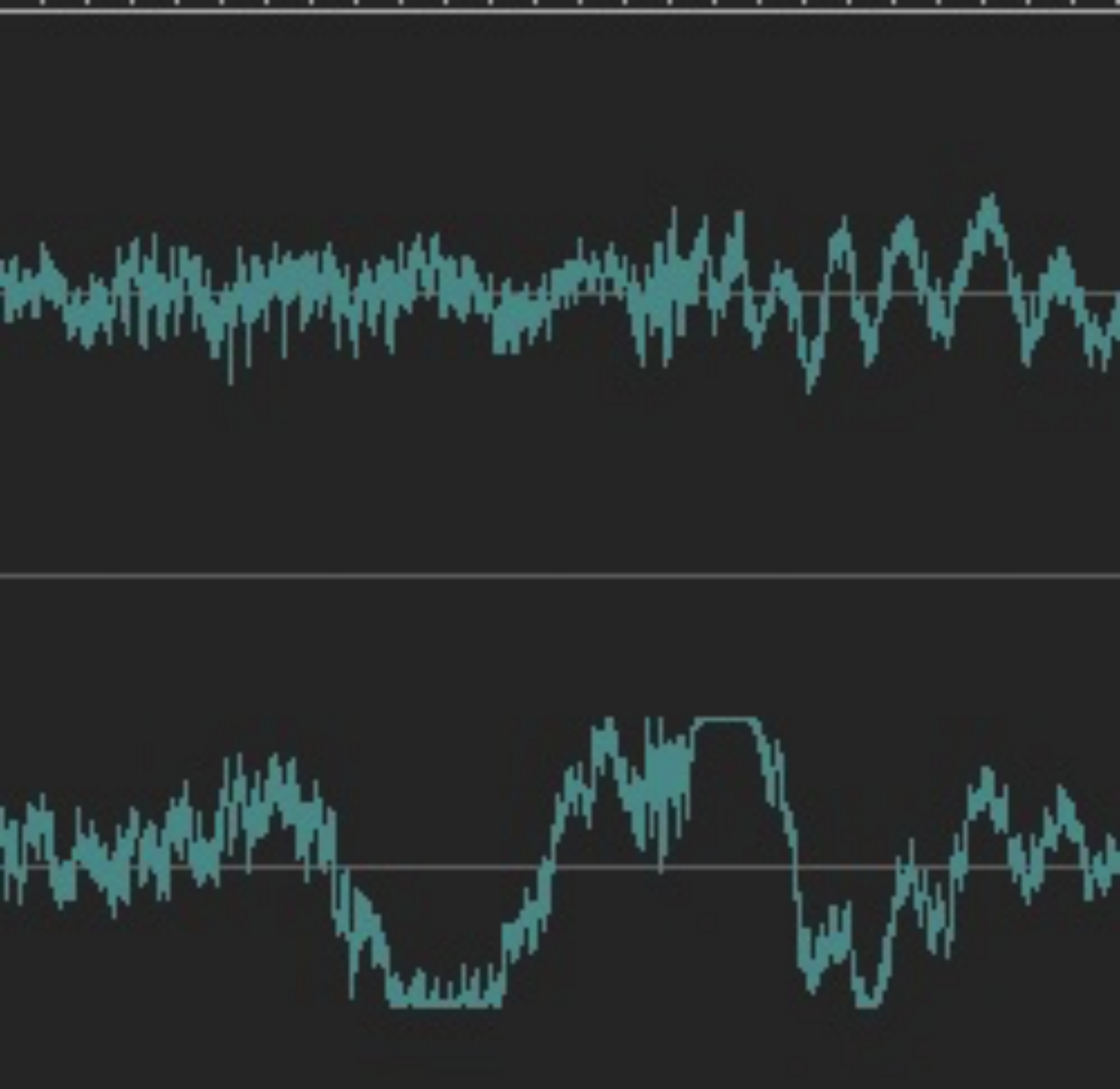
And it's probably not just over all volume since in a number of places it's much worse on one side.

Screen%20Shot%202018-04-19%20at%2010.55.58%20AM.jpg


The most likely culprits are A0 the music and excessive bass (toss a high pass filter on it at 20Hz or so) B) SFX. It is not rare for big beefy SFX to have been either pitched down, slowed down, or been processed with a subharmonic synthesizer. Any of those things can add subsonic content that will eat your bandwidth for lunch and give you nothing (it's below hearing, but uses a lot of power). You may also have a DC offset issue. Often when you see one side greatly different from the other there is a DC offset involved.

The first punches are pretty good the second set are still a bit soft. But till the over loading is fixed you can't do much about it because you have nowhere to go.

If it were me I would probably take a lot of bass out of the music, most of the time. You have a lot of bass SFX and the bass in the music is eating them up. If you took some of the bass out of the music the heart beat and punches and footsteps would pop out more, and it might fix the overmodulation.

It's fairly important in general to pick what is important at any given time and let it stand out by pulling other things out of it's "space". You can do that with volume but a lot of times you can also do it with EQ by carving out some sonic space where the "featured" sound lives. In your case this would mostly be in the lows.

You can automate the EQ or often a simpler way is to duplicate the music and take the bass out of one copy. That becomes your main track and then you can use volume automation to add some of the bassy version in when you don't need the sonic space for other things.
 
Last edited:
Ok I did not have time to work on it all that much the last couple of weeks. But I got a guy who made the voice over. And I just dropped it onto the soundtrack. And now more then ever the ending is totally overlapped. It needs some serious EQ work(16 layers of audio).
Are there any tools that might do this automatically like cut the voice over ranges out of the soundtrack? (Still need to find and cut/EQ the samples that are doing the bass in though).

But this is all the time I got tonight, and I already wanted to share it.

https://www.youtube.com/watch?v=W2wc7jil8QU&feature=youtu.be
 
Back
Top