snap cursor to end of clip

Soldier

Well-known member
Hey all,
I'm an Avid editor, trying to figure out Premiere pro at the moment. Is there an easy way to snap the cursor line to the start or ends of clips in the timeline? In Avid you hold down ctrl and click near the beginning (or end) of a clip and it snaps into place. Is there something similar in premiere?
 
What, no google?

Search for "premiere snap" and it's the very first hit you'll get.

I mean, come on already.....

[h=2]Snap a clip to a clip edge, marker, or current-time indicator[/h]
  1. Make sure that the Snap button
    P_SnapClip_N.png
    is selected in a Timeline panel.
  2. Drag the edge of a clip close to the edge of another clip or a marker or the current-time indicator. A vertical line appears when alignment occurs.
 
Obviously I've offended Keylight with my post, but perhaps he might have read my question properly. I don't want to snap clips to clips, I want to snap the cursor to clips. All google comes up with is snapping clips against clips, which I have no problem with. I can snap the cursor to clips if I extend the timeline out but it's a pain in the ass doing it every time. I'm after a shortcut that will enable me to snap the cursor to the heads or tails of clips when the timeline is not zoomed.

Thanks in advance.
 
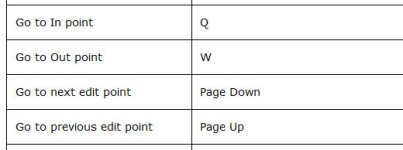
Soldier, you can use page up/page down to move the CTI to the previous/next edit point. In newer versions, it is dependant on which tracks are selected. The playhead will skip to the next/previous edit point on any currently selected track.
 
Obviously I've offended Keylight with my post, but perhaps he might have read my question properly. I don't want to snap clips to clips, I want to snap the cursor to clips. All google comes up with is snapping clips against clips, which I have no problem with. I can snap the cursor to clips if I extend the timeline out but it's a pain in the ass doing it every time. I'm after a shortcut that will enable me to snap the cursor to the heads or tails of clips when the timeline is not zoomed.

Thanks in advance.

LOL.... Not offended. I was just being a bit "snappy".

Did you try to Google "premiere keyboard shortcuts"? Because the very first hit would give you:

 
Back
Top