nessworks
Member
I am using Vegas 9 Pro and Vegas 8 Pro. I am using Panasonic P2 .mxf files via Raylight Ultra.
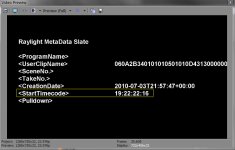
At the start of all my clips, (metadata) I can see the start point of the timecode on each clip (see attachment)
Is it possible to preview the "actual" running time of the actual smpte timecode of a individual video track in the preview window?
Or determine (view) the actual point of the running smpte timecode of the individual file at a certain cursor point?
I explored all the property settings for preview in Vegas, I think ...
I am familiar with adding the Timecode effect, which displays timecode starting at 00.00.00.00 of the beginning track, or applying "add timecode to all media", and the timeline timecode ...
but I would like to see the "actual" timecode of the actual individual .mxf file displayed in the preview or video efx if possible?
I have searched the forums and exhauseted my web searches.
Thank You.
At the start of all my clips, (metadata) I can see the start point of the timecode on each clip (see attachment)
Is it possible to preview the "actual" running time of the actual smpte timecode of a individual video track in the preview window?
Or determine (view) the actual point of the running smpte timecode of the individual file at a certain cursor point?
I explored all the property settings for preview in Vegas, I think ...
I am familiar with adding the Timecode effect, which displays timecode starting at 00.00.00.00 of the beginning track, or applying "add timecode to all media", and the timeline timecode ...
but I would like to see the "actual" timecode of the actual individual .mxf file displayed in the preview or video efx if possible?
I have searched the forums and exhauseted my web searches.
Thank You.