Simple Text Spin by Letter - How?

Exact

Veteran
I've been struggling with this for hours and can't figure it out. All I want is for all letters of a word (or words on a line) to spin on the Y axis at the same time. I don't want it to sequence or ripple through the letters, they all need to spin at the same time. BTW, I don't want to put every letter in it's own layer ;)

Here is an example I did in Final Cut Pro..... but I need to do this in After Effects.

This spins in, waits a couple of seconds then spins out again. I can't believe it's not possible..... but it's left me scratching my head a little!
 
Well..... in some of the effects yes, but they produced sequences of spinning, not all letters spinning together.

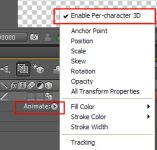
If I simply create a text layer (and even enable 3D for the layer) I can't find where to turn on "per character 3d" without dropping some other presents on there...... maybe I'm missing something obvious?
 
It's on the little "animate" fly out menu on the text layer. You have to enable first it before you adjust the y rotation or any other parameters

1.jpg
 
Right - I did find that - but when I choose that, then add a rotate to the animation it won't rotate them all at the same time, it wants to rotate them via the range selector. The first one starts before the second one and so on. I have the start set to 0% and end set to 100%. When the first character is at 90˙ (i.e. now effectively invisible) the last character is still very visible (maybe only 80˙). How can I get them to all turn the same?
 
I know what you're asking, but they do turn at the same time if you've set it up correctly

What you're probably seeing (i.e. a "sliver" of letter remaining) - It's because the camera is positioned in such a way that it's not dead on to every letter . Only the letter that is dead on will be 90 degrees to the camera. The others should be set to a bit off 90 degrees. i.e. AE is treating this as if it were "realistic". A 2d layer will only "disappear" if it was 90 degrees exactly straight on to the camera. So the letters the side will be off a bit

I'm not sure how to do the effect that you want by this method using the range selector, unless you apply different rotate value to each letter
 
I would just animate each letter separately and pre-compose them into one layer. Its an easy animation so it shouldnt take long.
 
There's no need to use the range selector. Just type your text, make the layer 3d, enable per-character 3d, then add a rotate animator and keyframe the Y rotation. If any characters are visible once at 90 degrees that's because of the camera. You can reduce that with turning up the zoom really high then push in on the Z axis. This flattens it out and has less distortion towards the edges of the frame.

Here's a project file with two different solutions: www.andrewfallon.tv/goodies/3d_text_rotate.zip
 
There's no need to use the range selector. Just type your text, make the layer 3d, enable per-character 3d, then add a rotate animator and keyframe the Y rotation. If any characters are visible once at 90 degrees that's because of the camera. You can reduce that with turning up the zoom really high then push in on the Z axis. This flattens it out and has less distortion towards the edges of the frame.

Here's a project file with two different solutions: www.andrewfallon.tv/goodies/3d_text_rotate.zip

Thanks. These seem as close as I think we'll get in AE. Looks like it's going to be harder work to achieve something this simple, and I'll need to play with opacity to make them all actually disappear.

I realise this is probably a function of 3D space and camera positioning, but it just seems more complicated than it needs to be, especially when I really wanted flat 2D space. :( Many thanks for the sample project though - I really appreciate it!
 
I would just animate each letter separately and pre-compose them into one layer. Its an easy animation so it shouldnt take long.

All things are relative. It this needs to be done for a complete titling sequence with lots of words and credits then it's not practical to do one letter at a time, especially when dropping in to Final Cut can make it happen in just a few mouse clicks. < sigh >
 
Why don't you do the sequence in Final Cut, export with alpha channel, then composite whatever else you have to do in AE ?
 
Why don't you do the sequence in Final Cut, export with alpha channel, then composite whatever else you have to do in AE ?

Reasonable question, and for this project I have done. What I am trying to do is move to an all CS5 workflow where possible so I don't have mixed projects, but I think for now I need to do things the easy way and come back t this one later.
 
ok sorry. i can do this in Sony Vegas with a few mouse clicks too. but i'm making myself learn AE and everything it can do.
 
Back
Top