Showing footage from the laptop

New_Zealand

Veteran
I have a showing and the place doesn't have a DVD setup so I have to hook my laptop to the projector and play the film from my desktop. I know the quality isn't going to be that great. I have in the past used WMA for rendering and showing. I'm on Vegas Pro 11 (not sure if that matters) but wondering is there a better setting to use for showing it from the laptop? Or is WMA the best bet?
 
Why would showing a film from a laptop be worse than showing it from a DVD? DVD is constrained to a certain format, with your laptop you control the resolution, compression and bitrate, it is much better.
WMA is an audio format. I'd suggest using H.264 at 1080p, 20 Mbps or higher if your laptop can handle it. If you know the resolution of the projector, you could even render it at the same size, 1:1, so that your laptop doesn't have to do any scaling.
 
I should have said WMV. I'm in New Zealand and have to pay for every second I'm using the computer so always rushing while I type.

Don't have any clue on the projector. I'm driving 8 hours to a small New Zealand town and hooking up the laptop. So I should render the film out at H.264? But what program am I doing this on? OR do you mean show the film from my Vegas editing time line?
 
You can keep using Vegas Pro 11.
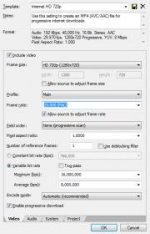
My recommendation is to use the Internet HD 720p preset found under the MainConcept AVC/AAC (*.mp4) template.
It gives you a 1280x720 file that should be very close to your projector resolution.
It defaults to NTSC so you'll need to customize it for PAL use.

pro 11.jpg

Mike
 
Back
Top