SGBlade Rotorazor 2 installation problem

Nomalz

Member
Hello everyone !

I just got my SG Blade this morning with RR1 and RR2, and since RR1 was preinstalled, I filmed a little and then tried to switch to RR2. Here is my problem.

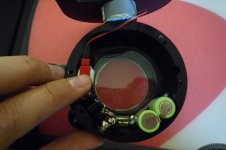
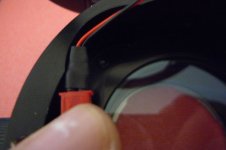
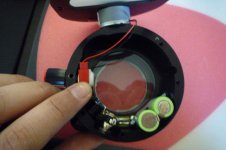
At the point of removing the RR1 and putting the RR2, we clearly see that the blade has a "round part" made to put the RR motor. But my RR2 has a little black plastic part that my RR1 hasn't, and this little part get into the way of the motor slot. Please look at the photos attached to understand : first one is RR1, second and third are RR2.

Is this black plastic part normal ? If yes, how do you manage to put the RR2 motor into his place with it getting in the way ?
 

Attachments

  • blade_rr1.jpg
    blade_rr1.jpg
    165.5 KB · Views: 0
  • blade_rr2a.jpg
    blade_rr2a.jpg
    165.7 KB · Views: 0
  • blade_rr2b.jpg
    blade_rr2b.jpg
    133 KB · Views: 0
Hi,

The first batch of motors were 'heat shrinked', which we now do not use, this is why one is different from the other.

You have the connector inserted correctly, but you should push the connectors a little further towards the ON/OFF switch, clearing the motor. The motor will squeeze in nicely against the heatshrink, give a little force to align the screw holes of the lid and front tube.
 
Last edited:
Ok, I tried as you said and it worked with a little force. RR2 is successfully in place ! :)

If possible, it would be nice to avoid this plastic part in the future batchs because the installation isn't really obvious (I worked on it for about 20 minutes before asking on the forum).

Anyway, thanks Wayne for your really fast answer ! I hope it will help some future SG Blade users ! :)
 
Glad to hear it is installed.

Yes you are correct, and this is the reason why we changed, it looks cleaner as well.
 
Good info to know in advance... Another question before I make the swap; the GG element appears to have ever so slight 'marks' on the surface that look like they can be cleaned. I know the manual briefly mentions this, but should these be rubbed off with the cleaning pen? How much effort can be used, I don't want to scratch the imaging element unnecessarily...

Thanks!
 
Hi Leo,

Could you email us regarding this with a photo of the 'marks'?

I tried taking some photos, but they really don't show up well. I went ahead and used the lens pen was able to remove the marks by gently rubbing them away...
 
Last edited:
When i was changin the RR, i also got a spot, but not on the GG, but on the glass which comes after RR, i used special eye glass cleaning cloth, works great for any lens, though you have
to be really careful, and then blow dust away with rubber air blower.
 
Yup, used that too, though it seemed for me a bit too synthetic, the one i used was something
similar to leather and seemed to be working little better. All is good if it ends good , right? :)
 
Back
Top