set rendered video thumbnail in Premiere Pro CC?

dylansmith

Well-known member
found a thread that is asking the exact question I want but with no final answers: https://forums.creativecow.net/thread/3/914066

When encoding a sequence, is there any way I can choose 1 frame as the thumbnail that the final output should show? As such, I don't have to export an additional JPEG and select from YouTube when I upload to the platform.

suggestions welcome!
 
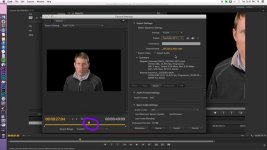
I believe where you have this selector (circled on the left screen) is what your icon will be. Not in front of to doublecheck but I believe that is it.

maxresdefault (2).jpg
 
I tried putting a marker and also placing the playhead at the desired frame, but it is still not chosen as the thumbnail.
 
You actually can accomplish this in Quicktime 7 Pro. Once you export your video, open it in Quicktime 7 Pro, then go to the frame you want to set as your poster frame (thumbnail). Then, go to VIEW > SET POSTER FRAME. And you're done.

I've also heard this can be done in iTunes but I have not tried it there. YMMV.
 
You actually can accomplish this in Quicktime 7 Pro. Once you export your video, open it in Quicktime 7 Pro, then go to the frame you want to set as your poster frame (thumbnail). Then, go to VIEW > SET POSTER FRAME. And you're done.

I've also heard this can be done in iTunes but I have not tried it there. YMMV.

This is great, but not the most ideal solution. I'd like to explore native solutions if possible.
 
Back
Top