
Just posting a tip I think people might find useful. I search certain websites so often that I like to create keyword shortcut searches in my browser for them. For example, I search for cameras on Amazon.com by typing in the url bar az cameras
You can create searches like this for dvxuser as well!
To do this in Firefox, create a bookmark for this link:
http://www.dvxuser.com/V6/search.ph...ending&saveprefs=1&do=process&searchthreadid=
And then go to the properties of the bookmark you saved and enter a keyword.
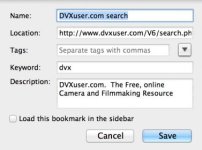
You can change parameters in the link above to suit your preferences. For example, I usually search within titles only, but if you want to search all text in a post just change titleonly=0 to titleonly=1.
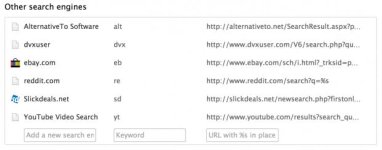
To do the same for Chrome, go to settings and then Manage search engines. Scroll down and you can enter a search engine name and keyword and then use the link above for the url.
You can create searches like this for dvxuser as well!
To do this in Firefox, create a bookmark for this link:
http://www.dvxuser.com/V6/search.ph...ending&saveprefs=1&do=process&searchthreadid=
And then go to the properties of the bookmark you saved and enter a keyword.
You can change parameters in the link above to suit your preferences. For example, I usually search within titles only, but if you want to search all text in a post just change titleonly=0 to titleonly=1.
To do the same for Chrome, go to settings and then Manage search engines. Scroll down and you can enter a search engine name and keyword and then use the link above for the url.