Resolve 14 dropping frames

offbeatbryce

Well-known member
here is a video of what is happening. https://drive.google.com/file/d/16HzchM6bmZH3Y3GMRnd_n0896NDE9WU2/view

As you can see it drops frames even though the timeline and clip are the same framerate. I tried installing version 12 and it plays fine. Also plays fine in premeire. Why won't it work in version 14?


What’s really weird is that I had another project at 29.97. Was working fine yesterday. All of the sudden that’s dropping frames. too.


Here is my computer specs

Nvidia quadro m400 8GB video graphic card, intel 17 quad core processor 3.4ghz with 16gb of ram. Windows 10 Pro.


I also tried converting the footage dnxhd. Same problem.
 
Need to know more. What is your setup, HDD or SSD do you use cache? (can be full). Did you make corrections as noise reduction or other, in the clips? Do you use a seperate audio file? If so what codec is it?
 
Last edited:
Need to know more. What is your setup, HDD or SSD do you use cache? (can be full). Did you make corrections as noise reduction or other, in the clips? Do you use a seperate audio file? If so what codec is it?

My cache is totally empty. Just downloaded the program. I can’t even play anything so therefore can’t add any color correction or noise. This happens exactly after I import. Tried creating new projects. Same thing.

Both the project and cache are on a 2TB ssd.

audio is straight from the camera as I had soundboard feed via xlr in my camera

Windows 10 is on its own ssd as swell
 
AVCHD can give problems, try to convert it to mp4 files. DNXHD will increase the size of your footage. Do you use 'optimise media'?
 
Last edited:
AVCHD can give problems, try to convert it to mp4 files. DNXHD will increase the size of your footage. Do you use 'optimise media'?

I'm converting to .mp4 right now. May I ask why resolve support told me avchd is fully supported in version 14?
 
converted to .mp4. Still drops frames like hell. Yes, I tried making optimize media. Same problem. However the same clips avchd, .mp4 etc all work in premiere just fine as well as resolve version 12. resolve support told me that my computer isn't powerful enough for version 14 but that makes no sense.
 
I looked at your specs again and googled your videocard, and if I can say it bluntly, your card is old and underpowered sir. You need a faster card such as the Gforce 780 or 980 or 1080. Davinci gets most of it's power from the videocard. The other specs from your PC seem to be good but you were not specific about your processor. So I am not sure.

Blackmagic published the specs: http://documents.blackmagicdesign.c...a7/DaVinci_Resolve_14_Configuration_Guide.pdf
 
Last edited:
I looked at your specs again and googled your videocard, and if I can say it bluntly, your card is old and underpowered sir. You need a faster card such as the Gforce 780 or 980 or 1080. Davinci gets most of it's power from the videocard. The other specs from your PC seem to be good but you were not specific about your processor. So I am not sure.

Blackmagic published the specs: http://documents.blackmagicdesign.c...a7/DaVinci_Resolve_14_Configuration_Guide.pdf


Underpowered? It’s an 8gb video ram card. The pc guy I know who built it said it was the most powerful video card on the market. It’s got 4 video outputs. We both couldn’t find another card with 4 outputs. I use 4 displays
 
When did you buy it? from were I can see it is a card from 2011. The number of outputs doesn't represent the power of the card as far as I know. Or did you mean the Nvideo Quadro M4000?

For extra 4 K output you also can use a cheap intensity pro 4K card. (also capture card)

Resolve 12.5 (and 14) now enforces the requirement that NVIDIA GPU cards support a minimum of CUDA 2.0.

This means that older legacy NVIDIA cards that work in Resolve 12.3.2 and earlier, will not work in 12.5 and later.

Your GPU is in the "CUDA-Enabled GeForce Products" list at this link, it will not work with Resolve 12.5:

https://developer.nvidia.com/cuda-legacy-gpus
 
Last edited:
When did you buy it? from were I can see it is a card from 2011. The number of outputs doesn't represent the power of the card as far as I know. Or did you mean the Nvideo Quadro M4000?

For extra 4 K output you also can use a cheap intensity pro 4K card. (also capture card)

Resolve 12.5 (and 14) now enforces the requirement that NVIDIA GPU cards support a minimum of CUDA 2.0.

This means that older legacy NVIDIA cards that work in Resolve 12.3.2 and earlier, will not work in 12.5 and later.

Your GPU is in the "CUDA-Enabled GeForce Products" list at this link, it will not work with Resolve 12.5:

https://developer.nvidia.com/cuda-legacy-gpus

Interesting,

Can you explain how come the first day I installed the program it was working and now it's not.

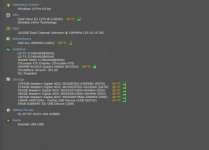
Here is my specs.


Windows 10 Pro 64-bit

CPU
Intel Xeon E3 1270 @ 3.60GHz 38 °C
Skylake 14nm Technology
RAM
16.0GB Dual-Channel Unknown @ 1064MHz (15-15-15-36)
Motherboard
Dell Inc. 09WH54 (U3E1) 28 °C
Graphics
LG TV (1768x992@30Hz)
SHARP HDMI (1768x992@30Hz)
Chrysalis-ITS iDisplay (Chrysalis-ITS)
4095MB NVIDIA Quadro M4000 (NVIDIA) 43 °C
ForceWare version: 381.65
SLI Disabled
Storage
2794GB Western Digital WDC WD30EZRX-00SPEB0 (SATA) 34 °C
2794GB Western Digital WDC WD3003FZEX-00Z4SA0 (SATA) 36 °C
931GB Western Digital WDC WDS100T1B0A-00H9H0 (SSD) 26 °C
465GB Western Digital WDC WDS500G1B0A-00H9H0 (SSD) 33 °C
1863GB Western Digital WDC WDS200T2B0A-00SM50 (SSD) 29 °C
100MB ASMT109x - Config USB Device (USB (SATA)) 34 °C
59GB SABRENT SD USB Device (USB)
Optical Drives
HL-DT-ST DVD+-RW GHB0N
Audio
Scarlett 18i8 USB

EDIT: According to this site my card was released in 2015 not 2011 and has a CUDA rate of 5.2 https://www.techpowerup.com/gpudb/2757/quadro-m4000
 

Attachments

  • computerspecs.jpg
    computerspecs.jpg
    10.3 KB · Views: 0
Last edited:
I am running out of inspiration.

I see you have the nvidea 4000 and not the 400 so that isn't the problem. Nice these temeratures :-)

Why did Resolve support tell you that your computer isn't powerful enough? Did they explain?

My PC is less powerfull but playing 4K and AVCHD isn't a problem. Did you try other footage?
 
Last edited:
I am running out of inspiration.

I see you have the nvidea 4000 and not the 400 so that isn't the problem. Nice these temeratures :-)

Why did Resolve support tell you that your computer isn't powerful enough? Did they explain?

My PC is less powerfull but playing 4K and AVCHD isn't a problem. Did you try other footage?

Yes, I tried .mp4 cineform, dnxhd etc. Nothing plays. I'm getting 4-10 frames a second playback. I've tried new projects and timelines. same thing. Tried optimize media. Same problem.

I read online that some guy who has a 12 core cant' even play anything either.

Unless you got a solution I give up and I'm keeping adobe CC. I really wanted to save money on their dumb cloud service but i can't play a thing in resolve.
 
I am running out of inspiration.

I see you have the nvidea 4000 and not the 400 so that isn't the problem. Nice these temeratures :-)

Why did Resolve support tell you that your computer isn't powerful enough? Did they explain?

My PC is less powerfull but playing 4K and AVCHD isn't a problem. Did you try other footage?

I'm uploading a video of what is happening from the start of a new project to import to show you what is actually happening.
 
Back
Top