Hey all... I use AE CS3... The problem that Im having is that I make the comp a widescreen... I set its aspect ratio to be a widescreen but when I render and make a movie the film turns out to be stretched... Recently I made a project... I rendered it out in uncompressed avi and imported the avi in Premiere CS3... Now in Cs3 it shows widescreen. The unocmpressed avi is stretched... whatever i export from premeire with that file is stretched... other than mpeg2... that is it... am i doing something wrong in rendering in AE... Please help me out...

Navigation
Install the app
How to install the app on iOS
Follow along with the video below to see how to install our site as a web app on your home screen.
Note: This feature may not be available in some browsers.
More options
You are using an out of date browser. It may not display this or other websites correctly.
You should upgrade or use an alternative browser.
You should upgrade or use an alternative browser.
Rendering question
- Thread starter sharry
- Start date
Ihdor - I have quicktime 7. I usually keep my stretch option off. I do use the render queue. I recently a project. After reading your comment I rendered it with my stretc options to 720*576 (that is PAL) and my pixel aspect ration was widscreen. It still renders in stretc view.
Jordan - I made the motion graphics in AE under the widescreen presets. I am exporting it on the same settings on which I made the comp... It should be widescreen but its not!
Jordan - I made the motion graphics in AE under the widescreen presets. I am exporting it on the same settings on which I made the comp... It should be widescreen but its not!
No, you're not doing anything wrong in AE.am i doing something wrong in rendering in AE...
This indicates AE is working as expected. You rendered out a widescreen comp, imported into Premiere and it displayed as a widescreen comp.Recently I made a project... I rendered it out in uncompressed avi and imported the avi in Premiere CS3... Now in Cs3 it shows widescreen.
Export from Premiere using square pixels (1025 x 576) and your uncompressed AVI will display properly.The unocmpressed avi is stretched... whatever i export from premeire with that file is stretched...
Do you understand pixel aspect ratio's ?
Screens in AE
Screens in AE
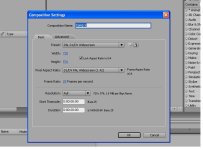
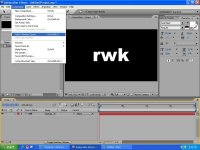
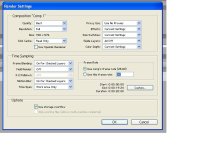
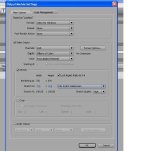
This is an example of how i set up my project and export it in screens. the image in the end is a snapshot i took from vlc player... you can see it is stretched....
Please help me out....
Screens in AE
This is an example of how i set up my project and export it in screens. the image in the end is a snapshot i took from vlc player... you can see it is stretched....
Please help me out....