Rendering Education

bigox

Well-known member
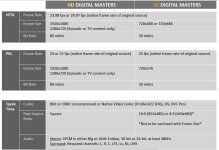
I have some specs I'm supposed to follow for rendering a feature length film of about 97 minutes. The footage was shot on a DVX100B 24fps. I have Vegas Pro 11 with Raylight & Vegas Pro 12.

The specs are as follows:

NTSC:
Frame Rate: 23.98fps or 29.97 (Native Frame Rate of Original Source
Frame Size: 720x480 or 720x480 or 720x486
Bit Rate: 50 mbits

QUICKTIME:
Codec: 8 bit or 10 Bit Uncompressed or Native Video Codec (ProRes422 (HQ), DV, DVC Pro)

Pixel Aspect Ratio: 16:9 (853x480) or 4:3 (640x480)* *Not to be confused with Frame Size*

Audio:
Stereo: LPCM in either Big or Liole Endian, 16‐bit or 24‐bit, at least 48kHz
Surround: Required channels: L, R, C, LFE, Ls, Rs, LtRt


I'm just having a difficult time finding the corresponding information when going through the RENDER AS process.

The specs they gave me are for a Quick Time Codec -

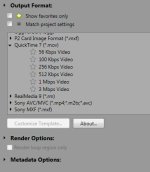
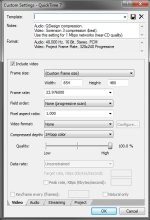
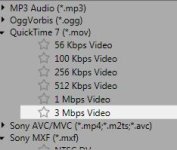
When I click RENDER AS, I choose QUICKTIME 7 (*.mov)
From there I am given several options, I'm assuming 3 Mbps Video is the right choice
From there I click Custom Template

From here:
For the NTSC Specs -
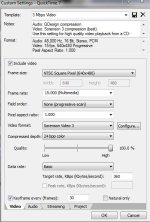
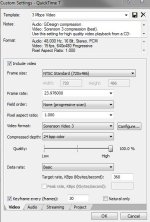
I see a FRAME RATE option with 23.976 (I'm assuming that's what I should choose)
I see a FRAME SIZE option, with the choices of 720x480 & 720x486
I see nothing here for BIT RATE

For the Quick Time Specs -
I see nothing to choose for 8 bit or 10 Bit Uncompressed or Native Video Codec (ProRes422 (HQ), DV, DVC Pro)
The Pixel Aspect Ratio listed gives options of 1.000 - 0.909 - 1.212 - 1.093 - 1.457 - Are any of these to be chosen to correspond with a 16:9 Pixel Aspect Ratio?

Audio:
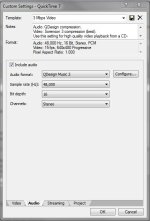
I don't see much correlation through their spec requirements with the options given when clicking the Audio tab.
The movie on the Vegas Timeline is Surround.

I see on the Audio Format there is an option of 16-bit Big Endian and a sample rate of 48,000 (The highest listed)
so under the Stereo spec, it seems like that would work.
However since it's Surround on the timeline I don't see anything listing the required channels they ask for which are: L, R, C, LFE, Ls, Rs, LtRt
On here for the channels there is an option for Stereo and Channels 1 thru 32. Nothing else is listed.

Is anyone able to educate me on this a bit. I'm pretty lost.

Thanks!
 

Attachments

  • Ren1.JPG
    Ren1.JPG
    17.9 KB · Views: 0
  • Ren2.JPG
    Ren2.JPG
    59.4 KB · Views: 0
I don't mean to keep whoring out my video but... It doesn't have quick-time but I still think a lot of the options and info will be helpful to you.
http://youtu.be/jADhisvtjo0

The Quick-time options are basically all the same between the different codecs and rendering options. Maybe the h.264 render options will work for you?

Some other thoughts.

50 mbits? I'm assuming they mean Mbps? (Million bits per second?). That's really high! 10 Mbps is usually more then enough for even 1080P footage.
http://en.wikipedia.org/wiki/High-definition_video

Pixel aspect ratio? But you list resolution? 1.0 is the setting used 99% of the time for Pixel apsect ratio. 1.2 ETC. is for anamorphic footage.

I have not experimented with surround sound so I can't give any advice there.

This is weird, I'm looking for what resolution the DVX100B shoots in and I can't find it on the web?? Does it do 1080I (1920x1080)? Or 720p? (1280x720) I see 24P setting but no resolution?
I see on Panasonic's website "60i (525i) interlaced fields Progressive mode (30P, 24P or 24P advance)" What is 525i?


Maybe when I get home I'll play around with my Quick-time settings and see if I can be more helpful. But hopefully some of this info will be helpful for now.
 
Our distributor is requesting our movie by using these specs. This is all for internet streaming.

The movie is a feature length film about 97 minutes and was shot with a DVX100B, so it's not HD. I've attached a screen shot of their actual spec list to see if it will make more sense than what I typed out.

Thanks a lot!

specs.JPG
 
Looking at the specifications...

NTSC is the North American video standard, both frame rates are very common.

Frame Size: the HD makes sense to me (those are very common resolution) but the SD 720x480 had me totally confused. But then I found this. http://forums.creativecow.net/thread/205/872969

"To my understanding, Standard definition like DV was created as a bridge between Analog and Digital.
Analog television was a D1 format, 720x486. DV is 720x480. The 6 missing vertical lines allow DV's dimensions to be divisible by 16, which is the block size of common compression systems. And it removes top and bottom pixel rows, which are typically the most degraded lines in an analog signal.


640x480 is a square pixel frame size for Full Screen DV video.
I think DVD specifications allow for 640x480, it wouldn't be pillarboxed on a standard full screen display, so long as the DVD is encoded properly, and the playback unit hasn't had a user controlled setting that would interfere with it.


A lot of confusion comes from there being a lot of incomplete information out there, and many times number are rounded so you are not actually working with the correct numbers. You have to dig real deep to find the type of numbers you are looking for.


In DV, both Full Screen and Widescreen are 720x480.
Full Screen 4:3 has a Pixel Aspect Ratio of 0.9 (approximate!, It's closer to 0.89), so 720x0.89=640 (rounded to the nearest integer divisible by 16). So, Full Screen 720x480, when displayed properly, appears as 640x480.
Widescreen 16:9 has a PAR of 1.2. So 720x1.2=864, which is the width that widescreen appears in when it is displayed properly."

The bit rate still has me scratching my head. They want 50 million BITS per second for a 720x480 video??? 50 million bits per second (Mbps) for a one hour video = 22.5 GB file! Here is a calculator, http://web.forret.com/tools/filesize.asp?speed=50&unit=Mbps&dur=3600. I have done experiments using H.264 at 1920x1080p 30FPS you can get excellent results with 7 Mbps and even lower. 20 Mbps is the highest you can enter using Sony AVC. Why do they want 50? Am I missing something here?

PAL is European standard, ok makes sense except for the crazy high bit rate again.

Then they want the Quick-time codec for some reason, but OK fine.

The HD pixel aspect ratio "1" is what I'm use to seeing but the SD one is a little strange. I 'think' they are saying use either 16:9 or 4:3. Here is a ton of info on Pixel aspect ratio: http://en.wikipedia.org/wiki/Pixel_aspect_ratio

Audio: OK LPCM http://en.wikipedia.org/wiki/Linear_pulse-code_modulation really means PCM... I've never seen the 'LPCM' used before now. But PCM is a common auto option. CD use PCM and so do windows WAV files. Why they want to use uncompressed auto I don't really understand, but maybe it's needed to support the old SD video standards.

Looks like the last thing to try is plug in all the setting they want and see what you get. From your screen shot I see you can enter the target date rates in KBps (big B = bytes) so 50 Mbps = 6250 KBps (using this calculator http://www.numion.com/calculators/units.html). But man that seems really high to me. You said your video is 97 minutes, that will be a 36 GB file! 36 gigs! That's huge. A single-layer Blu-Ray disc can hold 25GB.A dual-layer disc can hold 50GB. Have fun uploading that sucker.

Anyway that's my thoughts, maybe I'm totally missing the boat on something here. Hopefully some of this helps you. If anyone else sees an error in my info let me know. Thx.
 
The problem is, they say they want a digital master at 720x480, 50 Mbits, but then they say they can take it in DV, which is 25 Mbits . . . and THEN they specify square pixel, which doesn't make sense, because neither DV nor DVCPRO is square pixel.

If it were me, I'd tell them I have 24p DV and ask them exactly what they want.

(You edited this as 24p, right?)
 
Thanks a lot you guys for all this. This is much appreciated! Sorry, I was away for a few days.
Yes, this was edited 24p Widescreen.
I've got a message into them and I'll let you know what they wind up saying in reply to the questions brought up.
 
Okay, here's the latest on the specs. This is pretty general, but when I mentioned about the contradictions between what the specs were asking for and what DV allows their response was: "Just send uncompressed QT, the best quality you can."

They are aware that the file is going to be gigantic. I think the idea is that they are going to be placing the movie on many different platforms and will be dealing with many different companies & specs. By having such large uncompressed files they can adjust the specs if required based on who they are dealing with at the time.

So what they are wanting is just the best quality uncompressed QuickTime I can give them.
 
I don't see a clear cut option for uncompressed Quicktime at 854x480, square pixel. After selecting render as and quicktime, I am assuming I should select 3Mbps and these are the current settings I'm looking at. Does that seem correct. This is Vegas 11.


QT.JPGQT Settings.JPG
 
Any thoughts on the Audio render settings for this? The DVD version of the movie has surround sound.
QT Audio Render Settings.JPG
 
Okay, here's the latest on the specs. This is pretty general, but when I mentioned about the contradictions between what the specs were asking for and what DV allows their response was: "Just send uncompressed QT, the best quality you can."

They are aware that the file is going to be gigantic. I think the idea is that they are going to be placing the movie on many different platforms and will be dealing with many different companies & specs. By having such large uncompressed files they can adjust the specs if required based on who they are dealing with at the time.

So what they are wanting is just the best quality uncompressed QuickTime I can give them.

R Squared (distribution)? LOL...
 
So far when rendering these settings, the Video is looking good. The audio is giving me problems. The audio is 5.1 with about 12 different tracks of miscellaneous audio tracks.

I've been using the audio format of: Uncompressed

However I've test rendered bits in several of the options giving for Audio Format and the issue I"m having is that some of my audio isn't coming through at all. If I make the tracks that are not coming through "CENTER CENTER" on surround sound, they do come through, but if they are positioned elsewhere, those tracks don't come through.

Do you think it would be best to just "Center Center" the problem tracks or should I be rendering the audio differently than I am?
 
Back
Top