
Navigation
Install the app
How to install the app on iOS
Follow along with the video below to see how to install our site as a web app on your home screen.
Note: This feature may not be available in some browsers.
More options
You are using an out of date browser. It may not display this or other websites correctly.
You should upgrade or use an alternative browser.
You should upgrade or use an alternative browser.
Render has edges with stair steps
- Thread starter USLatin
- Start date
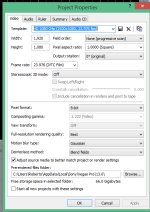
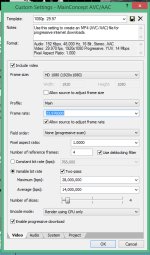

In your project settings, I'd change the deinterlace method to none. In your render settings, I'd uncheck "allow source to adjust frame rate." Those probably won't help with the aliasing, but as a general matter, that's what I'd do.
Under the Project tab in the Render window, make sure your render quality is "Best," because you're rescaling. It could be as simple as that.
Also, for 1080, I've never seen a need for a bitrate (CBR) of more than 10,000,000.
You could also try Sony AVC instead of MainConcept, which for me has given better results.
Under the Project tab in the Render window, make sure your render quality is "Best," because you're rescaling. It could be as simple as that.
Also, for 1080, I've never seen a need for a bitrate (CBR) of more than 10,000,000.
You could also try Sony AVC instead of MainConcept, which for me has given better results.
I did have best render selected, so I changed deinterlace to none and unchecked "allow source to adjust fps" and sadly they did not help. As expected those didn't help, but worth the try. Thank you David.
I also noticed I had main profile, and apparently high is best so I tried that, but still no change.
Thing is I am totally pixel peeping here, the shot has a metric ton of detail and I am starting to think that the only way to avoid aliasing when rendering an AVC will be to shave some detail off with the lowest possible amount of gaussian.
I also noticed I had main profile, and apparently high is best so I tried that, but still no change.
Thing is I am totally pixel peeping here, the shot has a metric ton of detail and I am starting to think that the only way to avoid aliasing when rendering an AVC will be to shave some detail off with the lowest possible amount of gaussian.
Which Cineform are you using?
I'm wondering if what you're seeing is actually the difference between color samplings. If your Cineform intermediates are 4:4:4 or 4:2:2, you might just be seeing what you you lose when you go to the 4:2:0 of AVC. "Stair-stepping" is a possibility.
Can you post some screen shots?
I use Sony AVC all the time; it certainly does allow for audio. There might be some presets which don't, for some reason, but in general it will.
I'm wondering if what you're seeing is actually the difference between color samplings. If your Cineform intermediates are 4:4:4 or 4:2:2, you might just be seeing what you you lose when you go to the 4:2:0 of AVC. "Stair-stepping" is a possibility.
Can you post some screen shots?
BTW, Sony's AVC doesn't let you include audio, so I think it is meant only for burning Bluray and wouldn't help for Vimeo/Youtube
I use Sony AVC all the time; it certainly does allow for audio. There might be some presets which don't, for some reason, but in general it will.
Cineform Premium. I looked again and I do see the aliasing on the timeline with best settings for the preview window.
I went back into the Sony AVC and I was obviously looking at the bluray setting. I rendered using it and it looks the same.
I will try different settings next time I downscale with cineform. That has to be where the issue lies.
I went back into the Sony AVC and I was obviously looking at the bluray setting. I rendered using it and it looks the same.
I will try different settings next time I downscale with cineform. That has to be where the issue lies.