Relighting in Color Correction

zucked

Well-known member
Hi everyone! Any help on this time sensitive question would be super appreciated!

Almost all of my (limited) experience is as DP, and while I've dabbled, I don't know very much about color correction. I shot on RED for the first time in August, and am now going over the footage in the edit back from the picture editor and Colorist.

I've attached a sample grab. While we shot in a nice location, the walls were still white, and it was difficult to light for the dark, mysterious mood I sought, since I struggled with my package to keep the light on the characters while off the walls. The light on the character's face is motivated by a fire in the middle of the living room, and the light in the back is motivated (and partially provided) by the practicals on the walls.

My question is about the extent to which it's possible to re-light in CC. I'm aware that this is, at its core, a production issue -- I should have lit better for the look I wanted. However, at this juncture, to what extent (if any) can I keep light and detail on the character's face, yet situate him in a darker, moodier, more brooding room?

Hope this question makes sense, and I'm extremely grateful for any and all timely help -- thank you!!

http://i.imgur.com/SHB8361.jpg
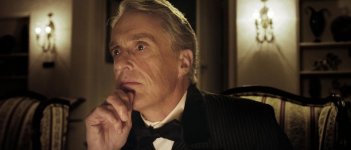
 
Seems processed out at way too high an ISO, and the colour slider is too warm, and that is before you do any secondaries.

If you have time and budget you can take Red footage a mile.

2 mins.

SHB8361.jpg
 
Hi everyone! Any help on this time sensitive question would be super appreciated!

Almost all of my (limited) experience is as DP, and while I've dabbled, I don't know very much about color correction. I shot on RED for the first time in August, and am now going over the footage in the edit back from the picture editor and Colorist.

I've attached a sample grab. While we shot in a nice location, the walls were still white, and it was difficult to light for the dark, mysterious mood I sought, since I struggled with my package to keep the light on the characters while off the walls. The light on the character's face is motivated by a fire in the middle of the living room, and the light in the back is motivated (and partially provided) by the practicals on the walls.

My question is about the extent to which it's possible to re-light in CC. I'm aware that this is, at its core, a production issue -- I should have lit better for the look I wanted. However, at this juncture, to what extent (if any) can I keep light and detail on the character's face, yet situate him in a darker, moodier, more brooding room?

Hope this question makes sense, and I'm extremely grateful for any and all timely help -- thank you!!

http://i.imgur.com/SHB8361.jpg

If you do it the way you're descibing, it won't be in color correction, per se. It'll require isolating him and and then working on him and the background separately, and however you do it, it'll be with some kind of mask. Just manipulating color won't really get you there.

Or, if what Morgan did above is along the lines of what you want, then you can do it with curves and CC, but it seemed like you going for more than that, right?
 
you could add a mask around your subject and darken the area around the walls by lowering the exposure for that mask. should work quite well...

EDIT: lol seems like it took me to long to write my post :)
 
Thank you everyone for such quick replies! Morgan, thank you so much for doing the quick demonstration. That's much closer to what I was imagining -- I just didn't know if it was possible.... Thanks again!
 
You can relight in CC to an extent, but a lot of the time it's a matter of choosing your battles. Running masks over any extensive amounts of footage is hugely time consuming, but power windows and the like can rescue a scene if your light isn't right.

It's normally only a problem I've run into with exteriors and uncontrolled sunlight, but if you play it smart you can get away with quite a bit. Here's a recent scene I shot that fell mercy to moving cloud cover:

In the wide original, we had soft overcast light through the whole scene:
4m76nkp.jpg


But by the time we switched to the reverse, the sun had come right out and we had a serious issue of mismatched lighting between the two:
yrBKbin.jpg


With the grade applied, this difference in contrast was hugely obvious:
rgPchkQ.jpg


TGCZNjP.jpg


But by using power windows to create pools of light and shadow around the park bench, the effect is sold and the two shots can cut seamlessly.
k2fhOz9.jpg


You can't always rescue these things, so it's important to stay vigilant, but with a bit of thinking you can often figure out a solution that will sell the shot just enough for it to cut without being distracting or obvious. I think Sam's sample grade is a perfect example of how to do this for a shot like your character there.
 
Running masks over any extensive amounts of footage is hugely time consuming,

Working in davinci I find a simple mask is part of the finishing process with nearly every shot

Really IMO it is a normal part of CC

In fact how do you fit a wide DR camera into a 709 space without doing this or going for a washed out log look.

Of course that doesn't make up for 'poor' lighting and would not mean the DOP should not for example be at pain to flag off the back walls correctly given the on-set resources - resources which our OP may or may not of had.

Of course a light pointing down will not hit the back walls :)

S
 
Working in davinci I find a simple mask is part of the finishing process with nearly every shot

Really IMO it is a normal part of CC

In fact how do you fit a wide DR camera into a 709 space without doing this or going for a washed out log look.

That's what curves are for! :) compressing that wide DR down into a rec709 space whilst maintaining the smoother highlight rolloff that starting with a wider DR gets you.
 
Well it is important to understand 'compressing' the the highlights (which can go horrid sony-vision - an unrealistic flattening of the gamma), personally I want to 'pull' my highlights which does require a secondary - and with raw you can do that (you can do it with a thin codec too, of course, but risk inducing noise/banding)

Edit - Ill try and explain why.

Say the wall is at 80IRE (but you want the wall at 70IRE) and a face highlight is at 80IRE (which is giving a good skintone and you want to leave as is)

Applying a curve that takes ALL 80IRE values to 70IRE may cure the wall, but will ruin the skin-tone becuase the skin hotspot just dropped from 80IRE to 70IRE - plastic skin - So you must apply a secondary excluding the face and apply the correctional curve to that, result skin highlight at 80IRE as desired, wall at 70IRE as desired.

S
 
Last edited:
Back
Top