RED 5K - Project Settings - Jittery

USLatin

Panamaniac
Sorry, I meant to type 4K.

I need some help, after a VERY long time of not playing around in Vegas I have to deliver something with it. The footage is mostly R3D's which I dropped right into the timeline. I let Vegas match the settings, but then I tried a few things when the render wasn't looking right and changed 8-bit to 32 for video, and also manually set deinterlace to None. Still, TONS of jitter in shots that shouldn't have very little if any.

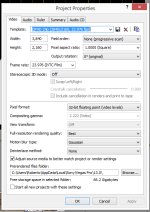
project settings:
3.jpg

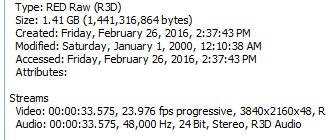
footage:
2.jpg

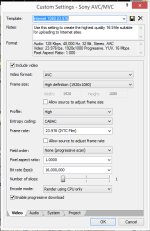
render settings:
1.jpg
 
so you have footage at 30p and your timeline and export run at 24p, so motion is not smooth. Yep. what's the problem?
 
Mac's correct about the 30p footage -- that'll give you problems in a 24p timeline/render -- but you say you're having trouble with the 24p footage, too?

Is the problem in the footage itself, or just on the timeline?
 
thank you for popping in guys

exactly, it is a 23.976 timeline, most of the footage is 23.976 (all that isn't drone) and a lot of those show the issue, like the shot at the end of the first clip panning down and to the right from the high windows, and the shot ont he second clip panning to the right by the pool with the two columns

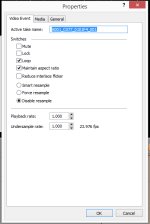
the footage does have some of the issue, but it seems to be exacerbated quite a bit, even when I disable re-sample and make sure playback rate is 1.0
 
Yeap... what is bothering me now is that the jitter seems to be a bit worse after rendering, not by a lot, but it does get worse by a tiny little bit that WE would notice (and most no one else would) but it is ticking me off being a perfectionist and I wonder if there is anything else I could do to at least shave that little bit off completely

For the drone footage I tried using Twixtor and it helped, but not 100%, any ideas or tips on how to get the best out of 29.97 on a 23.976 timeline other than twixtor?
 
Last edited:
Definitely, the best way to make 30p footage look its best on a 24p timeline is to set the playback rate to 0.800, for 20% slow-mo. But, it'll be slightly slow-mo, so you'd have to be okay with that.
 
Yea, that was the first thing I did. I set the playback to 0.8 but it still stuttered in waves, with a rythm to it, with cadence.

So then I tried to twixtor it to 80%, and same thing... better, but not by much.

I think the first sample shows it on the opening drone shot.
 
So I was able to go back to this and realized it was poorly transcoded footage causing this, but when replaced with the originals and properly twixtored it remains as it should in the render

There is still strobbing all over the place, but now it is not being agravated, and if you slow it down further all strobing does dissapear

Just thought I'd update to avoid letting Vegas get a bad name
 
Back
Top