Recording Super 8?

Why not use pro8mm?
http://www.pro8mm.com/

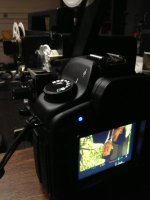
This was my setup running the project right into the sensor. With magic lantern you can adjust the fps. But like David said, getting them to start at the same time is impossible so I would get flicker.
69277_594679723894998_1835849942_n.jpg
 
Caught a $100 off sale that lasted a couple days at the end of last year on this Wolverine 8/Super-8 film scanner.
https://www.bhphotovideo.com/c/prod..._f2dmmpro_moviemaker_pro_8mm_and_super_8.html
We've transferred about thirty 50 foot films so far.
I'm happy with this. Thankful the old films dating back to 1969 are still in decent shape.

The scanner saves the films onto an SDHC card at 1080P (1440 X 1080 @20fps). It can supposedly save them at 30fps according to the box, but I see no instructions or menu option on how to do that.
The films look better than expected and I'm excited to be able to work with these in the future.

The worst things about the scanner are that you have to manually load the film onto the scan glass whereas our projector auto loaded. Once the film is lined up on the glass and the routing "sprockets" it then can scan automatically. It takes about 30 minutes to transfer a 3 minute film.
The other worst thing is the low recording bit rate ~10Mb/sec. I wish there was a setting to increase this to around 20MB/sec but there is not.

I've been too busy to edit any of them in Premiere Pro yet but I need to see how best to work with the 20fps footage so it plays correctly on the final product.

I like the unique look of super 8 film, so much so that it makes me want to shoot some with the old camera. Only problem is one of the AA battery contacts broke loose in the past when a battery corroded so I don't know if it will make electrical contact.
If anyone is interested I may share a few frames
 
Back
Top