Recording lighting notes

DDirector

Veteran
I'm trying to find a way to record all my notes on lighting on set.
Such as: type of light(s) used, f/stop, etc.

I am a visual person so I want to do this in a visual way instead of just jotting down notes.
This is so I can keep a reference for myself for future use and for continuity reasons.
So, yes this is very important to me.

What I originally wanted to do is take my DSLR and take a picture of the location.
Then print the picture to an 8x10 and on the picture write down the f/stops in the certain locations and point out what lights were used and other useful notes.
But, there doesn't seem to be a practical instant way to print pictures on set like that.
Has to be done on set. Not after

The other way was to use an iPad. Take a picture and then jot down notes on the picture itself.
Since its a fairly large screen and I can write notes down on it right away, I wouldn't need to print it off.
However, the problem I see is; if I want a picture and there are lights shining, it will be blown out and I may miss something important since its blown or underexposed.

Any ideas?
Maybe there is a way to print pictures. - Fairly large ones (8x10 or similar)
 
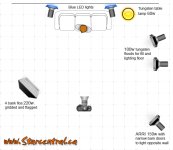
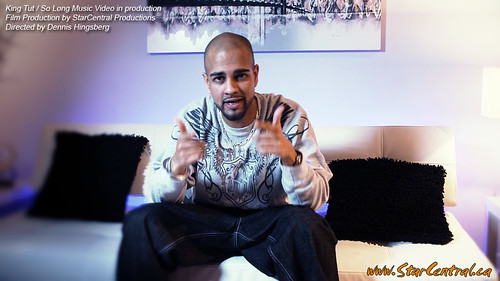
I record f-stops and lens used on my shot list sheet, as well try to make notes on a small note pad what lights I used. Then later when I go home if I really want to remember the setup I make a diagram like this using a free website that lets you create lighting diagrams. You could easily add your f-stops on it or FC if you prefer as well, and save to PNG or PDF on your computer. Check out www.lightingdiagrams.com

I also make notes in a little book on other camera settings that I want to remember...

Lighting Setup:
KTlighting-diagramII.jpg

Frame Grab:

6632616381_c67d685740.jpg
 
Last edited:
I tried to do this on the last movie I shot, and while it seemed like a great idea I realized I needed a little more planning. I used an iPad and some sketchpad app, but I wonder if there is some sort of lighting plot app that could be used. That coupled with overhead diagrams of the locations seem like they could be pretty useful.

As far as a good way to do this...I wish I knew! Anybody have something they use? It also would be great to be able to export them to PDF and keep them all nicely organized. Unfortunately I'm not much of a pen and paper sort of guy.
 
There is an iPad app called lighting designer that seems to do just what we're asking about. Anybody tried it?
 
in all reality I don't know how much time one would expect to have on-set to create pretty diagrams on paper or on computer or tablet device, etc.. I'm usually running around frantically from one thing to the other - half the time there doesn't even seem to be enough time to use the washroom or stop to drink some water.

:D
 
Sure, we don't have that much time on set to make everything just so, but if you have some walkie talkies along with a camera operator, things change pretty drastically. You'll be able to sit at a monitor and figure out how to tell the story with pictures and it'll give you a moment here and there to take some notes on your lighting setups. I've already worked the iPad into my workflow with the ShotList app, so having another app thats quick and simple to use to create diagrams would be a great little addition. Of course we don't always have this luxury, but you know, try and work these things in when you can and do it based on the size of the show.

The notes at the time won't seem that helpful, but when your upset with a shot 4 or 5 months down the line, you can take a look at what you did and learn from your mistakes. Or hey, maybe there was something you liked and you want to recreate it, the notes will be there for you.
 
No one is debating the value of having good notes to take away for future reference, as I said in my first post I make notes all the time and create pretty diagrams later when there is the time to do so.

BUT - is there any reason you can not create diagrams in advance of going on-set which would allow you to fill them out quickly and efficiently when you are on-set on shooting day? Surely you scouted the locations with the director weeks or months in advance, and walked around with your tape meter, compass, light meter and made detailed notes about the areas. Surely you reviewed with the director where the main action will take place and perhaps even went through some basic blocking? Surely you informed the director that "holy @#$, you are going to need to spend way more and rent these lights for me or I can't do what the directors asking".

:D
 
I always do simple diagrams before the shoot so my gaffer knows what needs to be done.
However, when your on set and set up the lights, some times things get changed around from the diagrams.
Having an overhead diagram of the lights is great to have as you can see a bit more detail... But this can be done later at home.

I'm more interested in taking a picture of the setup on set with a camera or iPad.
So I can see it exactly how it looks. On an overhead diagram you can say that the light shines on this wall, but what if its doing so in a specific way that causes some design or something, and its important. You need to see it to understand how it was done and how it should look.

I want to take a picture of the scene with a camera then instantly print and jot some quick notes or use iPad and jot notes on there. But, i dont know if the iPad would be good idea as things wont look the same as through the camera.

Yes, there usually isnt time on set. If you're working with a small crew or solo, then its even harder.
But if you are on a big production where everything matters, keeping lighting continuity is important and some time can be found. Take a snap shot a minute before rolling and jot notes down every once in a while..
 
No one is debating the value of having good notes to take away for future reference, as I said in my first post I make notes all the time and create pretty diagrams later when there is the time to do so.

BUT - is there any reason you can not create diagrams in advance of going on-set which would allow you to fill them out quickly and efficiently when you are on-set on shooting day? Surely you scouted the locations with the director weeks or months in advance, and walked around with your tape meter, compass, light meter and made detailed notes about the areas. Surely you reviewed with the director where the main action will take place and perhaps even went through some basic blocking? Surely you informed the director that "holy @#$, you are going to need to spend way more and rent these lights for me or I can't do what the directors asking".

:D

Of course, and maybe thats the answer. As long as you can make simple changes on set, that would be great, but man! How do we do it! I think it could be a combination of mostly overheads and some pictures where needed, but relying on photographs of your setups could become pretty problematic, as it's difficult to tell the relation of the lights to the actors and the surrounding area.

Also, the dynamic range of the kind of camera you would want to use leaves a bit to be desired, and I can't imagine taking pictures of lights working out very well when you want to see whats surrounding it. Not to mention if the light is boxed in with grip equipment.
 
I think If I was going to do that exercise... I would use my sp0tmeter and use the IRE Scale ( not f-stops)

That would give me direct relativity to the waveform monitor as well as the abilty to do all the readings from the camera position.

In practice as a D.P ...I have never been able to find the time on set to do such comprehensive note taking and always made do with a few scribbled notes.
 
Ddirector I guess what you need is to take a photo with something you can immediately edit (write on) electronically. I'm sure there are enough apps in the app store to find something you can use.
 
There is an iPad app called lighting designer that seems to do just what we're asking about. Anybody tried it?

Ryan,

Even though it seems the previous version received a lot of complaints about crashing, & the new one hasn't received sufficient reviews to be published, I just plunked down the $25 for Lighting Designer.

Getting started with the app isn't intuitive, & seems I'll need to RTFM, but I'd much prefer to email these diagrams to the team then hand-drawn versions.

Also I often diagram a lot of setups just to get my head in the game, & generate G&E orders.

Best,
Bern
 
Last edited:
Ddirector I guess what you need is to take a photo with something you can immediately edit (write on) electronically. I'm sure there are enough apps in the app store to find something you can use.
exactly what i need. so i can immediately do it. Id need an iPod first to see if its even possible
 
ipod to small, you need ipad. just get a used generation 2 model and you'll be laughing. Then hit the app store and see what photo/image apps exist.
 
Back
Top