Recording Help

Were you going to answer these? We are trying to help you, but we are completely in the dark without important information only you can provide.
If you don't understand a question, we are happy to help. But it is frustrating when communication is so irregular and incomplete.

Sorry, as I said, Monday and Tuesday were busy. I was out of the office for those days and only briefly had a chance to check in.

As stated, we're using the Sennheiser G2 Lav/ receiver and a Behringer Xenyx 1202.
 
The g2/3s produce a mic level output. The issue here is puzzling but the only issues I have with my sets is distortion from rf hits which seem to have become more common over the past 3 years. It's making me consider a used lectrosonic set.

Perhaps try a different lav mic.
It's not just the Lav, but our Handheld mic does the same thing. My assumption is that we're doing something wrong with the mixer.


Current status-- we set up the mixer as per the instructions received last week. Now we're not peaking on the mixer, but the LED tends to hold steady at -20. Rarely do we get to 0, and even more rarely do we get to 6.

We do still experience peaking on the camera, though.

I have the Lav itself set to a sensitivity of -20dB. The AF Out on the receiver is set to -24.
 
"We do still experience peaking on the camera, though"
-- The Behringer Xenyx 1202 has a Line level output.
Is the camera's audio input set to Line?
Unless I missed something, you still did not specify which model G2 receiver. Can we assume it's the 'EK100 camera mount receiver'?.. which seems to be the most commonly used Sennheiser receiver by folks on this forum.

"I have the Lav itself set to a sensitivity of -20dB. The AF Out on the receiver is set to -24"
-- Assuming it's the 'EK100 receiver' and if your using the Sennheser 1/8" to XLR cable to go from the Receiver to Mixer, those settings should work. (though may be slightly low)
 
Last edited:
I take that back. We do have a 1/8 to XLR (came with our other lav, the G3). Though I don't see how that would fit into the line-in on the mixer, which is a 1/4. What I meant to ask then, is do we need a 1/4th to XLR?
 
Last edited:
I see. You have the EM100 G2 rack-mount (base station) receiver.
You should NOT use an 1/8" to XLR cable or a 1/4th to XLR cable for this receiver..

"We are just using an XLR male-female from the receiver into the mixer"
- That is the correct connection. ( I would assume the AF out menu set at -15dB should work)
(Note: a 1/4" to 1/4" cable going from the receiver to the mixer's channel input would work also)

"We use the main out from there into the camera"
- Correct.. As a I stated, the camera audio inputs should be set to Line. I assume you have 1/4" to XLR cables going from the mixer's main outputs to camera's audio inputs. If your camera does not have XLR inputs, please specify... because that is another issue. BTW, what camera are you using?
 
Last edited:
I see. You have the EM100 G2 rack-mount (base station) receiver.
You should NOT use an 1/8" to XLR cable or a 1/4th to XLR cable for this receiver..

"We are just using an XLR male-female from the receiver into the mixer"
- That is the correct connection. ( I would assume the AF out menu set at -15dB should work)
(Note: a 1/4" to 1/4" cable going from the receiver to the mixer's channel input would work also)

"We use the main out from there into the camera"
- Correct.. As a I stated, the camera audio inputs should be set to Line. I assume you have 1/4" to XLR cables going from the mixer's main outputs to camera's audio inputs. If your camera does not have XLR inputs, please specify... because that is another issue. BTW, what camera are you using?


Thanks for the response.

We're using the Panasonic HMC-40. We connect the XLR via the AG-MYA30G XLR adapter.
 
There are still so many unknowns, and you seem to be struggling to find the time to do the necessary experiments, and not understand many of our questions and directives. You may need to find/hire a knowledgeable audio person to come over and sort it out on-site.
 
There are still so many unknowns, and you seem to be struggling to find the time to do the necessary experiments, and not understand many of our questions and directives. You may need to find/hire a knowledgeable audio person to come over and sort it out on-site.

What unknowns specifically?
 
Is this a wireless microphone problem or a mixer problem or a recorder (camcorder) problem? There are "differential diagnosis" methods of listening to the signal at each point along the chain to see where it has proper level and not clipping, vs. low level and clipping. But since we still don't know exactly which receiver you are using, we can't tell you how to listen to the signal at that point. Or how to confirm that both the transmitter adjustments and receiver settings are correct.

Do you have a plain ordinary microphone to test with? Trying to troubleshoot this problem with wireless microphones is a much more difficult task. I have 40+ years of experience in audio and I would never try to attack this problem using wireless microphones. One equation and 17 unknowns. Keep it simple, isolate links in the chain and confirm that each one is working properly by itself before connecting everything together. Use known-good things to test unknown things.

I don't ever recall hearing a response to the question about what the LEDs are showing on the mixer? And the nature of the connections (cables, adapters, etc.) still seems very murky. You occasionally post photos showing PARTS of the system, but frequently they create more questions than they answer.

And we haven't even got to the camcorder yet. There are probably a dozen details there and we haven't even scratched the surface.
 
Yes, we have a Behringer XM8500. Which is news to me as well...


For the record, I just tried the same setup as before with the XM85000 and had no better results.

I thought I had stated the receiver I was using-- that is if you're referring to the receiver for the wireless Lav. If so, we're using the True Diversity EM100 G2 A:

http://www.performanceaudio.com/buy/Sennheiser/EM100G2/916


Give me 10 minutes here and I will fully document the setup with pictures.

I did state that I'm using the HMC40 camcorder. What should I be looking at there?
 
Does the Behringer XM8500 work properly? I would plug it into the mixer and listen on headphones.

Does the camcorder work properly with the built-in microphones?
I would place a person 18~24 inches from the camera lens and have them talk in a normal voice.
I would listen on headphones plugged into the camera.
What does it sound like when set for auto-level? What do the audio level indicators read?
What does it sound like/look like when you set a manual audio level on the camcorder?

Then I would plug the Behringer mic into the camcorder and set the camcorder inputs for mic-level and listen on headphones.
Conduct the same experiment with auto-level and manal level.
Conduct the same experiment recording (vs. just listening without recording) and then play it back.
Is the playback quality equal to what you heard while recording?
 
Will try that now, thanks Richard.

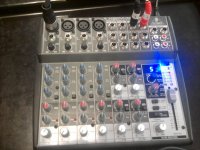
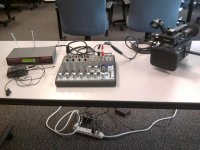
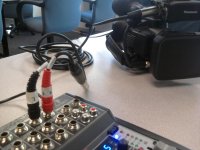
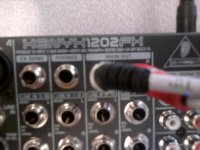
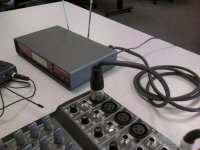
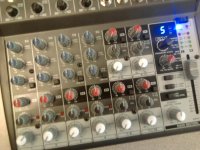
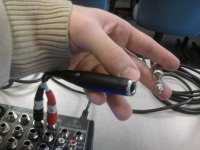
Here are pictures of absolutely everything I currently have set up. This is with the wireless lav rather than the Behringer mic.1019121448.jpg1019121448a.jpg1019121449.jpg1019121449a.jpg1019121449b.jpg1019121458.jpg
 
I'm seeing something very odd - you have a MONO microphone socket on the camera, but you are feeding it with a stereo unbalanced input - the xlr will expect a balanced signal, and what you will get on the camera is the things that are out of phase on the left and right output - so an output on left, and right at the same amplitude gives you NO signal (well, actually you get a sort of hissy unpleasant noise with a bit of the source in it. You've got the wrong cable. You need a single mono feed. Just use one of the outputs, and rewire the 1/4" jack - the 3 circuit plug on that xlr-jack cable is of no use at all. Replace it with a two circuit jack, or wire it differently.

XLR pin 1 is ground
XLR pin 2 is +
XLR pin 3 is -

you can wire the 3 circuit plug you have like this

XLR pin 1 and 3 to jack plug sleeve and ring
XLR pin 2 to jack plug 2

This will take the unbalanced mixer out into the camera mic socket - I don't know the camera - does the xlr have a line switch? it will need to be set to line.

XLRs are often miswired like this using adaptors. Jacks can be unbalanced or balanced, mono or stereo, but XLRs rarely are used for unbalanced stereo.
 
Follow Richard's test procedure to eliminate a camera audio malfunction. I susoect the female 1/4" -to-XLR adaptor may be the issue. Combining L&R, screwing up the balenced input circuit... cancels out. Can you get and try a single cable: 1/4" TRS (stereo plug) to XLR, from the the mixer to the camera's XLR in.. set to Line of course.

PS- Does the wireless lav sound OK though headphones plugged into the mixer?
 
Just tried! And yes, the lav sounds great with the headphones plugged into the mixer. ...now we're getting somewhere...

Paul, we use an XLR adapter on the camera. But yes, it has a switch to line.

I don't know that we have the necessary cable, though. We will get our hands on one.

The description you gave, Paul, sounds a lot like our problem. There's a lot of noise and the voices reside pretty consistently around -33db.
 
Back
Top