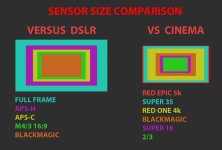
Continue the discussion at BMCuser.com. A new Landmine Community for Blackmagic Camera Users
CROP FACTOR/LENS MATCHING DATABASE: http://www.dvxuser.com/V6/showthread.php?280682-Crop-factor-pdfs-etc-(all-questions-go-here)
RELEASE NOTES THREAD BY PAPPASARTS: http://www.dvxuser.com/V6/showthread.php?280216-BlackMagic-Cinema-Camera-Technology-Announcements-amp-Latest-Info
PRE-ORDERING INFO: http://www.dvxuser.com/V6/showthread.php?280525-Pre-Ordering
Main web url: http://www.blackmagic-design.com/pro...ccinemacamera/
Specs:
[TABLE="class: cms_table_techSpec cms_table_singleTechSpec, width: 0"]
[TR="bgcolor: transparent"]
[TD="bgcolor: #D8791F, colspan: 2, align: left"]Camera Features[/TD]
[/TR]
[TR="bgcolor: transparent"]
[TD="bgcolor: #FFFFFF, align: left"]Sensor Resolution[/TD]
[TD="bgcolor: #FFFFFF, align: left"]2592 x 2192[/TD]
[/TR]
[TR="bgcolor: transparent"]
[TD="bgcolor: #F9E5CC, align: left"]Raw Resolution[/TD]
[TD="bgcolor: #F9E5CC, align: left"]12-bit RAW files recorded at 2432 x 1366[/TD]
[/TR]
[TR="bgcolor: transparent"]
[TD="bgcolor: #FFFFFF, align: left"]Shooting Resolutions[/TD]
[TD="bgcolor: #FFFFFF, align: left"]2.5K RAW at 2432 x 1366.
ProRes and DNxHD at 1920 x 1080[/TD]
[/TR]
[TR="bgcolor: transparent"]
[TD="bgcolor: #F9E5CC, align: left"]Frame Rates[/TD]
[TD="bgcolor: #F9E5CC, align: left"]23.98p, 24p, 25p, 29.97p, 30p[/TD]
[/TR]
[TR="bgcolor: transparent"]
[TD="bgcolor: #FFFFFF, align: left"]Sensor Size[/TD]
[TD="bgcolor: #FFFFFF, align: left"]16.64 mm x 14.04 mm[/TD]
[/TR]
[TR="bgcolor: transparent"]
[TD="bgcolor: #F9E5CC, align: left"]Sensor Size - Active[/TD]
[TD="bgcolor: #F9E5CC, align: left"]15.6 mm x 8.8 mm[/TD]
[/TR]
[TR="bgcolor: transparent"]
[TD="bgcolor: #FFFFFF, align: left"]Dynamic Range[/TD]
[TD="bgcolor: #FFFFFF, align: left"]13 stops[/TD]
[/TR]
[TR="bgcolor: transparent"]
[TD="bgcolor: #F9E5CC, align: left"]Focus[/TD]
[TD="bgcolor: #F9E5CC, align: left"]Focus button turns on peaking[/TD]
[/TR]
[TR="bgcolor: transparent"]
[TD="bgcolor: #FFFFFF, align: left"]Iris Control[/TD]
[TD="bgcolor: #FFFFFF, align: left"]Iris button automatically adjusts the lens iris settings so no pixel is clipped[/TD]
[/TR]
[TR="bgcolor: transparent"]
[TD="bgcolor: #F9E5CC, align: left"]Lens Mount[/TD]
[TD="bgcolor: #F9E5CC, align: left"]EF and ZE mount compatible with electronic iris control[/TD]
[/TR]
[TR="bgcolor: transparent"]
[TD="bgcolor: #FFFFFF, align: left"]Screen Dimensions[/TD]
[TD="bgcolor: #FFFFFF, align: left"]5" and 800 x 480 resolution[/TD]
[/TR]
[TR="bgcolor: transparent"]
[TD="bgcolor: #F9E5CC, align: left"]Screen Type[/TD]
[TD="bgcolor: #F9E5CC, align: left"]Integrated LCD capacitive touchscreen[/TD]
[/TR]
[TR="bgcolor: transparent"]
[TD="bgcolor: #FFFFFF, align: left"]Metadata Support[/TD]
[TD="bgcolor: #FFFFFF, align: left"]Automatic camera data and user data such as shot number, filenames and keywords[/TD]
[/TR]
[TR="bgcolor: transparent"]
[TD="bgcolor: #F9E5CC, align: left"]Controls[/TD]
[TD="bgcolor: #F9E5CC, align: left"]Onscreen touch menus and physical buttons for recording and transport control[/TD]
[/TR]
[TR="bgcolor: transparent"]
[TD="bgcolor: #FFFFFF, align: left"]Microphone[/TD]
[TD="bgcolor: #FFFFFF, align: left"]Integrated mono microphone[/TD]
[/TR]
[TR="bgcolor: transparent"]
[TD="bgcolor: #F9E5CC, align: left"]Speaker[/TD]
[TD="bgcolor: #F9E5CC, align: left"]Integrated mono speaker[/TD]
[/TR]
[TR="bgcolor: transparent"]
[TD="bgcolor: #FFFFFF, align: left"]Mounting Options[/TD]
[TD="bgcolor: #FFFFFF, align: left"]3 x 1/4" thread mounting points on top of camera.
1 x 1/4" thread tripod mount with locator pin.[/TD]
[/TR]
[TR="bgcolor: transparent"]
[TD="bgcolor: #F9E5CC, align: left"]Power[/TD]
[TD="bgcolor: #F9E5CC, align: left"]Integrated Lithium-ion Polymer rechargeable battery.
12V-30V DC port for external battery power or use included 12V AC adapter.[/TD]
[/TR]
[TR="bgcolor: transparent"]
[TD="bgcolor: #FFFFFF, align: left"]Battery Life[/TD]
[TD="bgcolor: #FFFFFF, align: left"]Approximately 90 minutes[/TD]
[/TR]
[TR="bgcolor: transparent"]
[TD="bgcolor: #F9E5CC, align: left"]Battery Charge Time[/TD]
[TD="bgcolor: #F9E5CC, align: left"]Approximately 2 hours when not in use.[/TD]
[/TR]
[TR="bgcolor: transparent"]
[TD="bgcolor: #FFFFFF, align: left"]Camera Dimensions[/TD]
[TD="bgcolor: #FFFFFF, align: left"]166.2mm by 113.51mm x 126.49mm excluding detachable sunshade and turret dust cap[/TD]
[/TR]
[TR="bgcolor: transparent"]
[TD="bgcolor: #F9E5CC, align: left"]Camera Weight[/TD]
[TD="bgcolor: #F9E5CC, align: left"]1.7 kg / 3.75 lb[/TD]
[/TR]
[/TABLE]
[TABLE="class: cms_table_techSpec cms_table_singleTechSpec, width: 0"]
[TR="bgcolor: transparent"]
[TD="bgcolor: #D8791F, colspan: 2, align: left"]Storage Features[/TD]
[/TR]
[TR="bgcolor: transparent"]
[TD="bgcolor: #FFFFFF, align: left"]Storage Type[/TD]
[TD="bgcolor: #FFFFFF, align: left"]Removable 2.5” SSD[/TD]
[/TR]
[TR="bgcolor: transparent"]
[TD="bgcolor: #F9E5CC, align: left"]Storage Format[/TD]
[TD="bgcolor: #F9E5CC, align: left"]Mac OS Extended format. SSDs can be formatted on any Mac or use Mediafour MacDrive (not included) on a Windows PC.[/TD]
[/TR]
[TR="bgcolor: transparent"]
[TD="bgcolor: #FFFFFF, align: left"]Storage Rates[/TD]
[TD="bgcolor: #FFFFFF, align: left"]5 MB/frame in RAW 2.5K fits about 30 minutes of 24p video on a 256 GB solid state disk. Compressed HD formats fit more than 5 times the amount of RAW video.[/TD]
[/TR]
[TR="bgcolor: transparent"]
[TD="bgcolor: #F9E5CC, align: left"]Uncompressed Recording Formats[/TD]
[TD="bgcolor: #F9E5CC, align: left"]RAW 2.5K CinemaDNG[/TD]
[/TR]
[TR="bgcolor: transparent"]
[TD="bgcolor: #FFFFFF, align: left"]Compressed Recording Formats[/TD]
[TD="bgcolor: #FFFFFF, align: left"]Apple ProRes and Avid DNxHD. All compressed recording in 1920x1080 10-bit YUV with choice of Film or Video Dynamic Range.[/TD]
[/TR]
[/TABLE]
[TABLE="class: cms_table_techSpec cms_table_singleTechSpec, width: 0"]
[TR="bgcolor: transparent"]
[TD="bgcolor: #D8791F, colspan: 2, align: left"]Connections[/TD]
[/TR]
[TR="bgcolor: transparent"]
[TD="bgcolor: #FFFFFF, align: left"]SDI Video Output[/TD]
[TD="bgcolor: #FFFFFF, align: left"]1 x 10-bit HD-SDI 4:2:2 with choice of Film or Video Dynamic Range[/TD]
[/TR]
[TR="bgcolor: transparent"]
[TD="bgcolor: #F9E5CC, align: left"]Analog Audio Input[/TD]
[TD="bgcolor: #F9E5CC, align: left"]2 x 1/4” jacks for professional balanced analog audio, switchable between mic and line levels.[/TD]
[/TR]
[TR="bgcolor: transparent"]
[TD="bgcolor: #FFFFFF, align: left"]Analog Audio Output[/TD]
[TD="bgcolor: #FFFFFF, align: left"]1 x 3.5mm stereo headphone output[/TD]
[/TR]
[TR="bgcolor: transparent"]
[TD="bgcolor: #F9E5CC, align: left"]SDI Audio Output[/TD]
[TD="bgcolor: #F9E5CC, align: left"]4 channels in HD-SDI[/TD]
[/TR]
[TR="bgcolor: transparent"]
[TD="bgcolor: #FFFFFF, align: left"]Remote Control[/TD]
[TD="bgcolor: #FFFFFF, align: left"]1 x 2.5mm LANC for Rec Start/Stop, Iris Control and Focus Control[/TD]
[/TR]
[TR="bgcolor: transparent"]
[TD="bgcolor: #F9E5CC, align: left"]Computer Interface[/TD]
[TD="bgcolor: #F9E5CC, align: left"]Thunderbolt port for capture of RAW video and audio.
USB 2.0 mini B port for software updates and configuration.[/TD]
[/TR]
[TR="bgcolor: transparent"]
[TD="bgcolor: #FFFFFF, align: left"]External Power[/TD]
[TD="bgcolor: #FFFFFF, align: left"]12V-30V DC port for external battery power or use included 12V AC adapter.[/TD]
[/TR]
[/TABLE]
[TABLE="class: cms_table_techSpec cms_table_singleTechSpec, width: 0"]
[TR="bgcolor: transparent"]
[TD="bgcolor: #D8791F, colspan: 2, align: left"]Standards[/TD]
[/TR]
[TR="bgcolor: transparent"]
[TD="bgcolor: #FFFFFF, align: left"]SDI Compliance[/TD]
[TD="bgcolor: #FFFFFF, align: left"]SMPTE 292M.[/TD]
[/TR]
[TR="bgcolor: transparent"]
[TD="bgcolor: #F9E5CC, align: left"]SDI Audio Sampling[/TD]
[TD="bgcolor: #F9E5CC, align: left"]48 kHz and 24 bit.[/TD]
[/TR]
[/TABLE]
[TABLE="class: cms_table_techSpec cms_table_singleTechSpec, width: 0"]
[TR="bgcolor: transparent"]
[TD="bgcolor: #D8791F, colspan: 2, align: left"]Extras[/TD]
[/TR]
[TR="bgcolor: transparent"]
[TD="bgcolor: #FFFFFF, align: left"]Software Included[/TD]
[TD="bgcolor: #FFFFFF, align: left"]DaVinci Resolve grading software including Resolve USB dongle for Mac OS X and Windows.
Media Express software for video capture from the camera’s Thunderbolt port.
Blackmagic UltraScope software for waveform monitoring from the camera’s Thunderbolt port.[/TD]
[/TR]
[TR="bgcolor: transparent"]
[TD="bgcolor: #F9E5CC, align: left"]Accessories[/TD]
[TD="bgcolor: #F9E5CC, align: left"]Detachable sun shield, camera strap, turret dust cap and 12V AC adapter.[/TD]
[/TR]
[TR="bgcolor: transparent"]
[TD="bgcolor: #FFFFFF, align: left"]Product Warranty[/TD]
[TD="bgcolor: #FFFFFF, align: left"]12 Month Limited Manufacturer's Warranty.[/TD]
[/TR]
[/TABLE]
[TABLE="class: cms_table_techSpec cms_table_singleTechSpec, width: 0"]
[TR="bgcolor: transparent"]
[TD="bgcolor: #D8791F, colspan: 2, align: left"]Optional Accessories[/TD]
[/TR]
[TR="bgcolor: transparent"]
[TD="bgcolor: #FFFFFF, align: left"]Camera Handles[/TD]
[TD="bgcolor: #FFFFFF, align: left"]Blackmagic Cinema Camera Handles[/TD]
[/TR]
[/TABLE]
Price: MSRP 2,999.99 (as of today--april 18, I paid pre-ordered for 2845.00) bundled with Resolve 9 (995.99 value) and Ultrascope (599.99) software.
Release Date: Mid to Late July 2012
Early and ONLY footage (April 18):
http://johnbrawley.wordpress.com/201...-from-the-top/
http://johnbrawley.wordpress.com/201...ackmagic-clip/
PRODUCTION FAQ:
By using wider lenses (ex. Sigma 20/1.8) you can achieve a similar angle of view to larger sensor cameras such as the GH2, 7D, or 5D.
Example: A 45mm on the 5D would exhibit a similar angle of view to the Magic Cam with a 20mm attached. The DOF characteristics may or may not be different, depending on F-stop.
On the wide end, you may want to take a look at offerings from several manufacturers. Focal lengths starting at 8mm or so. For more info, check out the lens sub forum.
As of today, BMD must be very aware that the potential user base is requesting more mounting options. While a lot of glass can be attached to the EF mount that will ship in July, major interests are PL and Micro Four Thirds (or Four Thirds). They've made no indication of when, but so far it sounds like it's being considered.
Apple ProRes Log 4:2:2 HQ @ 1080
Avid DNxHD @ 1080
When set to VIDEO (Rec. 709), footage will be acquired under the broadcast standard gamma, seeing a reduction in usable DR, but a more broadcast ready image.
The jury's still out on how this works, because again, RAW is supposed to be RAW.
The details of the batteries cycle/charge life are currently unknown.
AUDIO :
factual information not available yet
POST PRODUCTION FAQ
What is the difference between RAW and Compressed?
What is the RAW format from the Magic Cam?
How do I process DNG files?
Are there any current NLEs that allow you to edit DNG?
Will I need new hardware to take advantage of this camera's full potential?
Where can I find a workflow explanation for my current setup?
Are there tutorials for Resolve 9?
I know everyone wants answers now, but frankly the camera is not in a state where definitive answers can be given. Example: there's no f-stop readout. At all. You have absolutely zero idea what f-stop you're shooting at. I asked the guy at the booth about it and he said "that's coming". So I wouldn't get hung up about audio meters, I'm sure they'll be there, but the only way we will know for sure is when the camera is actually shipping in its final state. It was in a premature state at the show, and not entirely representative of what the shipping product will do.
CROP FACTOR/LENS MATCHING DATABASE: http://www.dvxuser.com/V6/showthread.php?280682-Crop-factor-pdfs-etc-(all-questions-go-here)
RELEASE NOTES THREAD BY PAPPASARTS: http://www.dvxuser.com/V6/showthread.php?280216-BlackMagic-Cinema-Camera-Technology-Announcements-amp-Latest-Info
PRE-ORDERING INFO: http://www.dvxuser.com/V6/showthread.php?280525-Pre-Ordering
Main web url: http://www.blackmagic-design.com/pro...ccinemacamera/
Specs:
[TABLE="class: cms_table_techSpec cms_table_singleTechSpec, width: 0"]
[TR="bgcolor: transparent"]
[TD="bgcolor: #D8791F, colspan: 2, align: left"]Camera Features[/TD]
[/TR]
[TR="bgcolor: transparent"]
[TD="bgcolor: #FFFFFF, align: left"]Sensor Resolution[/TD]
[TD="bgcolor: #FFFFFF, align: left"]2592 x 2192[/TD]
[/TR]
[TR="bgcolor: transparent"]
[TD="bgcolor: #F9E5CC, align: left"]Raw Resolution[/TD]
[TD="bgcolor: #F9E5CC, align: left"]12-bit RAW files recorded at 2432 x 1366[/TD]
[/TR]
[TR="bgcolor: transparent"]
[TD="bgcolor: #FFFFFF, align: left"]Shooting Resolutions[/TD]
[TD="bgcolor: #FFFFFF, align: left"]2.5K RAW at 2432 x 1366.
ProRes and DNxHD at 1920 x 1080[/TD]
[/TR]
[TR="bgcolor: transparent"]
[TD="bgcolor: #F9E5CC, align: left"]Frame Rates[/TD]
[TD="bgcolor: #F9E5CC, align: left"]23.98p, 24p, 25p, 29.97p, 30p[/TD]
[/TR]
[TR="bgcolor: transparent"]
[TD="bgcolor: #FFFFFF, align: left"]Sensor Size[/TD]
[TD="bgcolor: #FFFFFF, align: left"]16.64 mm x 14.04 mm[/TD]
[/TR]
[TR="bgcolor: transparent"]
[TD="bgcolor: #F9E5CC, align: left"]Sensor Size - Active[/TD]
[TD="bgcolor: #F9E5CC, align: left"]15.6 mm x 8.8 mm[/TD]
[/TR]
[TR="bgcolor: transparent"]
[TD="bgcolor: #FFFFFF, align: left"]Dynamic Range[/TD]
[TD="bgcolor: #FFFFFF, align: left"]13 stops[/TD]
[/TR]
[TR="bgcolor: transparent"]
[TD="bgcolor: #F9E5CC, align: left"]Focus[/TD]
[TD="bgcolor: #F9E5CC, align: left"]Focus button turns on peaking[/TD]
[/TR]
[TR="bgcolor: transparent"]
[TD="bgcolor: #FFFFFF, align: left"]Iris Control[/TD]
[TD="bgcolor: #FFFFFF, align: left"]Iris button automatically adjusts the lens iris settings so no pixel is clipped[/TD]
[/TR]
[TR="bgcolor: transparent"]
[TD="bgcolor: #F9E5CC, align: left"]Lens Mount[/TD]
[TD="bgcolor: #F9E5CC, align: left"]EF and ZE mount compatible with electronic iris control[/TD]
[/TR]
[TR="bgcolor: transparent"]
[TD="bgcolor: #FFFFFF, align: left"]Screen Dimensions[/TD]
[TD="bgcolor: #FFFFFF, align: left"]5" and 800 x 480 resolution[/TD]
[/TR]
[TR="bgcolor: transparent"]
[TD="bgcolor: #F9E5CC, align: left"]Screen Type[/TD]
[TD="bgcolor: #F9E5CC, align: left"]Integrated LCD capacitive touchscreen[/TD]
[/TR]
[TR="bgcolor: transparent"]
[TD="bgcolor: #FFFFFF, align: left"]Metadata Support[/TD]
[TD="bgcolor: #FFFFFF, align: left"]Automatic camera data and user data such as shot number, filenames and keywords[/TD]
[/TR]
[TR="bgcolor: transparent"]
[TD="bgcolor: #F9E5CC, align: left"]Controls[/TD]
[TD="bgcolor: #F9E5CC, align: left"]Onscreen touch menus and physical buttons for recording and transport control[/TD]
[/TR]
[TR="bgcolor: transparent"]
[TD="bgcolor: #FFFFFF, align: left"]Microphone[/TD]
[TD="bgcolor: #FFFFFF, align: left"]Integrated mono microphone[/TD]
[/TR]
[TR="bgcolor: transparent"]
[TD="bgcolor: #F9E5CC, align: left"]Speaker[/TD]
[TD="bgcolor: #F9E5CC, align: left"]Integrated mono speaker[/TD]
[/TR]
[TR="bgcolor: transparent"]
[TD="bgcolor: #FFFFFF, align: left"]Mounting Options[/TD]
[TD="bgcolor: #FFFFFF, align: left"]3 x 1/4" thread mounting points on top of camera.
1 x 1/4" thread tripod mount with locator pin.[/TD]
[/TR]
[TR="bgcolor: transparent"]
[TD="bgcolor: #F9E5CC, align: left"]Power[/TD]
[TD="bgcolor: #F9E5CC, align: left"]Integrated Lithium-ion Polymer rechargeable battery.
12V-30V DC port for external battery power or use included 12V AC adapter.[/TD]
[/TR]
[TR="bgcolor: transparent"]
[TD="bgcolor: #FFFFFF, align: left"]Battery Life[/TD]
[TD="bgcolor: #FFFFFF, align: left"]Approximately 90 minutes[/TD]
[/TR]
[TR="bgcolor: transparent"]
[TD="bgcolor: #F9E5CC, align: left"]Battery Charge Time[/TD]
[TD="bgcolor: #F9E5CC, align: left"]Approximately 2 hours when not in use.[/TD]
[/TR]
[TR="bgcolor: transparent"]
[TD="bgcolor: #FFFFFF, align: left"]Camera Dimensions[/TD]
[TD="bgcolor: #FFFFFF, align: left"]166.2mm by 113.51mm x 126.49mm excluding detachable sunshade and turret dust cap[/TD]
[/TR]
[TR="bgcolor: transparent"]
[TD="bgcolor: #F9E5CC, align: left"]Camera Weight[/TD]
[TD="bgcolor: #F9E5CC, align: left"]1.7 kg / 3.75 lb[/TD]
[/TR]
[/TABLE]
[TABLE="class: cms_table_techSpec cms_table_singleTechSpec, width: 0"]
[TR="bgcolor: transparent"]
[TD="bgcolor: #D8791F, colspan: 2, align: left"]Storage Features[/TD]
[/TR]
[TR="bgcolor: transparent"]
[TD="bgcolor: #FFFFFF, align: left"]Storage Type[/TD]
[TD="bgcolor: #FFFFFF, align: left"]Removable 2.5” SSD[/TD]
[/TR]
[TR="bgcolor: transparent"]
[TD="bgcolor: #F9E5CC, align: left"]Storage Format[/TD]
[TD="bgcolor: #F9E5CC, align: left"]Mac OS Extended format. SSDs can be formatted on any Mac or use Mediafour MacDrive (not included) on a Windows PC.[/TD]
[/TR]
[TR="bgcolor: transparent"]
[TD="bgcolor: #FFFFFF, align: left"]Storage Rates[/TD]
[TD="bgcolor: #FFFFFF, align: left"]5 MB/frame in RAW 2.5K fits about 30 minutes of 24p video on a 256 GB solid state disk. Compressed HD formats fit more than 5 times the amount of RAW video.[/TD]
[/TR]
[TR="bgcolor: transparent"]
[TD="bgcolor: #F9E5CC, align: left"]Uncompressed Recording Formats[/TD]
[TD="bgcolor: #F9E5CC, align: left"]RAW 2.5K CinemaDNG[/TD]
[/TR]
[TR="bgcolor: transparent"]
[TD="bgcolor: #FFFFFF, align: left"]Compressed Recording Formats[/TD]
[TD="bgcolor: #FFFFFF, align: left"]Apple ProRes and Avid DNxHD. All compressed recording in 1920x1080 10-bit YUV with choice of Film or Video Dynamic Range.[/TD]
[/TR]
[/TABLE]
[TABLE="class: cms_table_techSpec cms_table_singleTechSpec, width: 0"]
[TR="bgcolor: transparent"]
[TD="bgcolor: #D8791F, colspan: 2, align: left"]Connections[/TD]
[/TR]
[TR="bgcolor: transparent"]
[TD="bgcolor: #FFFFFF, align: left"]SDI Video Output[/TD]
[TD="bgcolor: #FFFFFF, align: left"]1 x 10-bit HD-SDI 4:2:2 with choice of Film or Video Dynamic Range[/TD]
[/TR]
[TR="bgcolor: transparent"]
[TD="bgcolor: #F9E5CC, align: left"]Analog Audio Input[/TD]
[TD="bgcolor: #F9E5CC, align: left"]2 x 1/4” jacks for professional balanced analog audio, switchable between mic and line levels.[/TD]
[/TR]
[TR="bgcolor: transparent"]
[TD="bgcolor: #FFFFFF, align: left"]Analog Audio Output[/TD]
[TD="bgcolor: #FFFFFF, align: left"]1 x 3.5mm stereo headphone output[/TD]
[/TR]
[TR="bgcolor: transparent"]
[TD="bgcolor: #F9E5CC, align: left"]SDI Audio Output[/TD]
[TD="bgcolor: #F9E5CC, align: left"]4 channels in HD-SDI[/TD]
[/TR]
[TR="bgcolor: transparent"]
[TD="bgcolor: #FFFFFF, align: left"]Remote Control[/TD]
[TD="bgcolor: #FFFFFF, align: left"]1 x 2.5mm LANC for Rec Start/Stop, Iris Control and Focus Control[/TD]
[/TR]
[TR="bgcolor: transparent"]
[TD="bgcolor: #F9E5CC, align: left"]Computer Interface[/TD]
[TD="bgcolor: #F9E5CC, align: left"]Thunderbolt port for capture of RAW video and audio.
USB 2.0 mini B port for software updates and configuration.[/TD]
[/TR]
[TR="bgcolor: transparent"]
[TD="bgcolor: #FFFFFF, align: left"]External Power[/TD]
[TD="bgcolor: #FFFFFF, align: left"]12V-30V DC port for external battery power or use included 12V AC adapter.[/TD]
[/TR]
[/TABLE]
[TABLE="class: cms_table_techSpec cms_table_singleTechSpec, width: 0"]
[TR="bgcolor: transparent"]
[TD="bgcolor: #D8791F, colspan: 2, align: left"]Standards[/TD]
[/TR]
[TR="bgcolor: transparent"]
[TD="bgcolor: #FFFFFF, align: left"]SDI Compliance[/TD]
[TD="bgcolor: #FFFFFF, align: left"]SMPTE 292M.[/TD]
[/TR]
[TR="bgcolor: transparent"]
[TD="bgcolor: #F9E5CC, align: left"]SDI Audio Sampling[/TD]
[TD="bgcolor: #F9E5CC, align: left"]48 kHz and 24 bit.[/TD]
[/TR]
[/TABLE]
[TABLE="class: cms_table_techSpec cms_table_singleTechSpec, width: 0"]
[TR="bgcolor: transparent"]
[TD="bgcolor: #D8791F, colspan: 2, align: left"]Extras[/TD]
[/TR]
[TR="bgcolor: transparent"]
[TD="bgcolor: #FFFFFF, align: left"]Software Included[/TD]
[TD="bgcolor: #FFFFFF, align: left"]DaVinci Resolve grading software including Resolve USB dongle for Mac OS X and Windows.
Media Express software for video capture from the camera’s Thunderbolt port.
Blackmagic UltraScope software for waveform monitoring from the camera’s Thunderbolt port.[/TD]
[/TR]
[TR="bgcolor: transparent"]
[TD="bgcolor: #F9E5CC, align: left"]Accessories[/TD]
[TD="bgcolor: #F9E5CC, align: left"]Detachable sun shield, camera strap, turret dust cap and 12V AC adapter.[/TD]
[/TR]
[TR="bgcolor: transparent"]
[TD="bgcolor: #FFFFFF, align: left"]Product Warranty[/TD]
[TD="bgcolor: #FFFFFF, align: left"]12 Month Limited Manufacturer's Warranty.[/TD]
[/TR]
[/TABLE]
[TABLE="class: cms_table_techSpec cms_table_singleTechSpec, width: 0"]
[TR="bgcolor: transparent"]
[TD="bgcolor: #D8791F, colspan: 2, align: left"]Optional Accessories[/TD]
[/TR]
[TR="bgcolor: transparent"]
[TD="bgcolor: #FFFFFF, align: left"]Camera Handles[/TD]
[TD="bgcolor: #FFFFFF, align: left"]Blackmagic Cinema Camera Handles[/TD]
[/TR]
[/TABLE]
Price: MSRP 2,999.99 (as of today--april 18, I paid pre-ordered for 2845.00) bundled with Resolve 9 (995.99 value) and Ultrascope (599.99) software.
Release Date: Mid to Late July 2012
Early and ONLY footage (April 18):
http://johnbrawley.wordpress.com/201...-from-the-top/
http://johnbrawley.wordpress.com/201...ackmagic-clip/
PRODUCTION FAQ:
- Is the sensor size too small for my needs?
By using wider lenses (ex. Sigma 20/1.8) you can achieve a similar angle of view to larger sensor cameras such as the GH2, 7D, or 5D.
Example: A 45mm on the 5D would exhibit a similar angle of view to the Magic Cam with a 20mm attached. The DOF characteristics may or may not be different, depending on F-stop.
- What lenses should I look at?
On the wide end, you may want to take a look at offerings from several manufacturers. Focal lengths starting at 8mm or so. For more info, check out the lens sub forum.
- Any info on possibilities of other lens mounts?
As of today, BMD must be very aware that the potential user base is requesting more mounting options. While a lot of glass can be attached to the EF mount that will ship in July, major interests are PL and Micro Four Thirds (or Four Thirds). They've made no indication of when, but so far it sounds like it's being considered.
- Does the EF mount control image stabilization?
- Why only up to 30P?
- What's the native ISO?
- How do I monitor beyond the built-in LCD?
- What are the recording format/compression options?
Apple ProRes Log 4:2:2 HQ @ 1080
Avid DNxHD @ 1080
- How do I view RAW footage on the LCD properly?
- When recording to ProRes or DNxHD, what will the end result be?
When set to VIDEO (Rec. 709), footage will be acquired under the broadcast standard gamma, seeing a reduction in usable DR, but a more broadcast ready image.
- Will the Magic Cam feed either LUT through the 3G-SDI port or THUNDERBOLT port?
- Does white balance matter with raw?
The jury's still out on how this works, because again, RAW is supposed to be RAW.
- What does a built-in battery mean for production?
The details of the batteries cycle/charge life are currently unknown.
- What kind of batteries should I look to purchase for production?
- What are the recommended SSD drives and capacities?
- Is there a recording time limitation?
- How is Timecode handled?
- Is the sensor CMOS or CCD?
- How bad is the rolling shutter (jello)?
- The sensor is larger than the active area, can we enable the entire sensor for anamorphic shooting?
AUDIO :
- Does the camera offer phantom power for mics?
- Are there on screen level meters?
factual information not available yet
POST PRODUCTION FAQ
What is the difference between RAW and Compressed?
What is the RAW format from the Magic Cam?
How do I process DNG files?
Are there any current NLEs that allow you to edit DNG?
Will I need new hardware to take advantage of this camera's full potential?
Where can I find a workflow explanation for my current setup?
Are there tutorials for Resolve 9?
Last edited:


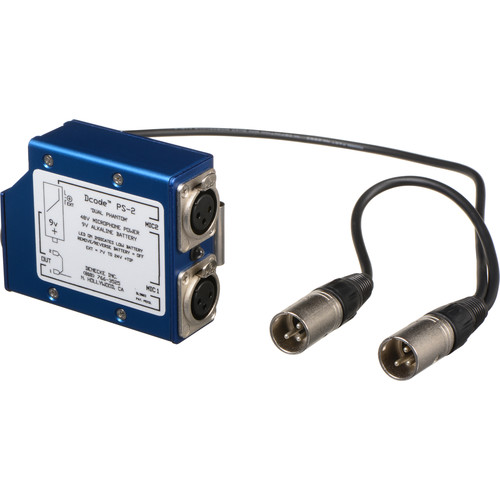

 plus the whole point of this camera is not to have boxes and dongles hanging off it.