711
Well-known member
First off, I know this is not directly a video question, however, I feel it has the best chance of being answered in here.
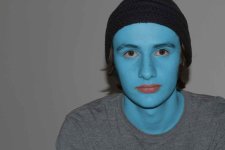
After watching several tutorials, I decided to try and create an Avatar for myself with what basic photoshop skills I have. This is my progress so far...
Original and Edited
I am still working on the edit, and I am going to touch up the nose and some other areas. However, my question is, how can I restore the skin texture of the original photo to the new one with out having to recolor? So basically, how can I texturize the new skin to match the old?
Thanks a bunch!
Eric
After watching several tutorials, I decided to try and create an Avatar for myself with what basic photoshop skills I have. This is my progress so far...
Original and Edited
I am still working on the edit, and I am going to touch up the nose and some other areas. However, my question is, how can I restore the skin texture of the original photo to the new one with out having to recolor? So basically, how can I texturize the new skin to match the old?
Thanks a bunch!
Eric
Last edited: