Question regarding using the full latitude (dynamic range) of the camera

Bubblegummonster

Active member
Hi everyone.

I've got a question about using zones and the latitude of the camera.

I've been reading a lot of books about light and cinematography, also Barry Green's Dvd on lighting. All great stuff but there's one aspect I'm still not 100% clear on.

From what I've read, you should always set your f/stop to a certain item in the scene and make sure the latitude of your camera uses all of the stops available to it either side of this f/stop and anything else that blows out or is under exposed should be lit to fit it into the window of latitude for that camera or removed from the scene. But is it always best to use the full latitude?

So for example say I have something that I want to expose for in the scene. A character that's exposure sits at V1 of the zone, so I think that's about 60 on a waveform monitor. What if there isn't anything that much brighter in the scene. For example a cream wall in the background might be 70% on the waveform monitor but everything else is darker. Should I be increasing the exposure so that I can get more detail in the shadows even though the skin tones and wall will appear to bright but can be brought back down in post. Or do I just forget about using the top end of the exposure?

I hope that makes some sense and I look forward to hearing your answers.

Peter
 
I shoot on a GH2 and NEVER try to use the full (limited) latitude because that will mean I'm capturing mud and crunchy edges. I don't know what camera you have but if it's an 8 bit DSLR I'd say don't use more than about 4 stops of the full range (60%) in any scene if you can control it. I use my false colors and can see exactly what elements in the scene are within the 60% target rage (the center of the IRE chart). Try to avoid the top 20% and bottom 20% because they look like crap and you can't do anything with them in post.
 
Hi Chris,

Thanks for your reply. I have an Af100 so very similar to the GH2, I guess? I haven't found any issues with using the latitude on the highlights as long as I don't go over 100 on the IRE chart. Although I know using the Cine modes does mean you don't get any fall off and a yellow tinge to the highlights if you do go over.
 
Use the waveform monitor and do whatever you want within its 0-100% range. On your AF100..I advise keeping all highlights and whites below 100% always.
 
Use the waveform monitor and do whatever you want within its 0-100% range.
Thanks for the explanation. I'd like to ask a related question:
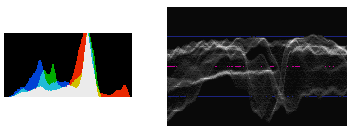
I'm more used to work with the histogram than the waveform (as attached below). Would it be better to use the latter instead from now on? If so, why? (more detail would be appreciated).
Histogram-and-waveform.png
 
To me ...a waveform tells me everything I want to know regarding where objects and subjects in the frame are sitting level wise and within the range. ie Between Black and White (shadows to highlights thru the gammas - midrange) I cant read a histogram as well because it only tells me a range of levels without telling me where they sit in the important IRE scale. .3 to 100% A practical example. The guy with the AF100 - I can tell him to set highlights to say 98% and a black subject to say 5% and face gammas to say 30 - 55%. How would he do that using a histogram or even know where those levels are? >Sorry guys..my enter key does not give a line shift in this post to make this easier to read!!!!
 
To me ...a waveform tells me everything I want to know regarding where objects and subjects in the frame are sitting level wise and within the range. ie Between Black and White (shadows to highlights thru the gammas - midrange)

I'll try to search and read more about how to use one (waveform monitor), properly.
 
THe van hurkman book I reccomended is a great source for this. Steve Hullfish does another. Using a waveform monitor in the camera and in grading stages are a hand and glove fit. search 'Color Correction for Video' - Amazon
 
Thanks for the explanation. I'd like to ask a related question:
I'm more used to work with the histogram than the waveform (as attached below). Would it be better to use the latter instead from now on? If so, why? (more detail would be appreciated).
View attachment 74316

A waveform is about 1000 times more useful for video exposure than a histogram. For what it's worth, we have pretty thorough explanations of the waveform, exposure, and dynamic range on the Lighting for Film and Television DVD.
 
Thanks for the explanation. I'd like to ask a related question:
I'm more used to work with the histogram than the waveform (as attached below). Would it be better to use the latter instead from now on? If so, why? (more detail would be appreciated).
View attachment 74316

The problem with the Waveform display is it is not available on many DSLRs (I don't know if it's available on any...). So, unless you have a monitor on set that has a waveform display option... you'll only be viewing the Waveform in an NLE or the like.

While a 'histogram' can give sort of an indication of that is going on... it is very limited and does not address the basic issue is 'is my subject or significant elements of the shot blown out'.

I don't have a Waveform display in camera or on a monitor... so I have to 'understand' what my light meter is telling me relative to blown highlights or blank black shadows.

The Waveform display can tell you a lot about the shot as the camera is set up... it is not so good for scouting a location, or more dynamic shooting.
 
Hi everyone,

Thanks for the replies I found them quite useful. Continuing on my quest to become better at lighting and cinematography I decided to try a food shot today using some cherries. https://vimeo.com/71281944 Overall I'm pleased with how they came out, I used B press so that the specular highlights didn't turn yellow. I shot cine-D and flat so that I could adjust it in post but I've now been reading that people aren't bothering doing this on the Af100 as there's not much benefit. I was under the impression that it gave me the best latitude and flexibility?


I still don't know if to invest in a light meter. I know Barry Green says that there's not much point (actually I haven't heard this directly from him so I apologies if this is incorrect) But I like the idea of being able to know exactly what f/stop is being read in certain areas and also being able to light without even having the camera on. What do you guys think?
 
The problem with the Waveform display is it is not available on many DSLRs (I don't know if it's available on any...).
With Magic Lantern installed, it's available, as well as Histogram and Vectorscope.
I still don't know if to invest in a light meter. I know Barry Green says that there's not much point (actually I haven't heard this directly from him so I apologies if this is incorrect) But I like the idea of being able to know exactly what f/stop is being read in certain areas and also being able to light without even having the camera on. What do you guys think?
I'm in the same situation. I'd like to get one, but a good one that I won't replace any soon would be around 250$ from what I've read. It's a bit pricey when you only do that as a hobby (in my case).
 
Very nice work on the cherry shots.

You seem to have a great understanding already.

Personally..I dont bother with light meters any more (except for rare test or teaching situations).

The waveform monitor is everything I need and I rely heavily on them... and trust them implicitly.

If you go the meter route for any reason...a spotmeter with an IRE scale attached (eg Pentax) is a great must have tool that directly matches WF monitor info.

An incident meter requires a different approach that is more difficult to relate with and use.
 
With Magic Lantern installed, it's available, as well as Histogram and Vectorscope.

It is unfortunate that one has to load in 'non-vender' firmware to have such features available...

Re: Light Meter.

I recommend getting a spot meter, but then that's because I've had one for years... I recently bought a Sekonic L-308DC because I was having trouble with dealing with 'lights' listed in terms of footcandles, and translating that into something I can set on my camera like F-stop...

One can look on ebay for used Sekonics, as well as some older and no longer manufactured meters.

But one still has to 'calibrate' the meter to what the camera responds with, especially in the low end DSLRs where these picture 'styles' can affect the linearity (or non-linearity...) of the resulting image, and with some cameras one can have custom transfer setups... while in others there are only a fixed few.
 
It is unfortunate that one has to load in 'non-vender' firmware to have such features available...
On Canon DSLR, it doesn't "void" the warranty. It's a simple "add-on" that is located on the memory card that "loads" when you boot the camera. Format the card and you get back to the "stock" DSLR.
 
You mentioned using Adams zone exposure techniques, as in exposing white skin for zone VI. If you are familiar with the Adams Zone Scale wave form is easy to understand.

grayscale-waveform.jpg
grayscale.png


A waveform monitor can be regarded as an electronic version of an Adams zone scale.
0-10 IRE= zone 0
10-20 IRE= zone 1
20-30 IRE= zone 2
30-40 IRE= zone 3
40-50 IRE= zone 4
50-60 IRE= zone 5
60-70 IRE= zone 6
70-80 IRE= zone 7
80-90 IRE= zone 8
90-100 IRE= zone 9

0 to -10 and 100 to 110 IRE are reserved ranges for chroma over/undershoot in color images. Black doesn't get blacker than 0 and white doesn't get whiter than 100. Values outside of this range are not displayed.
If you profile your camera to a light meter, by exposing an 18% gray card for between 50-60 IRE, you can use zone scale metering as an accurate exposure reference too. To protect highlights, placing 18% gray at 60 IRE is a more accurate choice as most light meters reference zone 5 as 12% reflectivity.
 
Last edited:
Brilliant info everyone, thank you so much for your support. Looks like it's best to stick with the Waveform monitor and zones which is something I've been doing so far.

And thanks Shooter for your kind words regarding my footage. I'm going to try shooting a few other subjects today to play with subjects with texture or transparency. Might also have a go with sub surface objects like milk.
 
Waveforms and zones ...yes absolutely. I don't complicate quite as much as thinking "zones" as in the Zone System. I simplify it down to thinking more about the Gray Scale Chart ( as shown). I kind of half "boast"... that I can see in black and white. Well that's not true but I do look at the color image and the waveform monitor and consider everythings position on the Gray Scale Chart.
 
Waveforms and zones ...yes absolutely. I don't complicate quite as much as thinking "zones" as in the Zone System. I simplify it down to thinking more about the Gray Scale Chart ( as shown). I kind of half "boast"... that I can see in black and white. Well that's not true but I do look at the color image and the waveform monitor and consider everythings position on the Gray Scale Chart.

To be sure the Waveform display does make 'light' work of doing a 'zone system' calibration these days... no more developing developing, and even more tedious densitometer reading...

On the other hand the stepwedge from DSC Labs for a simple 12 step grey scale is about $571 US...
 
Back
Top