I want to white balance halogen lights to look red-ish. Now usually if you want a light to look a certain color you have to white balance off of a card that is the opposite color. If you want blue light, white balance against on orange card. If you want orange light, do blue. If you want yellow light, do purple, etc. So in order to get red, logic tells me that I would have to use a green card, cause green is the opposite of red. But doing that just gives me purple instead. I've tried different kinds of greens but all purple-ish. Any thoughts on this? Thanks.

Navigation
Install the app
How to install the app on iOS
Follow along with the video below to see how to install our site as a web app on your home screen.
Note: This feature may not be available in some browsers.
More options
You are using an out of date browser. It may not display this or other websites correctly.
You should upgrade or use an alternative browser.
You should upgrade or use an alternative browser.
Question about white balancing light.
- Thread starter ironpony
- Start date
kennedymax
Well-known member
The complimentary color to red is cyan. Green is the complimentary color to magenta. Try a blue/green card and see what happens.
http://www.google.com/imgres?imgurl...a=X&ei=bkPHULrpBY3G9gSmtYC4Aw&ved=0CCMQ9QEwBg
http://www.google.com/imgres?imgurl...a=X&ei=bkPHULrpBY3G9gSmtYC4Aw&ved=0CCMQ9QEwBg
Last edited:

starcentral
Veteran
You're on the right track but don't use coloured cards at all. Get yourself variations of coloured gels in different strengths ie. 1/4, 1/2, etc... and you can place over your light source, or even lens and then do your camera's AWB.
Personally I dial in the white balance that I want to use and avoid using gels for cheating WB all together - but your camera might not have that feature.
Personally I dial in the white balance that I want to use and avoid using gels for cheating WB all together - but your camera might not have that feature.
Sorry I should have explained more. Some of the locations I want to use have lights that we aren't allowed to tough and they are to stay on. Which is okay cause as long as we light it correctly we can make it look good. But the owners do not want us to go up to the tall ceiling to gel all the lights. Which would require a lift anyway. So I want to balance for lights I cannot gel. I tried Cyan and it gives me a lot of red, but too much. It's a horror movie set in regular buildings, not a movie set inside a submarine with it's emergency red lights on. So I need to make the light appear like normal light, but with a more subtle red look.
I don't like the look so much in post. In camera, you are just changing the color of the source, of light, but in post, everything changes, and it looks like the whole picture has been changed, and not just the light, which is what I want. I tried shooting under natural white balance under halogens, with the intention of grading in post. The halogen light is yellow on actors faces, under natural white balance. If I add red, there is still yellow there. In order to remove the yellow I have to draw a line around the patterns of light, that are yellow, and then desaturated just the yellow parts of the picture. Frame by frame. Even if I made the lights white balanced in camera, I would still have draw lines around the white light in the picture, and make only those parts red.
That could take days or weeks. I really would like to just change the color of the light in camera, to save all that post work, and hammer out projects faster. It's not that I'm lazy but I would like to make more than one short a year by saving on as much post work as I can by getting it right on set.
That could take days or weeks. I really would like to just change the color of the light in camera, to save all that post work, and hammer out projects faster. It's not that I'm lazy but I would like to make more than one short a year by saving on as much post work as I can by getting it right on set.
Last edited:

paulears
Veteran
If you want a red cast, then setting a daylight setting is the usual outcome. My own view is that you can't use coloured cards to white balance because the intention is not to produce white - using coloured card just produces different colour temps than the usual 2800, 3000, 3200, 5000, 5600 we seem to use when we are trying to make white, that we gently tweak. If you select odd in-betweens, there's no guarantee the camera will not produce strange colours that are difficult to correct afterwards. For instance, you can accidentally enhance the apparent brightness of greens or reds - making these colours stand out too much - sometimes so much tweaking afterwards just looks wrong. I really agree with the idea that shoot with your white light set to the correct colour temp of the camera, and do the weird things with post tweaks.
This simply means you're no good at color grading.I don't like the look so much in post. In camera, you are just changing the color of the source, of light, but in post, everything changes, and it looks like the whole picture has been changed, and not just the light, which is what I want.
True. Okay then I am open to what's best for getting the look. Should I just shoot everything with all the lights on the location balanced to pure white then? I also tried daylight settings as paulears mentioned. They give off red and yellow. The red looks really good but the yellow looks too yellow, like bad yellow on a home video movie camera or something.
You could also play with finding a color filter that works on the camera too. This was a common approach for film cinematography. Shoot tests to determine the desired filter pack for a particular look. But this too gives an overall cast to the color of the image.
What are you shooting with, what video codec and what software do you use for finishing now?
I've been playing a bit with the grading tools available in Lightworks. I have managed to get some results from Canon GL2 DV footage that I could never achieve in camera. There is some modest capability to manipulate highlight and shadow color separately. Adobe's Lightroom 4 has support for processing video footage with a similar range of tools available for still photographs. I was surprised when my wife Suzy found tools for directly adjusting color temp white balance in iMovie that worked with the DV footage.
Gelling lights is still a favorite approach for me coming from a theatrical background. We set color themes for shows by finding complimentary warm/cool gel combinations that mixed together produced a fairly neutral white light, but you would get colored highlights and shadows where one or the other predominated. This could be as subtle or extreme as the scene called for. Shooting video or photography of such a show we would use standard 3200K tungsten white balance and let the gels determine the scene colors. Could get funky at times. Cameras don't see color exactly as we do.
As tungsten lights are dimmed the color temp naturally shifts to the red any way, so you might try a straight 3200k balance to start with and see how that works if you are in a dimmer controlled environment.
What are you shooting with, what video codec and what software do you use for finishing now?
I've been playing a bit with the grading tools available in Lightworks. I have managed to get some results from Canon GL2 DV footage that I could never achieve in camera. There is some modest capability to manipulate highlight and shadow color separately. Adobe's Lightroom 4 has support for processing video footage with a similar range of tools available for still photographs. I was surprised when my wife Suzy found tools for directly adjusting color temp white balance in iMovie that worked with the DV footage.
Gelling lights is still a favorite approach for me coming from a theatrical background. We set color themes for shows by finding complimentary warm/cool gel combinations that mixed together produced a fairly neutral white light, but you would get colored highlights and shadows where one or the other predominated. This could be as subtle or extreme as the scene called for. Shooting video or photography of such a show we would use standard 3200K tungsten white balance and let the gels determine the scene colors. Could get funky at times. Cameras don't see color exactly as we do.
As tungsten lights are dimmed the color temp naturally shifts to the red any way, so you might try a straight 3200k balance to start with and see how that works if you are in a dimmer controlled environment.
Last edited:
j1clark@ucsd.edu
Veteran
True. Okay then I am open to what's best for getting the look. Should I just shoot everything with all the lights on the location balanced to pure white then? I also tried daylight settings as paulears mentioned. They give off red and yellow. The red looks really good but the yellow looks too yellow, like bad yellow on a home video movie camera or something.
If I understand your problem, the facility you want to shoot in has fluorescent lights, industrial strength, which have a 'green' cast. Your additional 'movie' lights are daylight/tungsten balanced HMI/Tungsten. You can not change the existing lights.
'white balance' will not help you. While you may be able to 'balance' for the case where both light sources are shining on the scene, but shadows from one light and 'filled' by the other light will have a color cast, and the cast will be different for which light is illuminating the shadowed area.
The spectra of these two types of lights are different. Your choice is to condition the lights you have control over. If you gel the lights you control to better 'match' the existing fluorescents, you can then use 'white balance' to minimize the overall 'green' cast.
Alternatively in the NLE/color grading pass, dial the green cast back.
On the other hand, if the fluorescents are in a 'high' bay, they may not actually impact the talent and how they are lit as much as to cause a 'really big problem'... need to shoot some test footage to check.
For example, in my work place, the highbay 'fluorescents' deliver about 10 footcandles worth of light to the work area 'floor'. If my HMI/Tungsten lights are delivering 100 fc... the fluorescents are only 1/10 the light to the subjects. The fact that the background may be illuminated with the 10 fc, may be 'ok'... depending... and perhaps correctable in post by a minor reduction of 'green' in the 'shadow' values.
sonofaresiii
Well-known member
You can't turn the lights off or gel them, but how possible is it to block them out entirely? Unless it's a very large space, it may be worth trying to set up a large cover to block them all out, then light everything on your own.
besides that, i'm seeing two real options here, both involve just letting the house lights do their thing: you can overbake the set in your own lights (as j1clark) mentioned, which is what i'd do if i had the time, money and power... or you can flag off the light on the talent, light them with your lights, and just let the background go a little green and do your best to grade it out (may sound a bit trashy but in my experience, it comes out a lot better than you'd expect).
of course, the best way to know for sure what you want to do is shoot a test.
besides that, i'm seeing two real options here, both involve just letting the house lights do their thing: you can overbake the set in your own lights (as j1clark) mentioned, which is what i'd do if i had the time, money and power... or you can flag off the light on the talent, light them with your lights, and just let the background go a little green and do your best to grade it out (may sound a bit trashy but in my experience, it comes out a lot better than you'd expect).
of course, the best way to know for sure what you want to do is shoot a test.
So the lights in the location are sodium, like street lamps. The halogens are a close match to the color. I want to use both and make it all blend. But also make it red looking, but subtle red and not red red. And I'm shooting with the Canon T3i. It seems filters are a bad idea, because you changing the color of everything and not just the light. And it seems that post color grading is a bad idea, because you are coloring everything. Unless you draw lines around the light patterns specifically, and just color those. But that takes weeks or longer and it seems white balancing in camera is to red is better, because it takes a lot less time.
Have you ever considered bringing in an experienced cameraperson?
Some time ago I decided to stop participating in ironpony threads (I frustrate easily) but I still read them for entertainment value, and I'm surprised that nobody has ever suggested this - so here I am
Love ya ironpony, don't ever change, but I really think it would help you make better films to have an in-person mentor or guide. Please don't take this the wrong way, I don't want to discourage you from making films. I see that you have great passion and I do root for you to overcome your technical challenges.
Some time ago I decided to stop participating in ironpony threads (I frustrate easily) but I still read them for entertainment value, and I'm surprised that nobody has ever suggested this - so here I am
Love ya ironpony, don't ever change, but I really think it would help you make better films to have an in-person mentor or guide. Please don't take this the wrong way, I don't want to discourage you from making films. I see that you have great passion and I do root for you to overcome your technical challenges.
Last edited:
j1clark@ucsd.edu
Veteran
Have you ever considered bringing in an experienced cameraperson?
Some time ago I decided to stop participating in ironpony threads (I frustrate easily) but I still read them for entertainment value, and I'm surprised that nobody has ever suggested this - so here I am
On a site like this, I would not make such a suggestion, unless the question was 'where to find a qualified camera person(operator/cinematographer/DoP,etc.).
The reason is because I view this site as predominantly frequented by people who either are 'learning' the various skills or don't have the funds to hire skills, yet still want to make films. At the extreme... why not tell someone, 'how about just fund a film, and let the 'experts' take care of the rest'.
Even then, it is useful for a money person to actually understand what is involved, and not just 'book knowledge'... which is for the most part a 'hands on' learning process.
Another issue is where someone lives... I happen to live about 90 miles (that is 90 minutes or 10 hours depending...) from Downtown Hollywood... so yeah, I can probably find any amount talent and skill at some price to do anything 'I want'... ok I'd have to go another 30 miles ot Chatsworth to get even more of what 'I want'... but I digress...
Not everyone lives in So. Cal, so does not have a large base of 'skill' to draw from.
Personally I wish there had been this sort of environment when I was young... I may never have been able to make it in film making... but this environment would have provided a very good spring board for developing skill and understanding of the process of making films...
On...
I'm not suggesting an ASC member here, just somebody who has done it before. Anybody who has commented in this thread is qualified.
I feel like online help can only do so much, and at some point you have to learn from somebody in person. It's a far more effective method of education - especially in this field.
If you are in the northwest US, ironpony, I'd be glad to help out - in person. I'm sure there are others on this board, in other geographical locations, who would do the same. You've proven yourself to be one to not give up easily, worthy of help.
Last edited:
j1clark@ucsd.edu
Veteran
So the lights in the location are sodium, like street lamps. The halogens are a close match to the color. I want to use both and make it all blend. But also make it red looking, but subtle red and not red red. And I'm shooting with the Canon T3i. It seems filters are a bad idea, because you changing the color of everything and not just the light. And it seems that post color grading is a bad idea, because you are coloring everything. Unless you draw lines around the light patterns specifically, and just color those. But that takes weeks or longer and it seems white balancing in camera is to red is better, because it takes a lot less time.
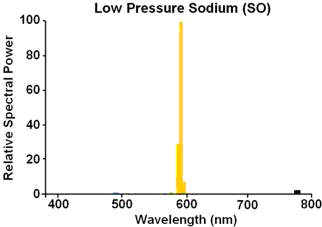
There are two classes of 'sodium' light used in most industrial situations. High Pressure and Low Pressure... in the case of Low Pressure the 'spectrum' of the light is nearly monochromatic 'orange/amber/yellow' (however someone perceives these things.
Here's a diagram of the spectrum:
Here's a picture of such a bulb in operation:

What these two images should strongly 'suggest' is that you will not get 'red' out of them in any 'natural' way. There is 'no red' in the Sodium spectrum. The way a 'filter' works is it absorbs portions of the spectrum and allows other portions to pass through. If there is no red on the light, as in the Sodium case, there will be no red passed through the filter...
Here's the spectrum of a High Pressure Sodium lamp... a little bit better in terms of having more width than the LPS lamp... but still the 'yellow' spike dominates...

Here's the spectrum found on the web for a 'halogen' type lamp:

The point of this is the only way you are going to get 'redish' out of this is by filter the halogen, or using tungsten and dropping the voltage more than usual to give a more 'redish' cast. An 'orange' filter would be the most commonly used one. Unless you are going for a non-standard color cast.
Or use post processing to give the color cast you desire.