Silly me I forgot to set the white balance, on the second day of shooting. I shot under fluorescent lights on the tungsten setting and the shots look green, which I don't like. I also have to match them with the properly white balanced shots from before. I can use the color balance plug in, on Premiere Pro. But they have three options. highlight, midtone, and shadow. Which is best for matching white balance? Or should I use a little of all three, to get the closet match? I tried highlight and it matches alright, but is there anything else I can do to match better?

Navigation
Install the app
How to install the app on iOS
Follow along with the video below to see how to install our site as a web app on your home screen.
Note: This feature may not be available in some browsers.
More options
You are using an out of date browser. It may not display this or other websites correctly.
You should upgrade or use an alternative browser.
You should upgrade or use an alternative browser.
Question about color correction.
- Thread starter ironpony
- Start date

William_Robinette
Shallow Member
Post a full res screen shot and lets see what we can do.
sonofaresiii
Well-known member
Wait, are you trying to match with other white-balanced flourescent shots, or shots from another light source?
j1clark@ucsd.edu
Veteran
If you were using the '3-way' color corrector, here's a screen shot I worked up using an old clip... unfortunately it is 'pretty well balanced', however I did click on the eyedroppers for each of the 3, 'white', 'mid', 'shadow', and then clicked on corresponding elements of the scene.
White Eyedropper --- on dog's muzzle which is nearly 'white' (like blinding...)...
Mid Eyedropper --- on 'bluish' pool siding.
Shadow Eyedropper -- on dog's 'black coat' (technically it is a middle with a slight tinge of 'brown' grey... but when wet is 'dark'...).

White Eyedropper --- on dog's muzzle which is nearly 'white' (like blinding...)...
Mid Eyedropper --- on 'bluish' pool siding.
Shadow Eyedropper -- on dog's 'black coat' (technically it is a middle with a slight tinge of 'brown' grey... but when wet is 'dark'...).
Last edited:

David W. Jones
Veteran
I always recommend shooting a little bit of chart at the head of each scene which will help you match shots in post.

starcentral
Veteran
Silly me I forgot to set the white balance, on the second day of shooting. I shot under fluorescent lights on the tungsten setting and the shots look green, which I don't like. I also have to match them with the properly white balanced shots from before. I can use the color balance plug in, on Premiere Pro. But they have three options. highlight, midtone, and shadow. Which is best for matching white balance? Or should I use a little of all three, to get the closet match? I tried highlight and it matches alright, but is there anything else I can do to match better?
I use premiere and stock filters to adjust my color. I use fast color corrector followed by RGB Curves.
Fast CC can be used to move around your overall scene hue balance and angle. I find this useful to get just a little shift in color temperature, say my shot is too cool or to warm I just move the "balance angle" AWAY from the overall scene color you are trying to remove. In your case "green" so go towards MAGENTA. Keep your MASTER BALANCE between 15 and 20 and your MASTER GAIN at 20.
Next open up your RGB curves. Always start with MIDTONS because generally your scene makes up mostly midtones and you will see the change easier than in the shadows or highlights which you can tweak last.
RGB has a master RGB curve good for adding contrast by making a small S curve. For the color channels however, you can try uping the RED and BLUE mid section of the curves ever so slightly, and see if this pulls out the green.
You need to experient, keep your language clean, and have fun.
starcentral
Veteran
TOP SECRET! Shhhh.....
TOP SECRET! Shhhh.....
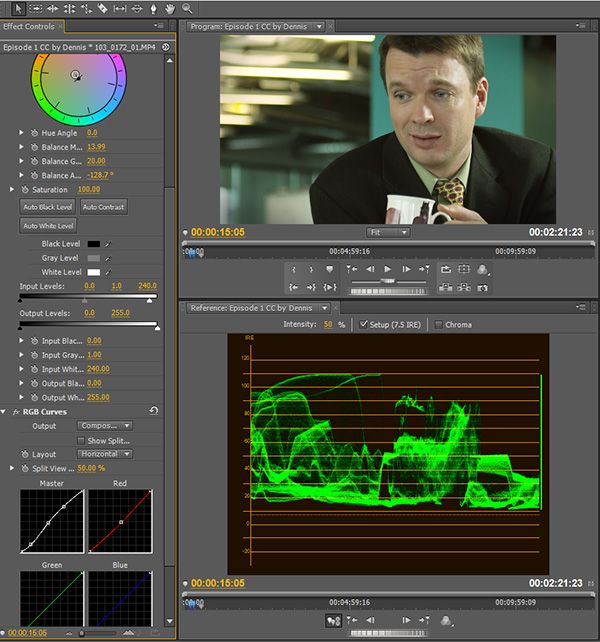
So here we have an example of a top secret project I worked on as DOP a couple weeks ago (shot with the Sony F3 not that it matters) and I've been color correcting and grading it for its big debut later this week.
Near the top of my Effects Control panel you see a color wheel. This is from the Fast Color Corrector I had mentioned. I moved it just SLIGHTLY over towards RED because I wanted some warmth to my overall shot. The INPUT and OUTPUT tools are also really useful for adjusting your where black and white points are on the IRE scale. It's possible to use this to re-expose your image by adjusting the black, gamma and white sliders. In my example, you will see I lowerd the white from 255 to 240. This was to compress and bring down the highs slightly. The flo lights are clipping as you can see (reading 110IRE) but I don't care in this case.
Under the RGB curves filter you can see the subtle easy S-curve I added under MASTER to adjust different aspects of the tones in the scene. On the red channel I give a slight decrease to the red from the mid-tones.
TOP SECRET! Shhhh.....
So here we have an example of a top secret project I worked on as DOP a couple weeks ago (shot with the Sony F3 not that it matters) and I've been color correcting and grading it for its big debut later this week.
Near the top of my Effects Control panel you see a color wheel. This is from the Fast Color Corrector I had mentioned. I moved it just SLIGHTLY over towards RED because I wanted some warmth to my overall shot. The INPUT and OUTPUT tools are also really useful for adjusting your where black and white points are on the IRE scale. It's possible to use this to re-expose your image by adjusting the black, gamma and white sliders. In my example, you will see I lowerd the white from 255 to 240. This was to compress and bring down the highs slightly. The flo lights are clipping as you can see (reading 110IRE) but I don't care in this case.
Under the RGB curves filter you can see the subtle easy S-curve I added under MASTER to adjust different aspects of the tones in the scene. On the red channel I give a slight decrease to the red from the mid-tones.
ReelFilmGeek
Well-known member
Hey Starcentral, do you use the fast color corrector for most of your color correction? I currently have been using colorista (which I love) but it doesn't seem to work well in premiere so I have to use it in after effects and I cant find a way to get a waveform monitor
starcentral
Veteran
Yeah I mentioned I use Fast CC, and RGB curves. Also ProcAmp and Brightness/Contrast are useful.
I own the full Adobe Production Premium CS6 suite which does include After Effects, and honestly although I prefer and love After Effects it just makes my life easier to use the built in tools of premiere once you learn them. Also, I work with directors and producers through email and can send them the project file since we both have copies of the footage they are able to view it and give feedback. When you use after effects or even plugins for premiere you wouldn't be able to do that.
Don't get me wrong however, I have magic bullet too which is great for establishing different looks and experimenting.
If you bought the CS5 or CS6 suite I believe it came with Synthetic Aperture which gives you a WM in After Effects. Its pretty good but and gives you sane tools as all CC software.
I own the full Adobe Production Premium CS6 suite which does include After Effects, and honestly although I prefer and love After Effects it just makes my life easier to use the built in tools of premiere once you learn them. Also, I work with directors and producers through email and can send them the project file since we both have copies of the footage they are able to view it and give feedback. When you use after effects or even plugins for premiere you wouldn't be able to do that.
Don't get me wrong however, I have magic bullet too which is great for establishing different looks and experimenting.
If you bought the CS5 or CS6 suite I believe it came with Synthetic Aperture which gives you a WM in After Effects. Its pretty good but and gives you sane tools as all CC software.
Last edited:
ReelFilmGeek
Well-known member
Okay cool will look in to it but will first give Fast CC a try because that would make my life easier. I just see everyone using after effects so I never thought to look in to color grading in premiere, guess its a mistake on my part >.<
starcentral
Veteran
Basic CC can be done in anything, but complex CC such as selective grading of a scene (for example seperate CC on subject and background) needs something like After Effects.
Selective grading , or selectively adjusting exposure to parts of a scene also requires After Effects.
Magic Bullet however even in Premiere can be powerful for doing some grading and animating masks, etc.. But AE is where its at and lastly (big tip!!!) if you use the CS bundled suite you can actually link to AE project files from within Premiere.
Selective grading , or selectively adjusting exposure to parts of a scene also requires After Effects.
Magic Bullet however even in Premiere can be powerful for doing some grading and animating masks, etc.. But AE is where its at and lastly (big tip!!!) if you use the CS bundled suite you can actually link to AE project files from within Premiere.
Last edited:
starcentral
Veteran
Matching other shots, same lights.
If you read post #6 I tell you exactly how to do it.