quality of juicedlink on a camcorder that doesnt have manual audio control

deleuze3

Well-known member
Hi,
i have a camcorder that can be set to low or high for audio recording.
If i put it on low, i could use a juicedlink with audio meter.

I wonder if i would have good sound.

Do you guys think i should upgrade to a manual audio camcorder where ill be able to put to mute the audio of the camcorder in order to control the sound entirely on the juicedlink ?

Thank you in advance
Have a good day
Deleuze3
 
I haven't shot with that model, but I have shot with a bunch of Canon and Panasonic camcorders that were equivalent to the Sony model you have, and they definitely sounded much better with a good pre-amp feeding an audio signal to them. I would expect your Sony camera would perform the same.

A lot will depend on the type of mic you are using with the JuicedLink unit, and how the mic is placed while recording.

What do you want to shoot and which mic are you planning on using to record sound ?
 
I would put my camcorder cx550v at "low" function.
I would place a rode lavalier connected in XLR on the juicedlink RA222.
That would be my set up. I record myself talking into the lavalier.
thanks for the reply
 
Its probably not worth it to buy another camcorder just to have a manual audio switch that i can put to zero.
The camcorder cx550 can be put to "low" and the signal will be ok probably...?
 
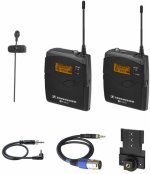
If you don't own any of the audio gear you mentioned ( Rode lav and JuicedLink RA222 ) you might want to consider a Sennheiser G3 UHF mic system which provides you with a lot of control with both the transmitter and receiver units, and you can plug directly into your camcorder's mic input. The cost would be close to what the JuicedLink and Rode lav mic would cost you, and give you the freedom of no cables between the person on cam an your camera. If you plan on using other mics at some point, then the JuicedLink would be the better choice.

I've also used a small pocket recorder ( like the Olympus DM-620 or WS-802 recorder ), with my lav mic plugged directly into the recorder and the recorder clipped to the person's belt or popped into their coat pocket. These recorders can power the lav mic and can record high quality PCM audio. You have to do the audio syncing when you edit, but it's not that difficult once you're used to it. An Olympus recorder can be bought new for $150 or less, and an OscarSoundTech lav mic wired for the Olympus 3.5mm mic input will cost you about $100. So for $250, you've got an effective audio solution.

The Sennheiser UHF or JuicedLink set-ups are better because you can properly monitor your audio as you shoot ( something usually not possible with a small recorder placed on your subject ), but they will cost a fair bit more. You can also buy an OscarSoundTech lav mic ( it's one of the best low cost lav mics I've ever used ) wired for XLR inputs, which can be used with the JuicedLink or with portable recorders like the Tascam DR-40.
 
Last edited:
I highlighly suggest new accessories over new camera. Many accessories will last much longer than cameras will. There are some lights & microphones that are over 20-30+ years old that still work today & the models are still being produced today.

A juiced link will work well for this camera you have now & might work with the next camera you buy too.

---

Also, look on eBay for some used units. Not as nice as the newest models, but you could find an older model for 50-70% less than the current ones.
 
Also, look on eBay for some used units. Not as nice as the newest models, but you could find an older model for 50-70% less than the current ones.

*** Remember that the JuicedLink "Riggy" models provide 30 dB of clean gain, while the older models only provide 15 dB of clean gain.
 
If you get the Sennheiser G3 UHF kit, I would start with the following settings and see how the audio sounds on your Sony camcorder...

Set your Sony camcorder to it's low audio input setting.

Transmitter pack ( with the lav mic attached ) set the "Sensitivity" to -18 dB

Reciever pack set the audio OUT to -18 dB

Then using the Sony's headphone jack, see if your audio is loud enough and make sure it's not distorting. If it's too loud or distorting, then lower the audio OUT level from the Sennheiser receiver. If it's too quiet, then raise the audio OUT level on the receiver. The Sennheiser reciever has quite a large audio OUT range, so you should be able to figure out an optimum setting for your Sony camcorder.
 
Back
Top