Projecting Logos

morgan_moore

Major Contributor
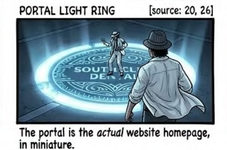
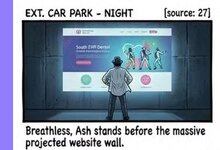
I have two images on my (provided) stroyboard

One being a 'website homepage' projected on a concrete wall.. I feel this could be done with a rental 'tv/presentation/movie' prjector.. PLEASDE COMMENT ON PROJECTORS

the other is logo on floor.. which could be done with the smae 'movie projector' or maybe (due to the bicolor pattern) a custom burned Gobo ??

third question.. in general to folk have comments on a lensed fixture to fit my led light (godox 200 and aperture 600) .. im feeling the $300 ebay specials more than the £1500 aperture version!

project.JPG
project2.JPG
 

Attachments

  • 1774353783885.png
    1774353783885.png
    322.3 KB · Views: 0
If you want to do it practically, which I respect, I would rear-project the website page onto a cut sheet or translucent panel. Any projector should let you do that.

Alternatively, with almost any projector, you should also have wide latitude to angle the projection, so you could front-project from the side at an angle and adjust the proportions of the image accordingly.

But for the effect most matching the storyboard and most flexibility, I would do it as SFX in post.

As for the floor, the only way to do it without shadows to match the storyboard would be as SFX in post. Otherwise, yes, a gobo would be needed.
 
Thank for your thoughts.

In terms of a projector could you suggest a wattage or brand or some basic thing to ask a rental house (might not be cine rentals)

I guess they all manage keystoning?

I'd be capable of putting the projector up high on a combo stand 'goal'

It strikes me that a 'mid ground' between SFX and practically is that I project (with a lens and 'cut's ) a rectangle on the wall so there is a real element in the shot (causing reflections on the floor, and for the actor to perform to) but that actual website deign/content can be comped in later!

Ill check out a custom cut gobo .. or again I think a circle could be projected on the floor to be a tartget for the SFX comp.

S
 
Last edited:
I don't really know projectors well, though yes, they should all have that functionality. As for wattage, you can go brighter and always ND down if necessary, but you can't make a dimmer projector brighter.

If you want an element for the actor to react to, make it a greenscreen or bluescreen in a 16:9 ratio, or whatever ratio the website graphic will be. Just light it evenly and don't drop any shadows on it.
 
I don't really know projectors well, though yes, they should all have that functionality. As for wattage, you can go brighter and always ND down if necessary, but you can't make a dimmer projector brighter.

If you want an element for the actor to react to, make it a greenscreen or bluescreen in a 16:9 ratio, or whatever ratio the website graphic will be. Just light it evenly and don't drop any shadows on it.
Im not sure greenscreen is very 2026.

Large chunks of green around the set dont really work for reflections and glows.

I think todayts software can track four or six Xs tapesd to a wall.

I have. ordered..

1) a follow spot attachement.
2) a bownes mount that I can scew to anything
3) a $70 projector..

The $70 projector that wiill..

-educate me (FPS!!!!)

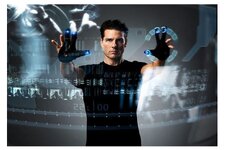
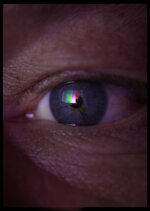
Enable me to do some small stuff.. like project the website onto a 3*4foot bit of tracing paper that can then ulluminate the talent on reverses.. maybe even get a legible 'website' reflected in the eyes.

IN terms of theat project it seems to have manual focus and manual tombstone levers.. its end of line with the new models having auto tombstone and focuas.. and you know what we think of auto!
 
Im not a post expert. Im just noting (from the camera dept end) that chunks of green can cause unpleasany reflections.

At the moment the challenge is understanding the director desirst and how to 'sell' the concept as the storyboard shows the website 'on' the wall. but chats now he might want the website 'floating' in the air !!! air.JPG
 
Im not sure greenscreen is very 2026.

I think todayts software can track four or six Xs tapesd to a wall.
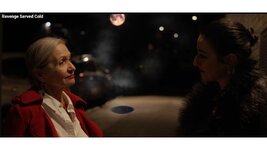
As you say, green screen is not needed in most cases. But the software needs edges. Even with Davinci's Magic mask, cutting out a human can be difficult and require hand rotoscoping on a frame by frame basis. Your storyboard for the last shot is indicating a dark room with low contrast lighting. Cutting those two character's out to put the gobo under them may not be easy. When it works, Magic Mask is great. But when it doesn't, hand scoping a few hundred frames is a chore. I suggest you run a test.

Here is an example where the person on the left has decent contrast compared to the background. While Magic Mask did most of the work, some hand scoping had to be done to bring the two actors in front of the VFX steam from the manhole cover which sometimes wandered behind them.

revenge mask.jpg
 
Paul - yes - you have saved me a schoolboy error!


THe frame standing in front of the 'sceen/projection onto the wall' .. the X method would work to 'add' that image in front of the wall.. BUT there is a character in front ot the 'image' to and that character will need cutting out... so at minimum the character pobably does need to be in front of a GS.. like a 6by6 pop up behind the character :)
 
That will work if it is a static shot. If it is a traveling shot, then it is way more complicated.

Since you are showing the actor's feet, the pop up won't work. You need green under the shoes. If you shoot from the knees upward, then ok.

If you're going to use a green screen, then you don't need a projector. Instead:

- Shoot the background plate (the scene without the actor and without the projection)
- Shoot the scene with the actor and green screen
- In post, put the three elements together
- Layer one is the background plate
- Layer two is the VFX
- Layer 3 is the actor keyed in over the other two elements
 
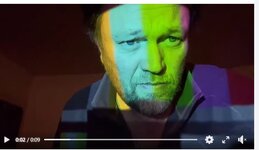
For projection on my face.. the amazon projector pops into HDMI on my laptop.. I have a differet idea to creat a catchlight

projector.JPG
 
Back
Top