StillGuerrillaFilms
Well-known member
I'm working in AE CS3 with upside down footage I shot using a 35mm adapter and I'm running across a curious problem I haven't figured out (well other than to render and replace each bit I want to use a mask on which I'm trying to avoid).
I have flipped the footage using a plugin to the correct orientation. I want to use a mask on a few clips to make the background darker than the actor for effect. So I duplicate the layer and draw a mask around the actor. The problem is, only one of the layers will orient right side up.
If I have just the actor isolated in the top layer via the mask, it is right side up but when I apply whatever I need to the bottom layer to create the effect on the background, the effect is upside down.
No matter what I do to the mask (i.e. invert it), flip, flop each layer in all types of combinations, it will not orient both right side up at the same time.
Anyone have any ideas about fixing this other than to render the clip right side up and replace the upside down original and then do the composite?
If it comes to that, I will but if someone had any other ideas, that would be cool. Thanks.
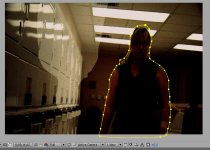
I've attached an example of what I'm talking about. The woman has a mask around her (top layer) and I've darkened the background (bottom layer). As you can see the masked woman on the bottom layer is upside down and flipped (lighter area).
I have flipped the footage using a plugin to the correct orientation. I want to use a mask on a few clips to make the background darker than the actor for effect. So I duplicate the layer and draw a mask around the actor. The problem is, only one of the layers will orient right side up.
If I have just the actor isolated in the top layer via the mask, it is right side up but when I apply whatever I need to the bottom layer to create the effect on the background, the effect is upside down.
No matter what I do to the mask (i.e. invert it), flip, flop each layer in all types of combinations, it will not orient both right side up at the same time.
Anyone have any ideas about fixing this other than to render the clip right side up and replace the upside down original and then do the composite?
If it comes to that, I will but if someone had any other ideas, that would be cool. Thanks.
I've attached an example of what I'm talking about. The woman has a mask around her (top layer) and I've darkened the background (bottom layer). As you can see the masked woman on the bottom layer is upside down and flipped (lighter area).