Problem with Compressor stretching text and titles

GregJ

Active member
Anyone else have this problem?

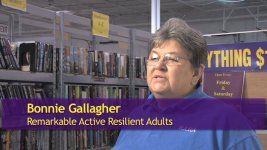
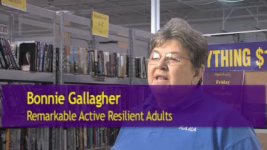
When I export an HDV-based timeline to Compressor (for web delivery), the lower third titles, which look fine in FCP, get stretched vertically. So does all the text in the clip, by the way. If I export using QuickTime conversion to a larger size, the titles and text are okay.

Is this a Compressor problem? Is there a workaround for this stretching?
 
What frame size are you exporting to? if the target format has a different aspect ratio than the original HDV footage, you will have to tweak your Compressor settings to tell it how to crop the footage or to include automatic cropping.

Even with correct settings, I had a small amount of distortion going from 720p footage (16:9) to DV (4:3). This seems to have been corrected in the current version of Compressor. At least I no longer experience the problem, so if it was user error, it somehow has been corrected.

Kevin
 
I export to 426x240, which is a proper 16x9 aspect ratio, give or take a fraction of a percentage point. And, as I said, when I compress it with QT conversion to 640x360, there is no distortion.

It's weird how the picture comes out fine, but just the text gets stretched.
 

Attachments

  • RARA large.jpg
    RARA large.jpg
    50.3 KB · Views: 0
  • RARA small.jpg
    RARA small.jpg
    22.8 KB · Views: 0
Compression ruins text

Compression ruins text

Hi,

I'm bumping this because I really don't like the workaround I've come up with and the text is still stretched. I'm sure someone has solved this problem, so...

How do you all compress videos with text without stretching the text until it looks lousy?
 
this is how i do it. export the sequence in its full res, native codec and then bring that file into compressor and export to the specs you want.
 
Of course, that makes perfect sense!

Which is why I didn't think of it.

I tried it and it works. Thanks, Zak. Much obliged.
:thumbsup:
 
Back
Top