
Jeff@Dodgenburnmedia
New member
Hi,
I'm having a problem grading my FCP sequence that is using footage from 2 different cameras (HPX170 & 7D).
The HPX170 footage is in quicktime format, 720p, DVCPRO HD 720p60 codec and 29.97fps.
Before I started editing I re-encoded all the footage from the EOS 7D to match the specs of the HPX170 footage. (7D footage was originally 720p, H.264, 60fps)
So I'm all done editing and everything looks fine in FCP.
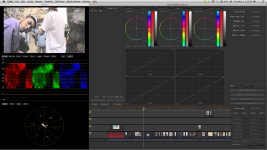
Now when I import the sequence into Apple Color, before even adding any grading... all the 7D shots look extremely overexposed and slightly desaturated. However when I look at the shots from the HPX170 in Apple Color, they look exactly the same as they did in FCP.
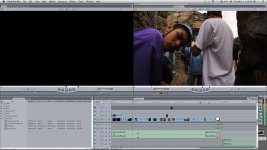
Any ideas why my 7D footage is showing up correctly in FCP but overexposed in Color??
Appreciate the help guys, thanks.
Here's how the shot looks in Color:
Same shot in FCP
I'm having a problem grading my FCP sequence that is using footage from 2 different cameras (HPX170 & 7D).
The HPX170 footage is in quicktime format, 720p, DVCPRO HD 720p60 codec and 29.97fps.
Before I started editing I re-encoded all the footage from the EOS 7D to match the specs of the HPX170 footage. (7D footage was originally 720p, H.264, 60fps)
So I'm all done editing and everything looks fine in FCP.
Now when I import the sequence into Apple Color, before even adding any grading... all the 7D shots look extremely overexposed and slightly desaturated. However when I look at the shots from the HPX170 in Apple Color, they look exactly the same as they did in FCP.
Any ideas why my 7D footage is showing up correctly in FCP but overexposed in Color??
Appreciate the help guys, thanks.
Here's how the shot looks in Color:
Same shot in FCP
Last edited:
