Preview gone on .MOV

michigan

Active member
I have 64 and 32 bit programs installed on my home and laptop computers. Recently bought a Canon 7D which delivers .MOV files. Previously used Panasonics AVCHD files with the HMC150.

Anyway, I am having a problem with previewing .MOV files. Today I started laying out .MOVclips and JPEG files. Everything normal for a few hours of work. I am approaching 20 minutes on timeline. I add a .MOV clip and Vegas preview no longer previews any .MOV files. it will preview JPEG and title work. I removed last 5 minutes of timeline clips and still no go.
uninstalled and reinstalled the 32 bit. Now neither 32 or 64 bit program will open project. Both stop loading around 30-35%.
This is on my new 2.8ghz, dual core Dell with 4GB ram. I've had a similar problem with my home computer (quad core, 8GB ram.....) and the no preview problem.


Any suggestions.

Thanks,

Doug

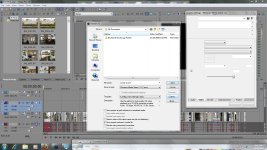
Attached is a screen shot of render selection. Look at custom box to right. all of the tabs look similar..... unpopulated
 

Attachments
  • Vegas Problem.jpg
    Vegas Problem.jpg
    368.1 KB · Views: 0
Last edited:
That's why almost no one is editing these files on Vegas as is. Vegas has a fundamental flaw with the Quicktime engine, it crashes, freezes, whatevers. Especially in 1080p h.264 footage.

Most of us with 5D/7D/1D/SX1/SX200 Canon cams either use Cineform, or DNxHD, as intermediate files. We don't use the h.264 files directly.

File a bug report with Sony. They already know of their weak Quicktime implementation, but more emails the better.
 
Eugenia,

Thank you for the info. Since I posted, I found your 10/28/2009 response to a similar 7D .MOV problem. As we speak, I am converting my .MOV files using Cineform.
Once again you have come through. You are a great asset and much appreciated.

Thanks again,

Doug Marcum
 
I've not had too much trouble with 5D files on the timeline in V9 64bit. But 32 bit was a no go. However, transcoding these files is the way to go. Cineform is an option. I use DnxHD but it doesn't play as nicely with Vegas as Cineform (usually) does.

Cineform has been problematic for many Vegas users recently as well. It's a real mess out there right now.
 
So what is the answer?
Is there an editing program that can handle these files (.MOV/AVCHD)?
I really like Vegas. But as the saying goes, "time is money" and it just seems like there is always some sort of work around, bug or problem to deal with when utilizing the latest HD technology. Is it the software or my lack of knowledge?
I don't want to switch editing software, but will if it means drastically diminishing problems. Suggestions?

Thanks again Perrone and Eugenia,

Doug
 
> Is there an editing program that can handle these files (.MOV/AVCHD)?

No, the common usage of 5D/7D files is transcoding to Cineform/DNxHD/ProRES or proxy mpeg2 files right now. Proxy files work better on other editors, like Premiere, but not on Vegas (because at the end, while exporting, you still use Quicktime, and as we established, Vegas has trouble with Quicktime). For Vegas, use Cineform if you already own Cineform. Just make sure you update it in its latest version.

AVCHD does not need transcoding. It works fine with Vegas as is on a fast-enough machine, because it does not use Quicktime underneath to decode these files. It uses MainConcept, which works better with Vegas. Looking at your machine specs, it works fine with AVCHD.
 
Eugenia, I'll have to take your word for this, but there are an aful lot of people out there having trouble with AVCHD on some pretty hot machines, and using Vegas. I'd still recommend a transcode of some kind. Maybe to the HD422 .MXF codec. It's not perfect, but it's free and fast.

I am most likely moving to Avid. It ingests all the codecs I shoot (most natively) and it works. Really works. But the price of entry is pretty steep. I just got tired of fighting all the time.

Edius is another possibility. It also works, and the Neo 2 with booster is a nice entry level program with realtime AVCHD performance. I know a few people who have switched over from Vegas and are thrilled.
 
Since upgrading to 9, I haven't really had any AVCHD problems. Last night I transcoded with Cineform and put together my 31 minute project with no problems. It is rendering now, so we will see what happens in a couple hours.

I have also read some favorable posts regarding Edius and have been tempted to give it a try. However, I am told that Edius does not provide the same level of editing options as Vegas. So, for now, I think I will hold tight.

Probably my biggest problem is lack of experience in general and with Vegas. Seems like the people who are familiar with and know what they are doing have fewer problems (although problems still exist).

Thanks again and in advance for past and future help.

Doug
 
Well,

I've been using Vegas since 2004. Been using Cineform since 2007, and have been editing professionally for about 10 years. Edius 5 (not the $200 intro program but the full deal) runs Vegas under a table in terms of editing ability. But Vegas has become horribly unstable for me with using both Cineform and AVCHD.

So much so, that I am leaving the program. A number of other pro editors are leaving also for the same reasons. It's maddening, and this is NOT the economy to begin spending a ton of money on new stuff, and to be losing work trying to learn a new program. So it was not an easy call.
 
AVCHD does not need transcoding. It works fine with Vegas as is on a fast-enough machine,

My machine was screwed when it comes to Panasonic MTS/AVCHD files and I have an i7 Quad with 12 GB.

Last night I converted a new project's files to MOV but have been having serious problems today.

What is the best format to use?

How does Cineform work... I would use it to convert the files then edit the AVI's in Vegas?
 
Edius 5 (not the $200 intro program but the full deal) runs Vegas under a table in terms of editing ability. But Vegas has become horribly unstable for me with using both Cineform and AVCHD.

I've never heard the term "under a table" (other than when it comes to drinking) so do you mean its better than Vegas, or Vegas is better than Edius?
 
I've never heard the term "under a table" (other than when it comes to drinking) so do you mean its better than Vegas, or Vegas is better than Edius?

LOL sorry. Yes, Edius offers quite a number of things Vegas does not. To be fair, Vegas has some things that Edius does not also. But there are a LOT of features I am willing to give up if my program doesn't crash regularly.

On my last project, I was literally having to restart Vegas after every render. NOT a good time when you have some 300+ clips to render.
 
I am having to restart after every couple adjustments.... previews just stop working.

I am going to try 32 bit with the MTS files & see how that goes.
 
Back
Top