premiere video flashes constantly after exporting?

PegLeg Media

Well-known member
So i've been having an issue for a month now on different videos on different hard drives. Whenever i have 2 assets overlap (video/graphic/vignette/transition) the video flashes to black and back over and over. I have rendered using both settings under file>preferences>general and the 2 choices given. Below is a video example, sometimes its this bad sometimes its only slightly noticeable on one asset. so anyone know the fix?

example:
https://www.youtube.com/watch?v=Jl23dDs57aQ
 
Does this happen in the timeline during playback or just on the exported files?

Can you share your export settings?
 
Wow, that could be seizure-inducing! Have never seen this and I'm on the Adobe forums daily.

Please provide as much detail as possible:

Computer hardware specs -
Adobe version -
Plugins used on video -
Source video specs -
Sequence Settings -
Export Settings -

Screen shots of last two most helpful

Thanks

Jeff
 
Does this happen in the timeline during playback or just on the exported files?

Can you share your export settings?

Sometimes it happens in playback sometimes it doesnt which makes it even more confusing. Ive been doing video in premiere since 2004 and have never had this issue. for export settings ill just go to h264, and then use the youtube 1080p preset. Ive tried it with still images, video and just graphics and its happening to all. my sequence settings are just the Digital SLR>DSLR 1080 30p preset (but i click maximum render quality and have tried 2 pass and constant bit rate.)
 
Wow, that could be seizure-inducing! Have never seen this and I'm on the Adobe forums daily.

Please provide as much detail as possible:

Computer hardware specs -
Adobe version -
Plugins used on video -
Source video specs -
Sequence Settings -
Export Settings -

Screen shots of last two most helpful

Thanks

Jeff

computer: MacBook Pro (Retina, 15-inch, Mid 2014)
OS X El Capitan version 10.11.6
Processor 2.8 GHz Intel Core i7
memory 16gb 1600 mhz ddr3
graphics NVIDIA GeForce GT 750m 2048mb

Adobe Creative Cloud premiere 2017

no plugins

it wont let me click the source settings

settings01.jpg
settings02.jpg
 
Okay, so i turned off the layer with a vignette and its exporting fine. I tried to do a simple cross dissolve as a test and it does teh flashing effect during the cross fade then goes back to normal. So is there a way to change settings to things added to the timeline like text/transitions/color mattes?
 
I can't say for certain what the problem is...but this is what I would do and in the order I would do it. Hopefully this helps...

1. Restart Premiere and/or computer.
2. Delete Render Files
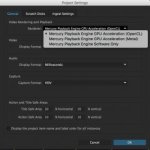
3. Change Renderer in Project Settings.
4. Re-render
5. If problem persists, go back to Step 2 and change Renderer.
6. If problem continues even with different Renderer, uncheck Composite in Linear Color in Sequence Settings.
7. If the problem is still there, delete the video files in Premiere and re-import them using the Media Browser.
8. Finally, last thing I would try is to delete the Media Cache Files. For me, that folder is located in /Users/Little Bobby/Documents/Adobe/Common/Media Cache Files

Beyond those things, I would maybe try to do the Vignette or Cross Dissolve in a different way and see if it continues.
 
Are your source files 1080P 29.97?
Do you still have CC 2015.4 on your mac? If so, maybe try it.

CC 2017 seems to have many weird issues at this moment.
 
it has to be a 2017 issue. Ive tried all those steps and still had the issue. Weird thing is yesterday i moved premiere from my right to left monitor and exported a smaller version of the project and it had no issues. Could the monitor im using be an issue? (i use two of the same monitors and they are both on at the same time I just keep premiere on the right monitor and emails on the left.
 
Back
Top