Premiere export settings for MP4

Most of my clients want an MP4 in a "Quicktime H264 wrapper" , if that's the right terminology. That's easy in FCP but I can't find the option in Premiere. Also, what would you suggest as far as export settings for Youtube/ Vimeo? Main thing I need to know is the "Limit data rate to...." setting. I tried 10,000 but the file looked blocky in areas (strange because I use 8-10,000 all the time in FCP). I raised it to 50,000 and the file looked great but a 4 minute video was over a gig and took 2 hours to upload.
 
Last edited:
View attachment 84042

Dude......make your life easier: Get off that trial version of Premiere and get yourself a copy of Media Encoder. Check out all the varieties above. My screen shot is just scratching the surface. You can start with the stock settings that ME provides and then tweak to your liking.

For Vimeo, I have the target bitrate (Mbps) to 6 and max bitrate set to 7. (I should probably go a bit higher) Your 50K is overkill, obviously .
Longtime Compressor user here, I find Media Encoder to be absolutely wonderful.
 
The built in Premiere encoder had about 6 presets, none usable. I switched over to MP4 for a second, switched back to custom, and all the presets on your screenshot were suddenly there. So maybe I won't need media encoder after all.

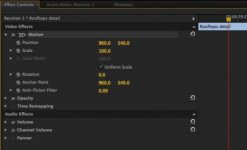
One other question, so I don't have to start another thread: FCP 7 has "wireframes" that let you easily scale say 720 footage to fit a 1080 frame. How is this done in Premiere?
 
FCP 7 has "wireframes" that let you easily scale say 720 footage to fit a 1080 frame. How is this done in Premiere?

See the "Scale" control in your effects box. Alternately, the wireframe is also present in Premiere, but you have to click the "Motion" tab and have it highlighted (as in the posted example) in order to see it.
 

Attachments

  • Screen Shot 2014-03-24 at 8.20.40 PM.jpg
    Screen Shot 2014-03-24 at 8.20.40 PM.jpg
    13.8 KB · Views: 0
I switched over to MP4 for a second, switched back to custom, and all the presets on your screenshot were suddenly there. So maybe I won't need media encoder after all.

:shocked: hey, if it works, it works!

also, i just checked, if you double click on the footage in the program (record) window, it puts a wireframe around the footage you can scale. I prefer the effects control window.
 
Most of my clients want an MP4 in a "Quicktime H264 wrapper" , if that's the right terminology.

It isn't. MP4 and QuickTime are both container formats, whereas H.264 is the codec used inside. So it would be an H.264 video in either an MP4 wrapper or a QuickTime wrapper.
 
It isn't. MP4 and QuickTime are both container formats, whereas H.264 is the codec used inside. So it would be an H.264 video in either an MP4 wrapper or a QuickTime wrapper.

SO how, in Premiere, would I generate an H.264 video in an MP4 wrapper, as the clients want? Simply selecting MP4 doesn't give that option anywhere.
 
Back
Top