Premiere CS5 / Quicktime, colors are too different.

robbie75vr

Active member
Check out this screenshot,

look at the sky color (other color as well), they are sooo different..
what is the correct one ?
how can I color correct it if they look so different from one player to another ?
In Windows Media Player is also different, lot lot darker shadows and clipping.

Thanks
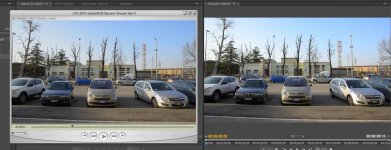
Quicktime vs Premiere.jpg
 
I wonder if this is related to the gamma shift on the part of Quicktime's render of H.264 that has been reported for years, noted when viewing the rendered Quicktime file on a PC? Do files other than Quicktime also display differently on the two players? If those look the same, then the issue is probably a gamma shift. Now, the real experts can correct me if I'm wrong.

Tom Harman
 
The hue its different, not the gamma, does video has color profile like pictures?, it looks like pictures when viewed with and without color profile.
 
Last edited:
Do you have Quicktime 7 Pro? I watched a video online where you are able to adjust the color shift of H.264 video by going through movie properties.
 
never rely on quicktime either it always seems to do things to video that looks fine on other players, divx or vlc players are the way to go.
 
Supposedly CS5 bypasses quicktime altogether. Given all the documentation about the quicktime gamma shift (which is what this looks like to me), I would try to avoid it. I don't know how much one can trust the CS5 display, but I'm betting that on a well calibrated computer monitor, especially one that lets you set a video gamma, you will get close to the aforementioned method.
 
CS5 does not "bypass" QuickTime. It fact, it requires it to import and work with MOV clips.

And again I say, never use your computer monitor for grading. Always use the best quality, properly calibrated external TV you can afford.
 
Try: Edit>Preferences>QuickTime Preferences>Advanced tab>Video section>Make sure that "Safe mode (GDI Only)" is checked on.

Let me know if that works.
 
Back
Top