Premiere CC not showing XML file to import on PC?

ashclever

Well-known member
Hi Guys, would love some help with this. I am exploring transitioning my workflow into incorporating RESOLVE. In testing what this workflow will be like with a few random clips, I go to DELIVERY in RESOLVE and choose FINAL CUT XML as the export I want to make of my RESOLVE timeline. This is what I saw to do on a tutorial where I witness it just work. Then I open up Premiere, go to import, and I see all the DNxHD clips it made but I cannont see the XML file? If I look up this same folder through WINDOWS EXPLORER where I told Resolve to put the XML I see all the DNxHD files AND the XML file, so it definitely exist and was created, but Premiere CC 2014 does not show it as an option?


Any ideas, am I missing a codec pack or something? Thanks for any help.
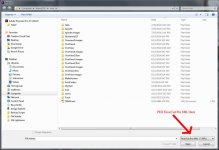
 
XML isn't included in the "All Supported Media" in the file browser. You have to drop the extension picker down and pick Final Cut XML to see XML files. No idea why, but that's how it is.
 
XML isn't included in the "All Supported Media" in the file browser. You have to drop the extension picker down and pick Final Cut XML to see XML files. No idea why, but that's how it is.

Thanks, that is weird. Sorry for sounding ignorant here, it's not like I am new to Premiere but, where is the extension picker. General EXTENSIONS tab under WINDOW is grayed out? Is that what you meant? LOL. Appreciate the help.
 
Here's a screenshot. The extension picker is what filters the browse dialog by file extension. The default in Premiere is something called "All Supported Media" which is a very long list. But for some reason .XML isn't on that list. Or perhaps it is but it's so far at the end I can't see it. It's also possible it is on the list, but Windows only supports so many extensions in a single entry in the picker (this I believe may be true).

In anycase to pick a .XML file for import you need to drop it down and pick Final Cut Pro XML. That will let you pick the XML file. Doesn't mean it will actually import right, that's a different problem.


Extensionpicker.jpg
 
Back
Top